I did some changes and it seems to be working now:
Please check and let me know.
Replies for tickets on suppota
I did some changes and it seems to be working now:
Please check and let me know.
I cannot do tests on your dev site, because some pages don’t load: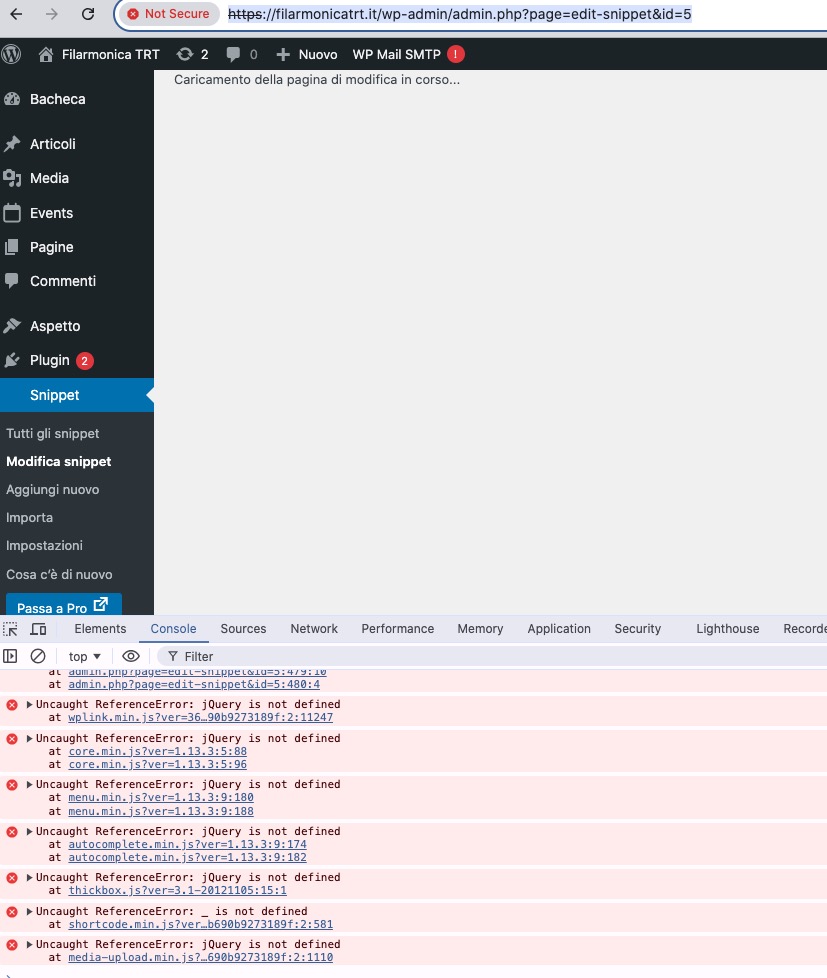
Could you fix it, so I can continue?
We are glad your issue is resolved, if you have any further questions or concerns please create a new ticket.
If you have a moment, we would greatly appreciate if you could kindly leave us a review at Codecanyon. By going to your account > Downloads. We are very grateful for your kind review!
Ashan,
https://helpdeskx.s3.amazonaws.com/wp-content/uploads/2025/02/03064421/Screenshot-2025-02-03-at-11.40.28.png
The same on dev2 when I set EventON > Single Events > Select “eventTop style: Clean White”:
https://dev2.myeventon.com/events/test-review/
Thank you for your messages, I am going to assign this ticket to Ashan and he will be able to take it from here and find you a solution. Please allow some time for him to get back to you, we greatly appreciate your patience and thank you for being a eventon customer! Also please disable any IP blocking on your site if there are any.
As a temporary solution, please try using this CSS code to change the color:
.eventon_events_list .eventon_list_event .evcal_desc .evcal_desc_info, .eventon_events_list .eventon_list_event .evoet_cx .level_3, .evo_pop_body .evcal_desc .evcal_desc_info, .evo_pop_body .evoet_cx .level_3 { color: #979797 !important; } .eventon_events_list .eventon_list_event .evoet_cx span.evowi_wi_area i, .evo_pop_body .evoet_cx span.evowi_wi_area i { color: #828282 !important; }
Thank you for your messages, I am going to assign this ticket to Ashan and he will be able to take it from here and find you a solution. Please allow some time for him to get back to you, we greatly appreciate your patience and thank you for being a eventon customer!
Hi Artem,
I don’t have that code anywhere else, but they have changed from black to purple now it is commented out – so a little bit of progress, thank you!
I still cannot find where to control that colour setting from – I really need the text to follow the black/white switch that the header text uses.
I did managed to find some custom code that was affecting the colour of the event date, and have removed this which has fixed my issue numbered ‘2’.
Hey Ashan,
Unfortunately, we are still experiencing problems.
We want to set up the Pinkstermarkt correctly, but we are unable to do so. The price differences between the seat and the checkout continue to occur.
We want to set up the Pinkstermarkt correctly: https://tickets.pinksterfestivalbrummen.nl/evenement/pinkstermarkt/ On this page, we have set up the seats. The seat map is divided into 2 parts. As an example, we use 2 seats that are set up in the ‘Ambachtstraat e.o.’ section. Seat 122 and the seat below it, Seat 113.
Seat 122 costs €210 on the map as a base price, but it is set with a base price of €65 via https://tickets.pinksterfestivalbrummen.nl/wp-admin/post.php?post=80&action=edit. This event is linked to the WooCommerce product https://tickets.pinksterfestivalbrummen.nl/wp-admin/post.php?post=81&action=edit, which has a regular price of €40.
When we want to reserve Seat 122, it still shows €210, but when we choose the ‘Reserve’ button, a base price of €40 appears, and this also shows up in the checkout. The €40 is the ticket price but should match the set Seat 122 price instead of the ticket price.
The same happens with Seat 113. The seat price is €65 on the map, but the checkout shows a price of €40.
How can we ensure that the set seat prices are automatically displayed correctly and not the ticket prices linked to the event in the checkout?
Hi,
We have switched off the main minify function, please go aheas and check the styling.
Thanks
Helen
Hi, it’s on the same order Order #203344 was placed on February 6, 2025
But did you mean license? Here’s both license numbers:
EVOVO0ef27d2b-7d96-4aea-bb78-a89664c8e28b (active on client’s site)
EVOVO28a743ad-df93-4873-9f2c-5ff803751b16 (not needed)
Many thanks