We did. We did the WPRocket clear URL of used CSS and it worked on the desktop but not mobile. I waited a bit to see if it took longer, but it hasn’t changed. Any ideas on how to get it to change on mobile?
Archives: Replies
Replies for tickets on suppota
Reply to: tickets(377436)
PHP 7.4 is a pretty old version — PHP 7.4 reached its end of life (EOL) on November 28, 2022
We do not have any check back on php version in EventON so I am not sure where those php version errors are coming from.
What I would suggest, since this is a big jump. See if you can create a clone of your site within your web host, and then in the clone version update to the latest versions and see what issues you get there or if everthing is fine. and then move on to live version.
Reply to: tickets(376445)
Kindly update to the latest version 3.0.5 https://docs.myeventon.com/documentations/changelog-rsvp-events/
Should resolve this.
Reply to: tickets(372904)
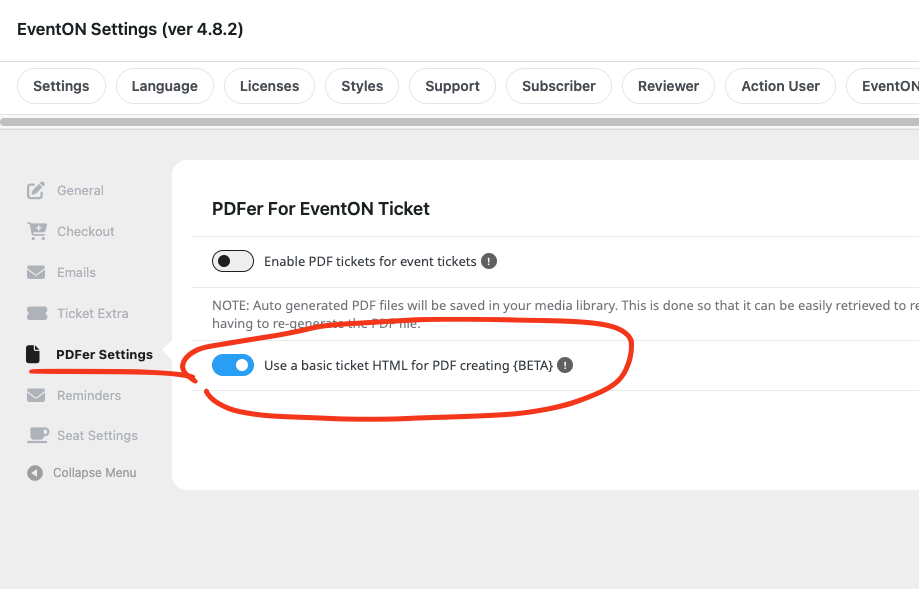
actually figured something else. I think the PDF is breaking into pages because of the table structure. So we just released (Just for you 🙂 a new version which you can use to strip the table structure and use a basic HTML for the PDF generation. — This is still a beta feature.
Reply to: tickets(377436)
Thanks Artem! Again, I really appreciate your help and especially the response over the weekend.
Reply to: tickets(372904)
Hello Jean-jacques, apologies for the delay.
We are unable to replicate this issue in our end. So it has to be something in your setup that break the ticket up.
Would you be able to share FTP access to eventon-pdfer/ folder?
We are using a 3rd party library here to convert the ticket content into PDF, but I can certainly look at your setup and see whats going on.
Another alternative is to create a separate just plain html ticket.
Reply to: tickets(368880)
Again, sorry for the delay. Could you please tell me if the email shows correctly in Troubleshooting Mode when only EventON (+Tickets) + WooCommerce are enabled with the default WordPress theme activated?
In your video it seems that the theme is in use. Could you check and let me know?
Reply to: tickets(377436)
Thank you for your messages, I am going to assign this ticket to Ashan and he will be able to take it from here and find you a solution. Please allow some time for him to get back to you, we greatly appreciate your patience and thank you for being a eventon customer! Also please disable any IP blocking on your site if there are any.
Reply to: tickets(377634)
Could you make sure that your cache plugin has been cleared?
Reply to: tickets(377623)
Hello,
Please go to EventON > Time Settings > make sure that Default Event Timezone is set to the one on your server. Should be “Timezone: Vancouver”.
On the same page enable “Apply default timezone to all events”.
Also go to Edit Event, make sure that each event has the correct timezone.