We are glad your issue is resolved, if you have any further questions or concerns please create a new ticket.
If you have a moment, we would greatly appreciate if you could kindly leave us a review at Codecanyon. By going to your account > Downloads. We are very grateful for your kind review!
Can I disable all other plugins and switch the theme for a test?
Did you enable them from EventON > Categories?
Please send us wp-admin access to your site as a private message for us to further assist your situation.
We are glad your issue is resolved, if you have any further questions or concerns please create a new ticket.
Ashan,
Please check:
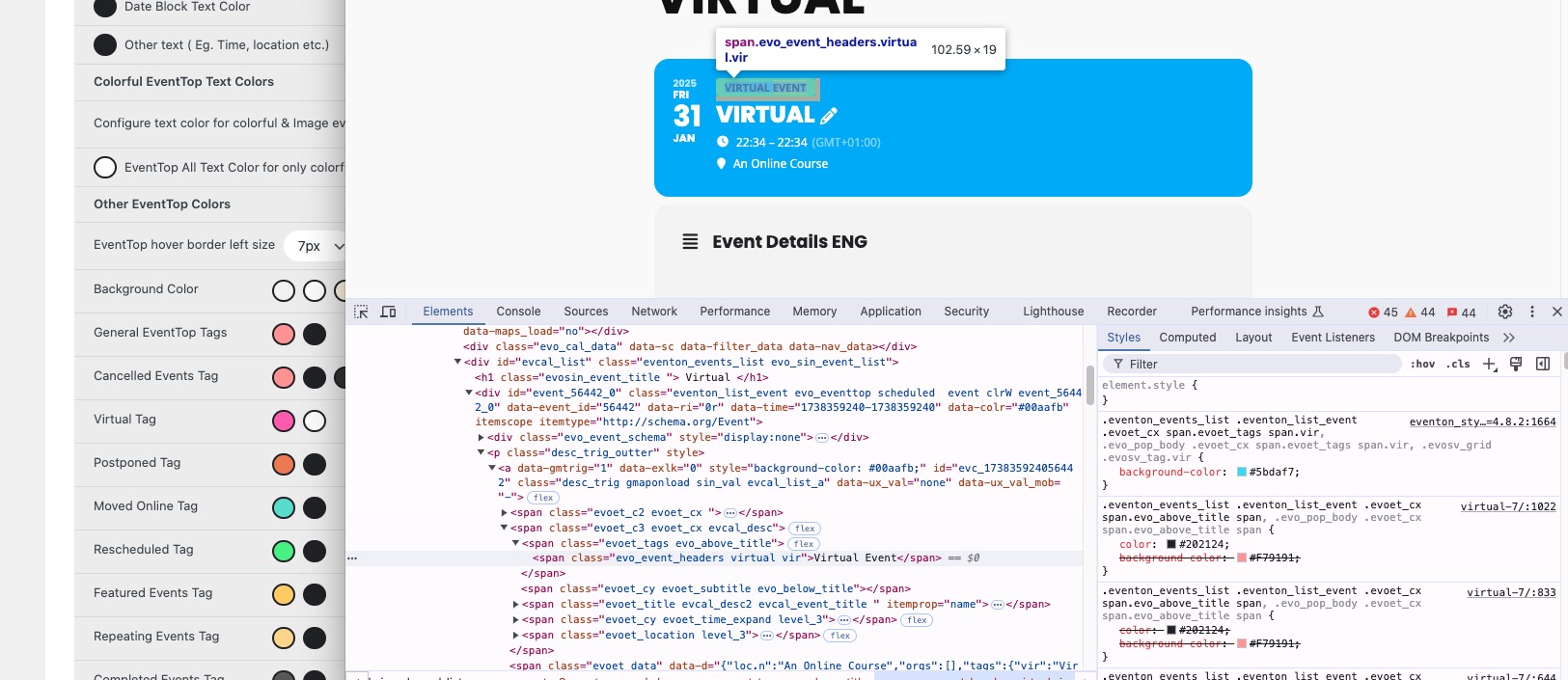
I could add the VIRTUAL EVENT tag in the event top as you indicated me but then I changed the colours of this tag, but it still shows the older colours. I attach print screens.
The same on dev2:
https://dev2.myeventon.com/events/virtual-7/
https://dev2.myeventon.com/wp-admin/admin.php?page=eventon#evcal_002
Thank you for your messages, I am going to assign this ticket to Ashan and he will be able to take it from here and find you a solution. Please allow some time for him to get back to you, we greatly appreciate your patience and thank you for being a eventon customer! Also please disable any IP blocking on your site if there are any.
As a temporary solution, please add this CSS code to EventON > Styles (If you don’t see any change, EventON > Scripts & Styling > turn off Write dynamic styles to header > save settings > turn on Write dynamic styles to header):
.eventon_events_list .eventon_list_event .evoet_cx span.evoet_tags span.vir, .evo_pop_body .evoet_cx span.evoet_tags span.vir, .evosv_grid .evosv_tag.vir { background: white !important; color: red !important; }
Hello,
We didn’t receive the screenshot. Could you re-send it?
Please also send us wp-admin access to your site as a private message for us to further assist your situation.
Hello,
Does it work for you when you try to download it from our test site:
https://dev2.myeventon.com/test-834/
It does work for me, so could you please try the instructions mentioned in this documentation to make sure your issue is indeed coming from eventon.
Hello,
There a lot of styles from the theme and other third-party plugins that affect FontAwesome icons. Please add this CSS code to EventON > Styles (If you don’t see any change, EventON > Scripts & Styling > turn off Write dynamic styles to header > save settings > turn on Write dynamic styles to header):
.ajde_evcal_calendar .calendar_header .evo_arrow i, .ajde_evcal_calendar .calendar_header .evcal_arrows i, .evo_footer_nav .evcal_arrows i { font-family: var(–fa-style-family, “evo_FontAwesome”) !important; font-weight: var(–fa-style, 900) !important; }
Hello Josh Garwood,
First of please try EventON > Scripts & Styling > turn off Write dynamic styles to header > save settings > turn on Write dynamic styles to header. Next create a new ticket with included login info, so we can check wp-admin.