Please do and let us know how it goes.
Archives: Replies
Replies for tickets on suppota
Reply to: tickets(376667)
If the issue continues, please send us wp-admin access to your site as a private message for us to further assist your situation.
Reply to: tickets(376667)
Hello,
Could you try following
https://docs.myeventon.com/documentations/single-events-page-not-working-404-error/
Reply to: tickets(376604)
We are glad your issue is resolved, if you have any further questions or concerns please create a new ticket.
Reply to: tickets(376604)
Thank you for letting us know! We will take a look more into your suggestion.
Reply to: tickets(376670)
Hello,
WordPress deletes Posts, Pages, Events and other content from Trash after a certain number of days. More info:
https://codex.wordpress.org/Trash_status#:~:text=By%20default%2C%20posts%2C%20pages%20or,are%20deleted%20and%20some%20remain.)
Reply to: tickets(376672)
Hello,
Could you go to EventON > Appearance > EventTop Styles > make sure all of these are white:
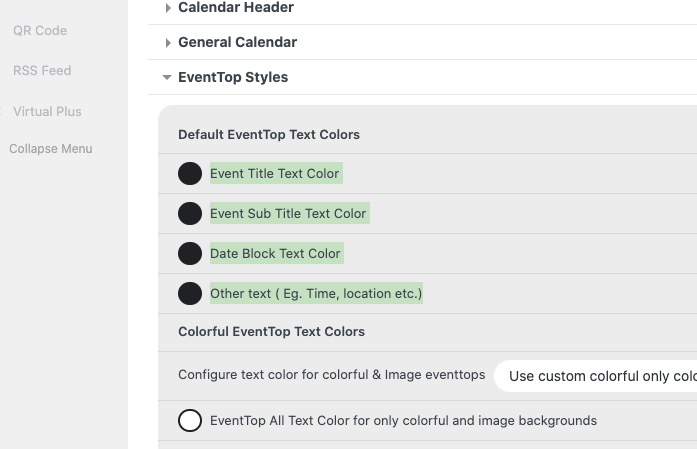
After the change go to EventON > Scripts & Styling > turn off Write dynamic styles to header > save settings > turn on Write dynamic styles to header.
Reply to: tickets(376673)
Hello,
If you are trying to show 2 months and they both don’t have any events, then the calendar isn’t going to show anything.
So you can either show 3 months or even more or use Event Lists: Ext https://www.myeventon.com/addons/event-lists-extended/ and show, for example, 6 events from 12 months (so the calendar is never empty):
https://dev2.myeventon.com/test-820/
Try on https://dev.myeventon.com/wp-admin/ with
[add_eventon_el number_of_months=”12″ event_count_list=”yes” hide_empty_months=”yes” event_count=”6″]
Reply to: tickets(376674)
Hello,
Please add this CSS code to EventON > Styles (If you don’t see any change, EventON > Scripts & Styling > turn off Write dynamic styles to header > save settings > turn on Write dynamic styles to header):
.evocard_main_image { pointer-events: none !important; }
Not possible to change it to the link. However, maybe you add an additional section the way you want by following:
https://docs.myeventon.com/documentations/setup-use-custom-meta-fields-events/
Reply to: tickets(376604)
I will! Seems like a must for your plugin 🙂