Hello,
Sorry for the inconvenience. We are working on the issue. Will update you ASAP.
Replies for tickets on suppota
Hello,
Sorry for the inconvenience. We are working on the issue. Will update you ASAP.
Hello,
Sorry for the inconvenience. We are working on the issue. Will update you ASAP.
Hello,
Sorry for the inconvenience. We are working on the issue. Will update you ASAP.
Hello,
Sorry for the inconvenience. We are working on the issue. Will update you ASAP.
why does it add ”var” to german events, but english events are clean?
Hello,
Thank you for your messages!
I am going to escalate this ticket to development to help in here. Please allow us some time to address this, and we truly appreciate your patience. Thank you for being a valued EventON customer!
Hello,
I changed these two settings to make the text black:
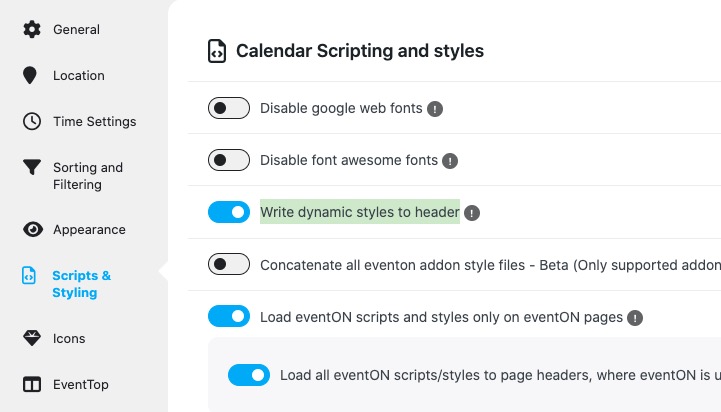
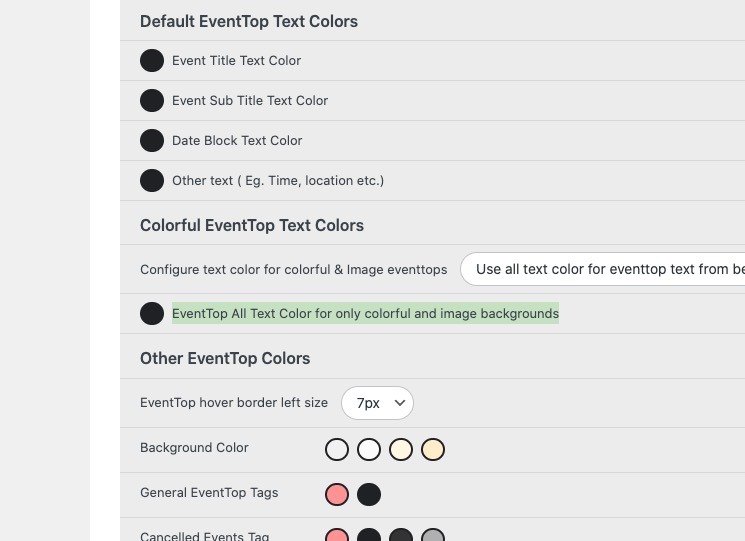
When you do any changes to EventON > Appearance, please go to EventON > Scripts & Styling > turn off Write dynamic styles to header > save settings > turn on Write dynamic styles to header.
This CSS code changes the font-size on mobiles only:
@media (max-width: 900px){ .eventon_events_list .eventon_list_event .evoet_cx span.evcal_desc2, .evo_pop_body .evoet_cx span.evcal_desc2 { font-size: 20px; } }
Please add this CSS code to EventON > Styles (If you don’t see any change, EventON > Scripts & Styling > turn off Write dynamic styles to header > save settings > turn on Write dynamic styles to header).
You can also add this code to wp-admin > Appearance > Customize > Additional CSS.
Please check and let me know.
When you enable ”Enable language corresponding events”, EventON adds /var to each link to correctly translate events.
If you copy a link and then put it to, for example, Facebook, it’s much better to send there as full link as possible.
Can I just get a copy of invoice paid in March?
Yes, that is the exact problem we are finding when activating the Event Tickets plugin.
And the same thing happened to me with the debug log a few days ago, for some reason it is not appearing.
I’m not an IT expert, so any insights you can give us to solve this issue will be greatly appreciated.