Could you please escalate this problem with your support team.
Archives: Replies
Replies for tickets on suppota
Reply to: tickets(374766)
yes but we have worked through them and setup as per your instructions. The other Australian site has no issues and is working properly. Please can we sort this issue ASAP as my site has been down for 2 days now and i am loosing business
Why does this site work and not the us one
https://www.ooveducation.com/aus/wp-admin
Username: Ooveducation
Psw: Oovpilates01
Reply to: tickets(375042)
Reactivated and the calendar stopped working so deactivated again.
Reply to: tickets(375042)
Please try enabling it again to see if it was just a cache issue.
Reply to: tickets(374874)
We are glad your issue is resolved, if you have any further questions or concerns please create a new ticket. If you have a moment, we would greatly appreciate if you could kindly leave us a review at Codecanyon. By going to your account > Downloads. We are very grateful for your kind review!
Reply to: tickets(374874)
Got it, thank you!
Reply to: tickets(375038)
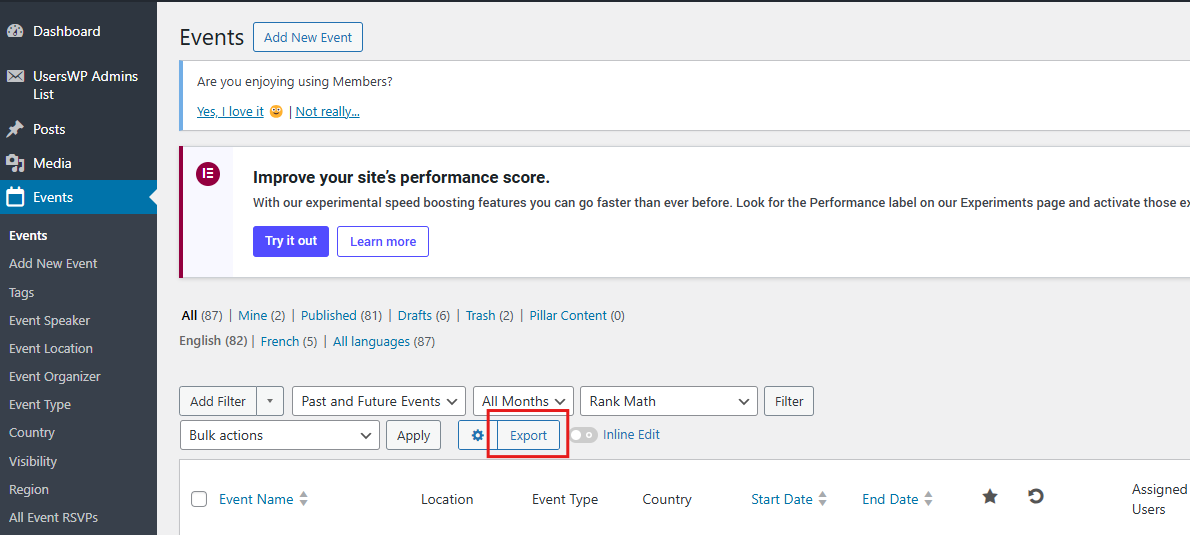
Hi Artem,
Thanks for your reply!
I actually forgot that an Export function do exist in the EventON settings!
And you’re right, this isn’t from where i’m trying to get the CSV, but instead from the Events Tab (please see screenshot)
Do you think that could be achievable, ideally without deactivating Admin Columns Pro plugin?
Or will it be easier to give limited access to EventON Plugin for Editors (for ex)? In this case, what would be the minimal Capabilities needed for them to access this Export button?
Thanks again!
Reply to: tickets(375042)
Yes as soon as I disabled the Autoptimize App it seems to fix itself.
Reply to: tickets(369226)
Hello Artem,
Happy new year guys. Btw I still havent got an update with the issue that I had from December.
But the immediate help that I need right now I hope you guys can help me. I know you already gave me the link on how to add additional fields in the download attendees csv file. But if it’s ok, can you please give me the specific code that I need to add so that when I download the CSV it will also save the seat number of the customer?
Thanks,
Reply to: tickets(374429)
Please try updating to 2.4.7. To update eventon addons: You can download latest eventon addons from myeventon > my account. Then you can go to your website, deactivate old addon and install new one and activate then delete the old addon. This link will further explain the process. Also you can follow us on twitter to get real-time announcements on updates!
After the update please follow the instructions in this documentation to activate debug in your site to see any PHP errors recorded that can provide insight on to whats going on. Please reply with a link to debug.log file. If you are not able to do this please send us FTP access to your site so we can do this for you.