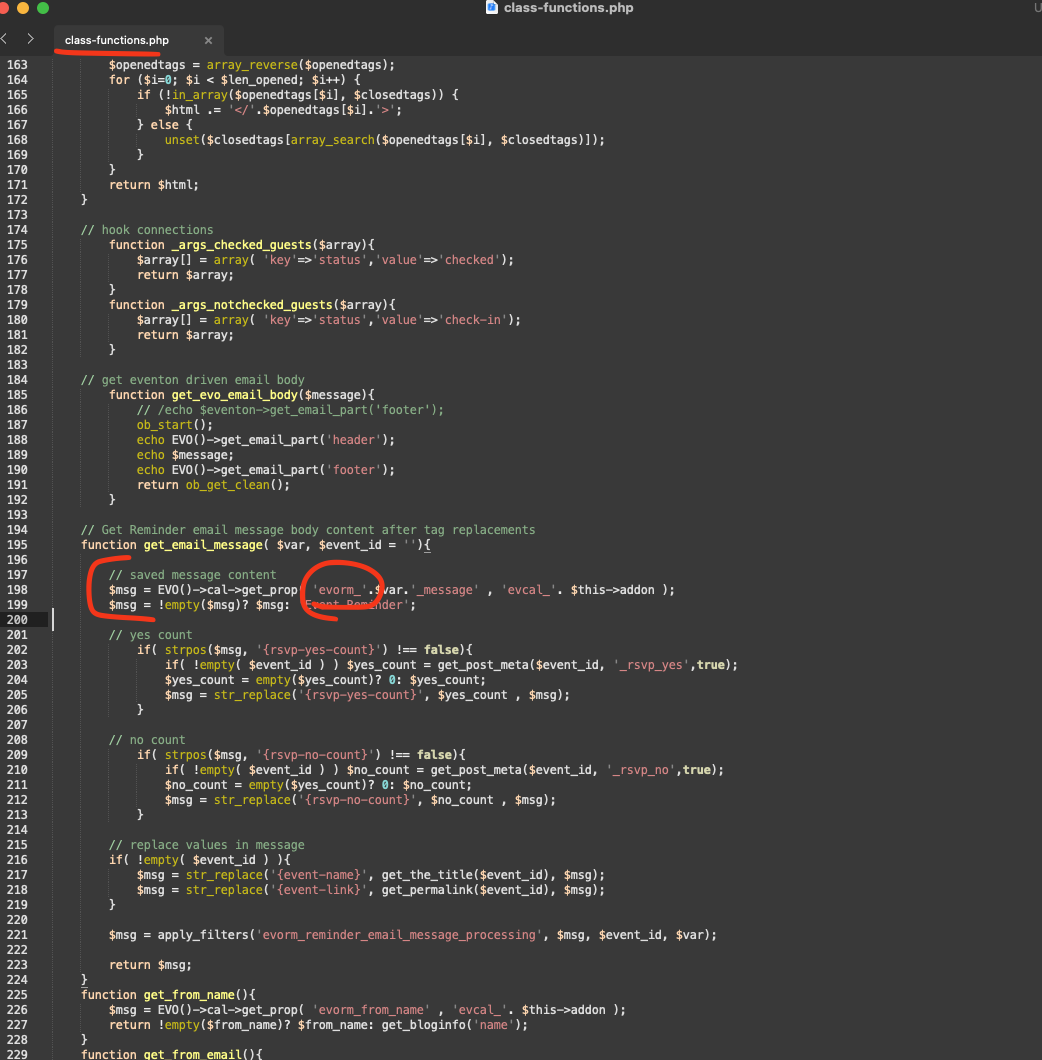
Kindly apply this code change and that will resolve the reminder message content not showing up.
We are going to be releasing an update which will include these changes 🙂
Replies for tickets on suppota
Kindly apply this code change and that will resolve the reminder message content not showing up.
We are going to be releasing an update which will include these changes 🙂
Found the fix for you please apply this change. And that should resolve the issue we are also going to release an update to the reminders addon soon 🙂
Thanks! That’s exactly what I was looking for.
We are working on the issue. The update will be available soon.
Meanwhile as a temporary solution please add this CSS code to EventON > Styles (If you don’t see any change, EventON > Scripts & Styling > turn off Write dynamic styles to header > save settings > turn on Write dynamic styles to header):
.ajde_evcal_calendar.color #evcal_list .eventon_list_event.clrW .evcal_cblock, .ajde_evcal_calendar.color #evcal_list.eventon_events_list .eventon_list_event.clrW p .evoet_cx span.evcal_event_title, .ajde_evcal_calendar.color #evcal_list .eventon_list_event.clrW .evoet_cx span.evcal_event_title, .ajde_evcal_calendar.color #evcal_list .eventon_list_event.clrW .evoet_cx span.evcal_event_subtitle, .ajde_evcal_calendar.color #evcal_list .eventon_list_event.clrW .evoet_cx em, .ajde_evcal_calendar.color #evcal_list .eventon_list_event.clrW .evoet_cx .evcal_desc_info, .ajde_evcal_calendar.color .eventon_list_event.clrW .evcal_cblock em.evo_day, .ajde_evcal_calendar.color .eventon_list_event.clrW .evoet_cx span, .ajde_evcal_calendar.color .eventon_list_event.clrW .evoet_cx .evo_below_title .status_reason, .ajde_evcal_calendar.color .eventon_list_event.clrW .evoet_cx .evo_tz_time .evo_tz, .ajde_evcal_calendar.color .eventon_list_event.clrW .evoet_cx .evo_mytime.tzo_trig i, .ajde_evcal_calendar.color .eventon_list_event.clrW .evoet_cx .evo_mytime.tzo_trig b, .ajde_evcal_calendar.color .eventon_list_event.clrW .evoet_cx em i, .ajde_evcal_calendar.color .eventon_list_event.clrW .evoet_cx .evo_ep_pre, .ajde_evcal_calendar.color .eventon_list_event.clrW .evoet_cx .evo_ep_time, .ajde_evcal_calendar.color .eventon_list_event.clrW .evoet_cx .evo_mytime.tzo_trig:hover i, .ajde_evcal_calendar.color .eventon_list_event.clrW .evoet_cx .evo_mytime.tzo_trig:hover b, .evo_lightboxes .color.eventon_list_event .clrW .evcal_cblock, .evo_lightboxes .color.eventon_list_event .clrW .evoet_cx span, .evo_lightboxes .color.eventon_list_event .clrW .evoet_cx span.evcal_event_title, .evo_lightboxes .color.eventon_list_event .clrW .evoet_cx span.evcal_event_subtitle, .evo_lightboxes .color.eventon_list_event .clrW .evoet_cx em, .evo_lightboxes .color.eventon_list_event .clrW .evoet_cx .evcal_desc_info, .evo_lightboxes .color.eventon_list_event .clrW .evcal_cblock em.evo_day, .evo_lightboxes .color.eventon_list_event .clrW .evoet_cx .evo_tz_time>*, .evo_lightboxes .color.eventon_list_event .clrW .evoet_cx .evo_mytime.tzo_trig i, .evo_lightboxes .color.eventon_list_event .clrW .evoet_cx .evo_mytime.tzo_trig b { color: white !important }
Thank you for reporting this to us. We have couple of other tickets about similar issue as well. We are going to do a deep investigation and see what is going on. Hope to get an update for this in the next couple of days 🙂
Could you please elaborate with screenshots? I am not sure if I understand you correctly.
Hello,
Unfortunately, we don’t support any customizations made to our products. So please contact the developer who made the custom work and ask them for the update.
Please try changing -24 and 24 in month_incre=”-24″ number_of_months=”24″. Make sure that there are enough months to cover all past events.
Please add this CSS code to EventON > Styles (If you don’t see any change, EventON > Scripts & Styling > turn off Write dynamic styles to header > save settings > turn on Write dynamic styles to header):
#evcal_list .eventon_list_event .evoet_cx span.evcal_event_title, .eventon_events_list .evcal_event_subtitle { letter-spacing: 2px; }
Hello,
Please send us wp-admin access to your site as a private message for us to further assist your situation.
Also follow the instructions in this documentation to activate debug in your site to see any PHP errors recorded that can provide insight on to whats going on. Please reply with a link to debug.log file. If you are not able to do this please send us FTP access to your site so we can do this for you.