Guys can you please check why after I scan the QR code the attendee still does not show that it is checked in? Even when I manually click the button “Check In” in the attendee name inside the Event it does not work
Archives: Replies
Replies for tickets on suppota
Reply to: tickets(372559)
Ah, it worked.
Thank you very much.
Kind regards.
RW.
Reply to: tickets(372286)
Reply to: tickets(372584)
Hello,
Thank you for your messages, I am going to assign this ticket to Ashan and he will be able to take it from here and find you a solution. Please allow some time for him to get back to you, we greatly appreciate your patience and thank you for being a eventon customer!
Reply to: tickets(371500)
The error is referring to td-composer plugin. It seems that it tries to load the plugin on EventON’s pages, but fails and throws the issue.
Reply to: tickets(371797)
I am sorry, the access information you have provided did not work for us. Please check them and post the correct login information as a private message, thank you!
Reply to: tickets(312070)
Could you contact your hosting provide and ask what maximum memory limit is possible to set on your current server?
Reply to: tickets(372471)
Hello,
The option that allows you to sort events is “Default Sort by“:
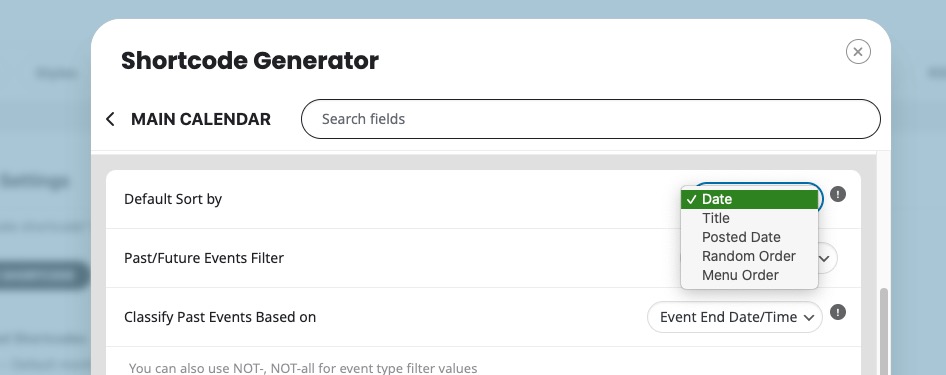
For more options, please create a new ticket and select Feature Request as category so others can vote and get it moved into development faster.
Reply to: tickets(372286)
How do you import events from Facebook? With ICS Import add-on:
https://www.myeventon.com/addons/ics-importer/
Reply to: tickets(372354)
I switched to “Event Repeat Type: Daily”, then updated the event and then switched to Custom Repeat. Could you try and let us know if you can add custom repeats now?