Hello,
All shortcodes can be found in Shortcode Generator:
https://docs.myeventon.com/documentations/shortcode-generator/
To hide past events, please go to EventON > Time Settings > enable Hide past events for default calendar(s).
You can also add event_past_future=”future” to your shortcodes.
Hello,
Not possible, I am afraid. The closest you can get is
https://dev2.myeventon.com/test-739/
Shortcodes:
[add_evo_submission_form lightbox=”yes”]
[add_eventon]
Please try replacing the code with this one:
@media (min-width: 960px){ .evopopclose, .evolbclose { position: relative !important; }} @media (max-width: 960px){ .evopopclose, .evolbclose { margin: -10px; }}
Hello,
We unable to refund the main plugin from here. Please contact CodeCanyon about the refund.
Worked perfectly, thank you
Hello,
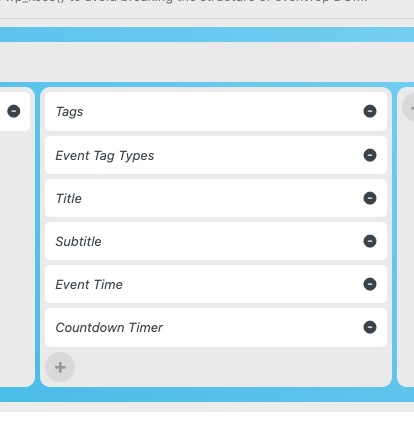
Please go to EventON > EventTop > make sure that Tags as well as Event Tag Types have been added:
Hello,
Please add hide_mult_occur=”yes” to the shortcode to show events only once per calendar.
Hello,
I am sorry, the access information you have provided did not work for us. Please check them and post the correct login information as a private message, thank you!
Hello,
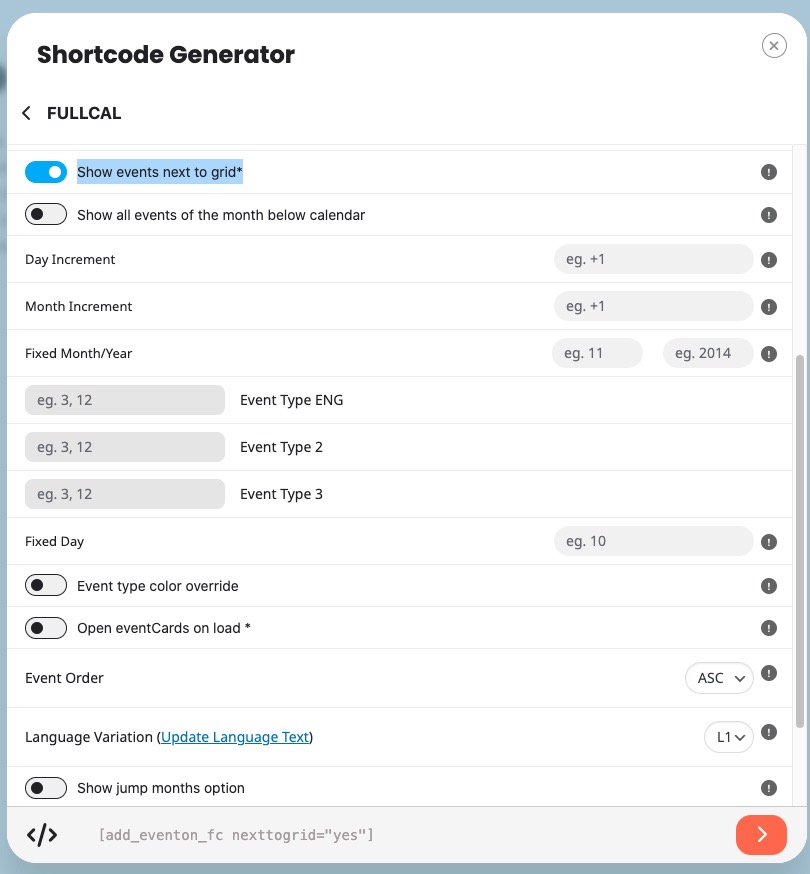
Please go to Shortcode Generator > FullCal > enable Show events next to grid* > now copy the shortcode:
I don’t quite understand what does the tickets addon do and what does Woocomerce do? Does the addon provide a link to the shop? and the woocomerce takes over? the demo on your website does not show more; it says: “Tickets are not available for sale any more for this event!” The crucial point is: how is the buying experience for the customer and that you don’t show. Do I have full control of the buying process within woocommerce once the customer is in the woocommerce shop? Upselling, cross selling etc.?