Thank you for your messages, I am going to assign this ticket to Ashan and he will be able to take it from here and find you a solution. Please allow some time for him to get back to you, we greatly appreciate your patience and thank you for being a eventon customer! Also please disable any IP blocking on your site if there are any.
Archives: Replies
Replies for tickets on suppota
Reply to: tickets(368807)
We are glad your issue is resolved, if you have any further questions or concerns please create a new ticket.
If you have a moment, we would greatly appreciate if you could kindly leave us a review at Codecanyon. By going to your account > Downloads. We are very grateful for your kind review!
Reply to: tickets(368810)
Perfect! Please keep us updated.
Reply to: tickets(369665)
Ashan,
Please take a look at this suggestion:
[Replyto/369734]
The same on dev2:
https://dev2.myeventon.com/events/speakers-2/
Reply to: tickets(369665)
Thank you for your messages, I am going to assign this ticket to Ashan and he will be able to take it from here and find you a solution. Please allow some time for him to get back to you, we greatly appreciate your patience and thank you for being a eventon customer! Also please disable any IP blocking on your site if there are any.
Reply to: tickets(367185)
Please add this CSS code to EventON > Styles (If you don’t see any change, EventON > Scripts & Styling > turn off Write dynamic styles to header > save settings > turn on Write dynamic styles to header):
.ajde_evcal_calendar.boxy.boxstyle0 #evcal_list .eventon_list_event .desc_trig .evoet_c2 { flex-basis: auto !important; }
Reply to: tickets(369607)
Hello,
Disabled “Pre-fill fields if user is already logged-in (eg. first name, last name, email)” is exactly what you need:
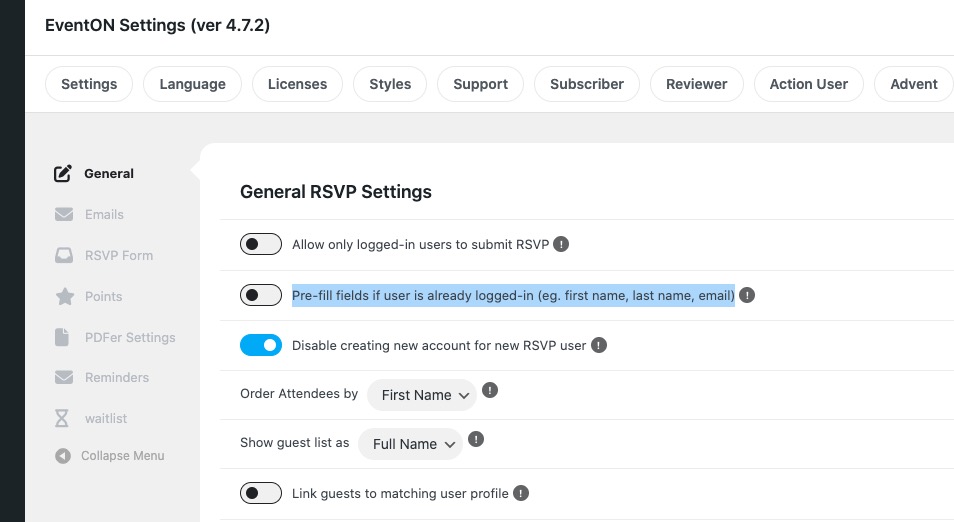
It should stop filling RSVP fields, so people can use any data they like.
Reply to: tickets(366965)
Please add this CSS code to EventON > Styles (If you don’t see any change, EventON > Scripts & Styling > turn off Write dynamic styles to header > save settings > turn on Write dynamic styles to header):
span.evoet_dayblock.evcal_cblock .date {display: none !important}
Reply to: tickets(369443)
Some data isn’t available, but you can add it by following:
https://docs.myeventon.com/documentations/add-additional-event-data-json-output/
Variables can be found here:
https://docs.myeventon.com/documentations/event-post-meta-variables/
Q1. JSON data structure can be found here:
https://docs.myeventon.com/documentations/json-data-structure/
Q2. Event API doesn’t have such functionality, but you can try a custom PHP request:
https://docs.myeventon.com/documentations/taxonomies-eventon/
Q3. Supported Additional Parameters can be found on this screenshot:
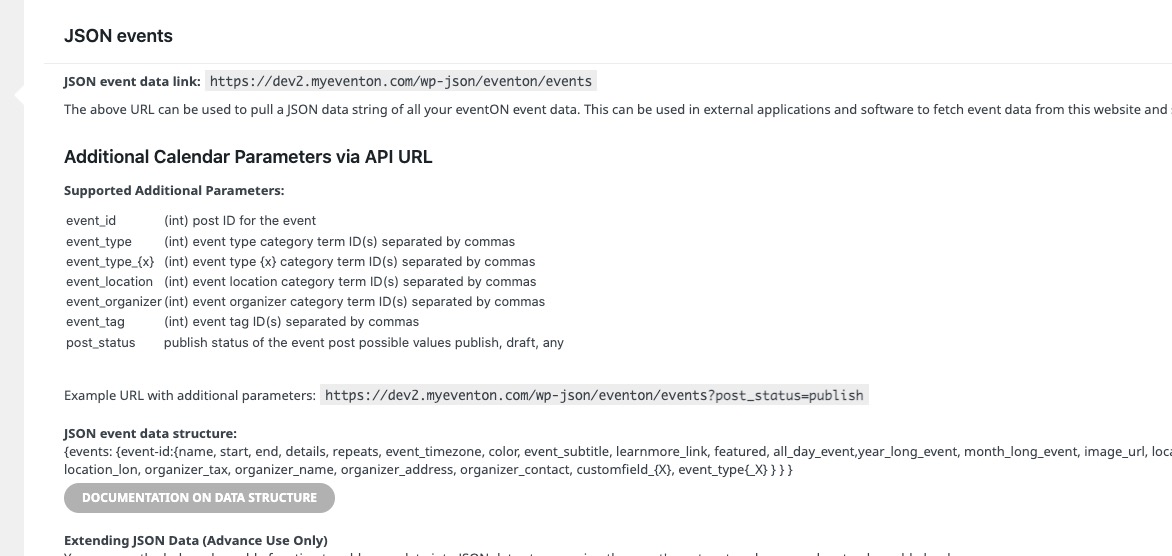
It gets all events available, so you need to filter them out with PHP. But you can use event_type to filter by Event Type.
Reply to: tickets(369748)
Hello,
Your website just keeps loading for me when I try to access Edit Event. It seems that the same issue happens when you try to remove the organizer. It just needs much more time to complete the task.
Could you please try the instructions mentioned in this documentation and try to delete with all plugins disabled and also the default theme enabled?