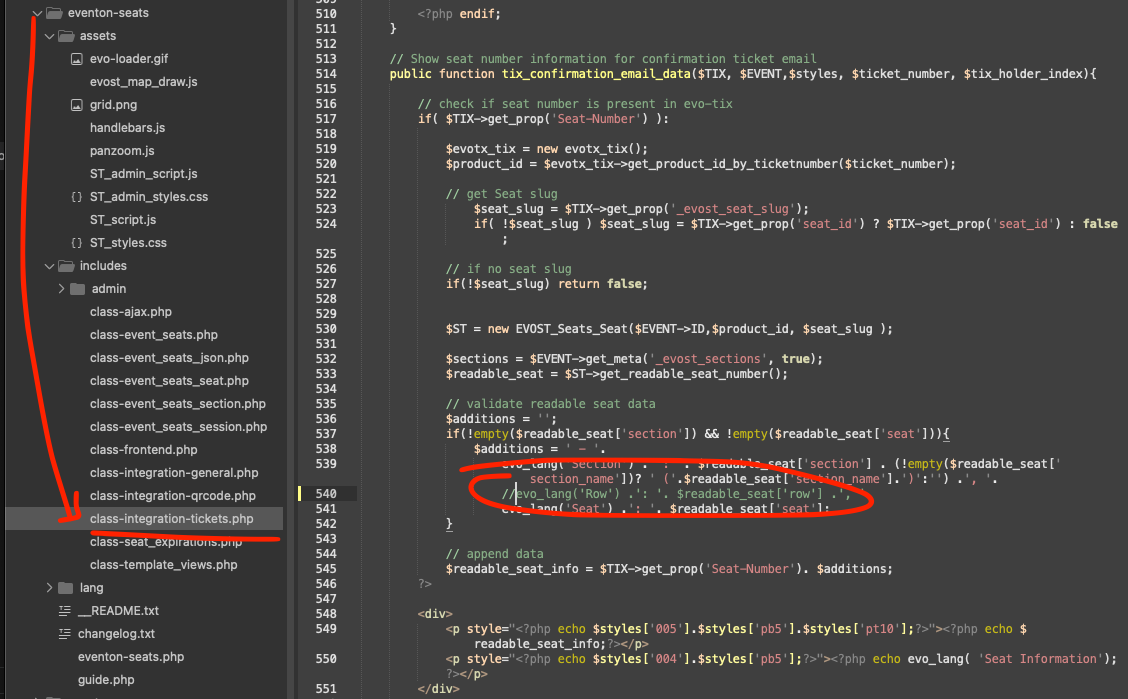
Gotcha, lets try this code change and see if that helps. Just comment out the line circled in the screenshot.
Replies for tickets on suppota
Gotcha, lets try this code change and see if that helps. Just comment out the line circled in the screenshot.
Hello,
You can generate a shortcode using Shortcode Generator:
https://dev.knoleacademy.org/wp-admin/admin.php?page=eventon#evcal_012
More info:
https://docs.myeventon.com/documentations/shortcode-generator/
On your pages you use WPBakery page builder, so could you tell us more about how do you generate your shortcodes?
We are glad your issue is resolved, if you have any further questions or concerns please create a new ticket.
You can import events from a google calendar with ICS Importer add-on:
https://www.myeventon.com/addons/ics-importer/
Try on
https://dev.myeventon.com/wp-admin/
THank you for letting me know this. It looks like a custom PDF plugin that allow you to download a PDF of the invoice.
Right now what we are doing it, in the order item names, if it is an event ticket we change the visible name for item. Using pluggable filter “woocommerce_before_order_item_line_item_html”
I don’t think this plugin is using that filter.
I think what we will have to do is when order is created, change the order item name to event ticket. But this approach will only effect new order, already existing orders will not be changed unless this pdf plugin can use the above pluggable filter before they get each order items.
We will implement this code change in the next version update to tickets addon.
Excellent! If you have more questions, kindly send us a new ticket and we would be more than happy to help you resolve your issues!
Hi Ashan! Thank you for your response. I tried on version 4.7.2 and it’s still happening for me. It’s deleting events as soon as I click “Update”. Do you need me to provide access to the site? I can duplicate an event for you to try it out.
Thank you very very much sir!
in myeventyon>>>>RSVP>>>general
make sure Pre-fill fields if user is already logged-in (eg. first name, last name, email)
is toggled off
go to myeventon>>>>settings>>>>event card
then open up the event card designer pop up- then save it
then scroll to the bottom and save again- this fixes the issue 99% of the time
if that doesn’t please provide wp-admin access so we can get in and sort it out