Thank you for your messages, I am going to assign this ticket to Ashan and he will be able to take it from here and find you a solution. Please allow some time for him to get back to you, we greatly appreciate your patience and thank you for being a eventon customer!
Archives: Replies
Replies for tickets on suppota
Reply to: tickets(366965)
If you want to completely remove the date, please remove “Event date block”:
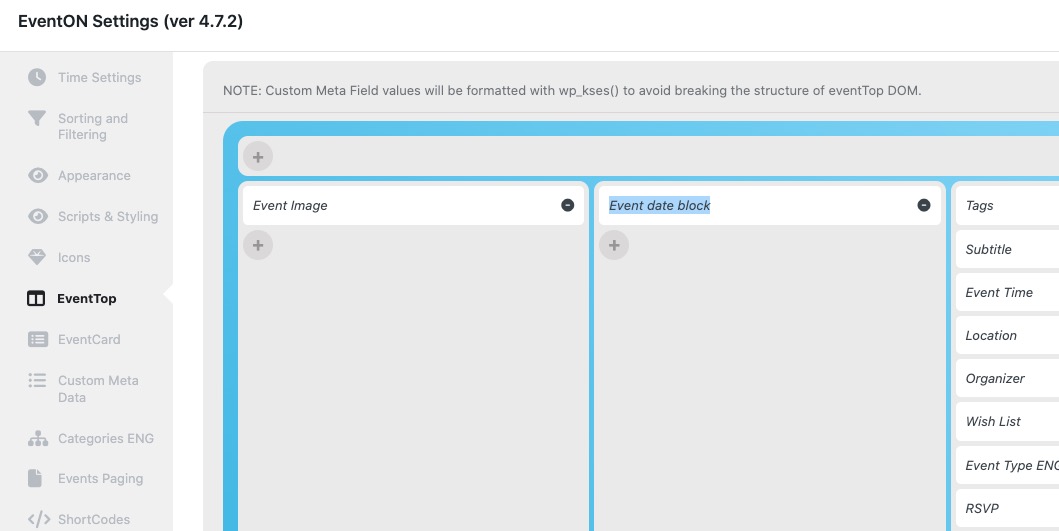
Could you send us a screenshot of the exact part you are trying to remove?
Reply to: tickets(368465)
Ashan,
Please take a look at the original ticket.
It works on my side with no issues. It also works on customer’s website in Incognito Mode as well in different browsers.
Could you check?
Reply to: tickets(368465)
We only provide support on this Helpdesk, I am afraid. From the start everything works completely fine for me and also as I understand for you in Incognito Mode and other browsers.
I am going to assign this ticket to Ashan, so he can check this as well. Please allow some time for him to get back to you, we greatly appreciate your patience and thank you for being a eventon customer!
Reply to: tickets(369443)
Hello,
Please go to our demo site:
https://dev.myeventon.com/wp-admin/admin.php?page=eventon&tab=evcal_ap
Event API is available there.
Reply to: tickets(369390)
Please send us wp-admin access to your site as a private message for us to further assist your situation.
Reply to: tickets(369446)
Hello,
Please go to https://www.myeventon.com/my-account/edit-address/billing/.
Reply to: tickets(368817)
Could you update EventON to 4.7.2 and try activating it again?
Reply to: tickets(369360)
Hello,
4.7.2 fixes the issue. Please update and let us know.
To update eventon to latest version: If you are unable to do autoupdate, you can go to codecanyon your account > download and get the latest eventon version as zip file. Then you can go to your website > make sure “Delete eventon settings & data when EventON is uninstalled” is Deslected from eventon settings, delete old eventon, install new one and activate. This link will further explain the process it. Also you can follow us on twitter to get real-time announcements on updates!
Reply to: tickets(369453)
Ashan,
The same on dev2:
https://dev2.myeventon.com/wp-admin/admin.php?page=eventon&tab=evoics_1