Hi Artem,
Is there any update or ETA on when the auto-update will be fixed?
Best.
Replies for tickets on suppota
Hi Artem,
Is there any update or ETA on when the auto-update will be fixed?
Best.
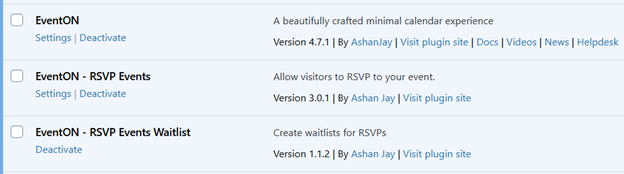
Can I not install the latest version? Please advise.
Hi Artem,
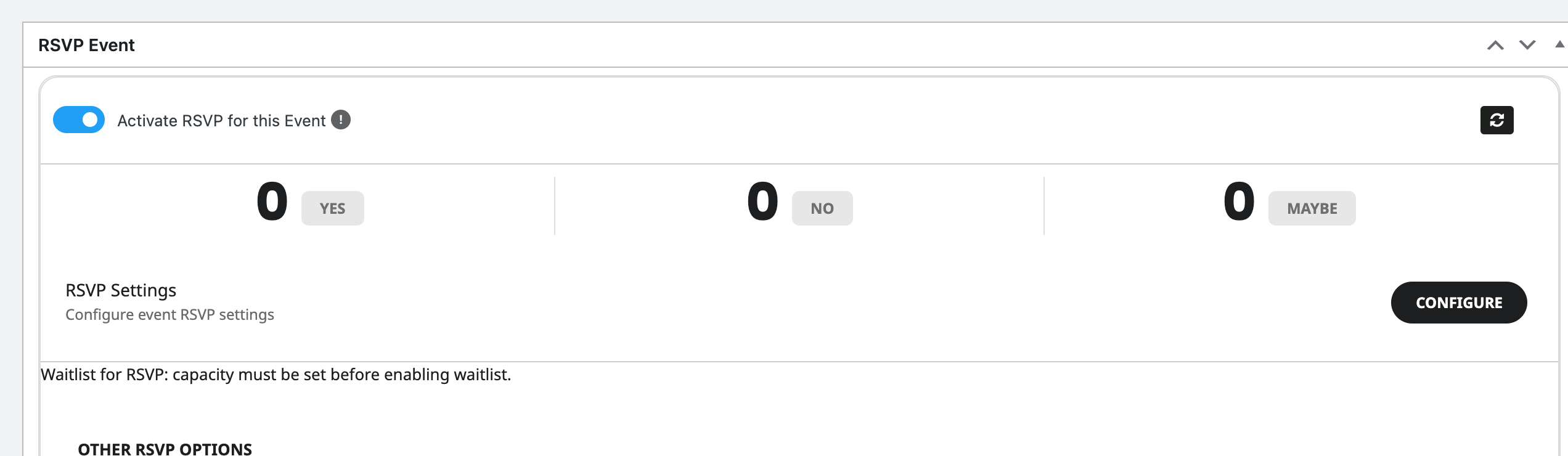
This patch gets rid of the initial critical error on the “Add Event” action, however the issue of clicking ‘Configure’ in the RSVP settings section still doesn’t do anything; it just refreshes the page.
On the other site where I’m seeing the issue, I’ve downgraded EventON – RSVP Events to version 3.0 and the button says “Configure RSVP Settings” VS just “Configure” and the action opens the settings in a modal as expected. So I would suggest potentially looking at the RSVP add-on for that issue.
https://bluejeanblues.live/wp-admin/
un: eventon2
pw: Mz0JJleZ4BV$Fy4ouxnkgQB8
Hallo Ashan,
Thank you for your words and sincerity. Regretfully I have to admit that with all the partners we work together with you are the one who causes the most Ticket. I am probably your only client who uses the Yearly View Plugin and for that reason it is not economically interesting for you.
Let’s stay that way and I think this plugin will be removed from our websites if in the future there are these problems that disrupt the daily work.
Thanks again for the pleasant and sincere tone of your correspondence, respect!
Guido
Ashan,
The same on dev2:

The event has 19:04 time:
https://dev2.myeventon.com/wp-admin/post.php?post=55825&action=edit
But the front-end still shows 19:02:
https://dev2.myeventon.com/events/ics-import/
Thank you for your messages, I am going to assign this ticket to Ashan and he will be able to take it from here and find you a solution. Please allow some time for him to get back to you, we greatly appreciate your patience and thank you for being a eventon customer! Also please disable any IP blocking on your site if there are any.
Hello,
I checked your other ticket and it seems that the issue is wrong time/date format:
event_start_date & event_end_date – Start/End date in format mm/dd/YYYY
event_start_time & event_end_time – Start/End time in format h:mm:AM/PM
Please make sure that the format is mm, because you used m.
Also time must be added to your file even if your events are AllDay.
Please re-read my previous response before answering.