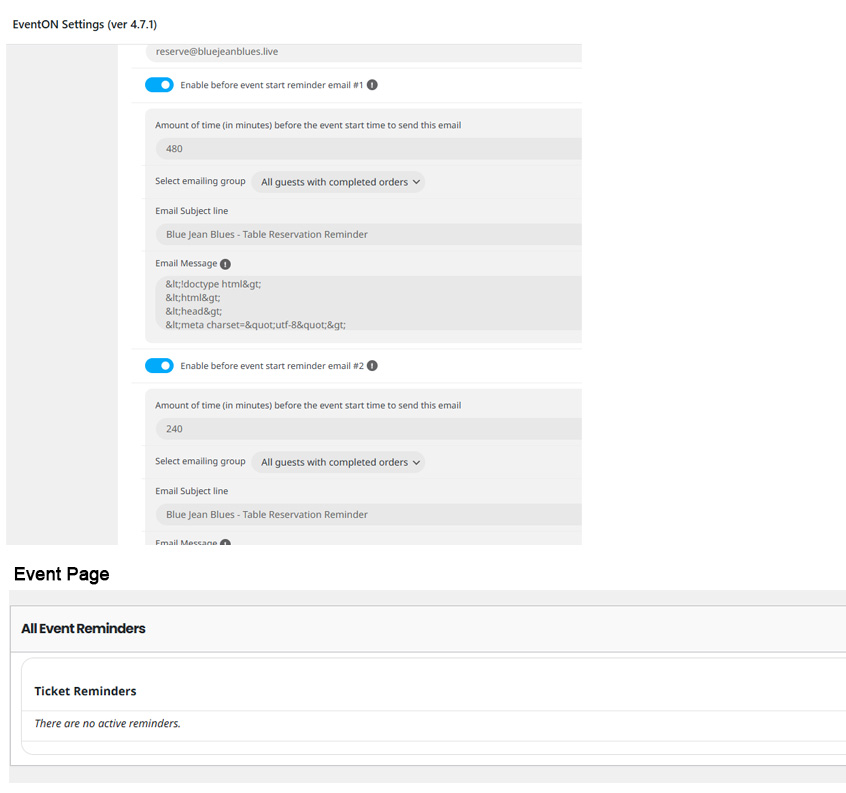
I have activated 2 reminders in SETTINGS.
SINGLE EVENT PAGE
Nothing appears in ALL Event Reminders
Replies for tickets on suppota
I have activated 2 reminders in SETTINGS.
SINGLE EVENT PAGE
Nothing appears in ALL Event Reminders
Happy to do that but I will need to be logged on with you and we can chat on the phone at the same time. I don’t have time to go back and forth for days or weeks. Please send me some times you can be available and I will send you my cell and your login info. I am in the Eastern Standard timezone. The best day is usually Wednesday. Thanks.
I thought that I will be able to change the code from wp-admin, but it seems that I also need FTP access. Could you provide us with one?
Also, could you tell us more about how did you install the plugin? Did you install it from wp-admin > Plugins > Add New Plugin or by unzipping the archive to your server folder?
https://lakelandarts.org.uk/wp-admin
u: eventon
p: WNhuj9gBtp5td0shH*VobBq(
add
sep_month=”yes”
to the top shortcode
admin access has been disabled
Is it possible to add you as a user to our wp-admin instead? Do you have a WordPress username and/or email?
ok gotcha… sorry for the confusion. So at the bottom its split up with heading month name and the future events are consolidated yes? What would be the shortcode to split them up on top? In that case i guess we need to do same as bottom events otherwise looks strange.
Is it possible for you to enable restrictions on the google maps API?
event: https://turkuon.fi/events/collegium-musicum-turku/
Works work fine for now.
I noticed event type filter is not working. I think the new eventON version 4.7.2 will resolve this.
Ashan,
The patch has been applied, but not possible to generate lat/long:
https://visitashlandva.com/wp-admin/term.php?taxonomy=event_location&tag_ID=704&post_type=ajde_events&wp_http_referer=%2Fwp-admin%2Fedit-tags.php%3Ftaxonomy%3Devent_location%26post_type%3Dajde_events
And the map doesn’t show because no Lat/Long values:
Invalid latlng: (nan, nan)
Login info:
U: eventon-support P: n7%l74Aw(bDuXSW9vByVBfNa
Ah sorry, you are right! Ashan will check this ASAP.