Please try downloading “Installable WordPress file only” and install it without extracting anything: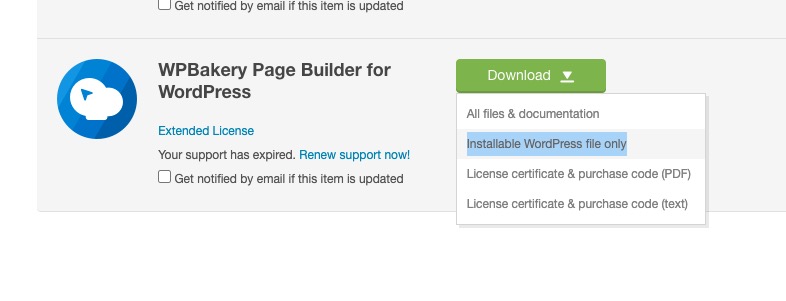
Archives: Replies
Replies for tickets on suppota
Reply to: tickets(368402)
Please send us wp-admin access to your site as a private message for us to further assist your situation.
Reply to: tickets(368403)
Please add this CSS code to EventON > Styles (If you don’t see any change, EventON > Scripts & Styling > turn off Write dynamic styles to header > save settings > turn on Write dynamic styles to header):
#evcal_list .eventon_list_event .evoet_cx span.evcal_event_title { display: none !important; }
Reply to: tickets(368603)
Ashan,
Two issues.
I think that one is similar to
https://helpdesk.ashanjay.com/ticket/tickets-causing-critical-error/
But the error is different.
Will the patch work?
The second is RSVP Config not opening.
Reply to: tickets(368603)
Thank you for your messages, I am going to assign this ticket to Ashan and he will be able to take it from here and find you a solution. Please allow some time for him to get back to you, we greatly appreciate your patience and thank you for being a eventon customer! Also please disable any IP blocking on your site if there are any.
Reply to: tickets(368652)
Hello,
Please add this CSS code to EventON > Styles (If you don’t see any change, EventON > Scripts & Styling > turn off Write dynamic styles to header > save settings > turn on Write dynamic styles to header):
@media (max-width:960px) { .evo_page_body { padding: 0 10px; }}
Reply to: tickets(368656)
Hello,
Could you manually clear cookies as well as browser cache and try to login again?
Reply to: tickets(368674)
Hello,
Please go to EventON > Time Settings > enable Hide GMT value from frontend.
Reply to: tickets(368675)
Hello,
Please add this CSS code to EventON > Styles (If you don’t see any change, EventON > Scripts & Styling > turn off Write dynamic styles to header > save settings > turn on Write dynamic styles to header):
.eventon_fc_daynames .evo_fc_day { color: black; }
Reply to: tickets(368402)
Yes. But now If I remove event date block then everything mashes together from the right to the left. I want things to stay as they are and have some space in between them.