Hello,
Please go to EventON > EventCard > open Designer and save > now save EventON Settings.
Replies for tickets on suppota
Hello,
Please go to EventON > EventCard > open Designer and save > now save EventON Settings.
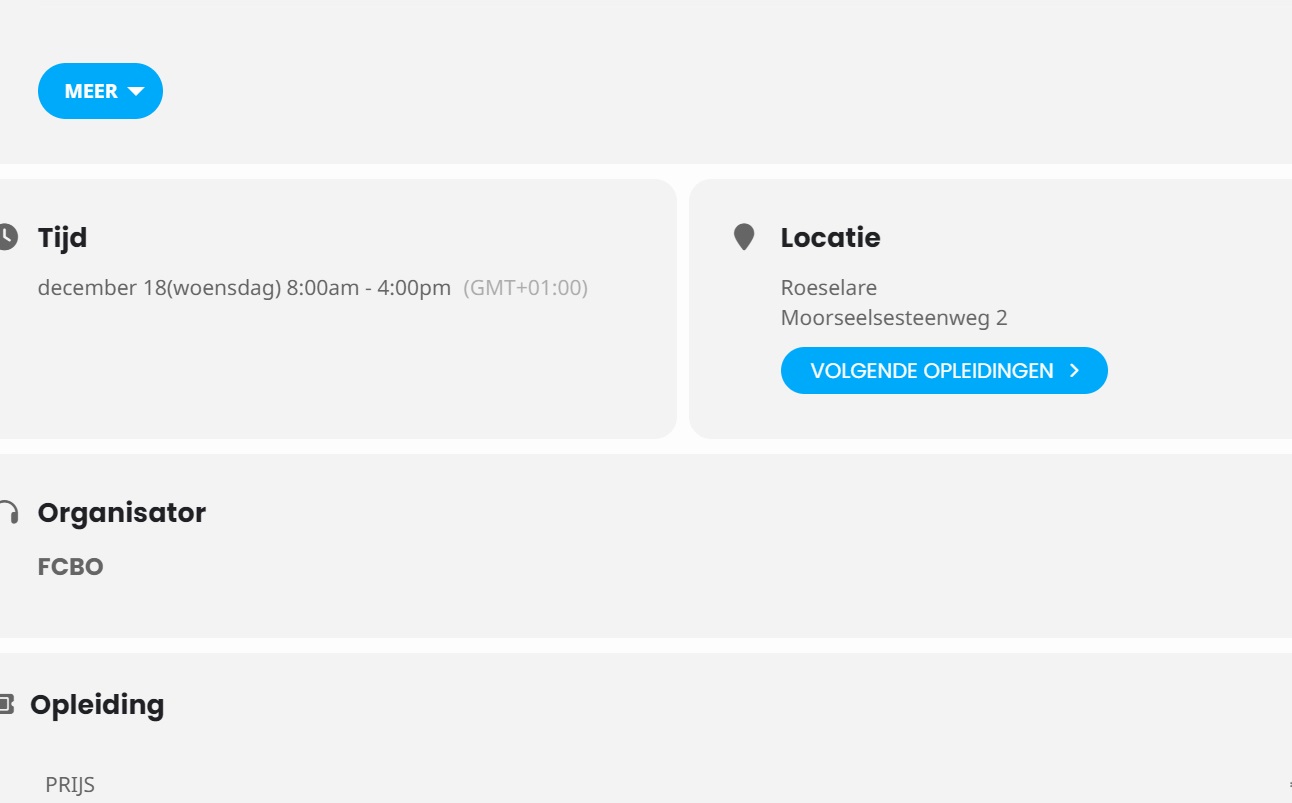
Please add this CSS code to EventON > Styles (If you don’t see any change, EventON > Scripts & Styling > turn off Write dynamic styles to header > save settings > turn on Write dynamic styles to header):
p.evo_location_name + .padt10 { display: none !important; }
Ok – thanks.
Is there a method to remove the “next events” in the calendar under location?
Ok Artem, that did it. 4.7.1 was inside the folder and it is now updated. Thanks for the help.
did my video a few post back with the templates help? I never heard back if it did.
in regard to this, I did try it but in the end I just continued with the google forms. I think it was easier to do that way but not sure now. As usual I probably had so much work going on, so many things to do, I probably just kept plowing on without a reply. Sorry about that, but all good. BTW the guestlist page is working well.
Thanks for your help
Artem,
Here’s a recap what I’ve done…
On the LIVE site – https://quoguewildliferefuge.org/
Edits the php.ini file, and the wp-config file to change the memory limit. It is now:
WP_MEMORY_LIMIT WordPress memory limit 512M
WP_MAX_MEMORY_LIMIT Administrative memory limit 512M
This does allow “query only the events posted this month” to display on the grid calendar. However, it does NOT work with “query only the events posted this year” and “query all of the event posts.
On the STAGING site – https://qwr.dlmwebdevelopment.com/
Removed the php.ini file and edited the wp-config file. The memory limit is now:
WP_MEMORY_LIMIT WordPress memory limit 512M
WP_MAX_MEMORY_LIMIT Administrative memory limit 768M
Same results:
This does allow “query only the events posted this month” to display on the grid calendar. However, it does NOT work with “query only the events posted this year” and “query all of the event posts.
However, when I deactivate the WooCommerce plugin, everything works perfectly.
I think there is still some sort of conflict with WooCommerce. Here is what I see in this morning debug log of the staging site:
[28-Oct-2024 14:16:39 UTC] PHP Fatal error: Uncaught Error: Call to a member function is_sold_individually() on bool in /home/dlmwebde/qwr.dlmwebdevelopment.com/wp-content/plugins/eventon-tickets/includes/class-frontend.php:400
Stack trace:
#0 /home/dlmwebde/qwr.dlmwebdevelopment.com/wp-includes/class-wp-hook.php(324): evotx_front->frontend_box()
#1 /home/dlmwebde/qwr.dlmwebdevelopment.com/wp-includes/plugin.php(205): WP_Hook->apply_filters()
#2 /home/dlmwebde/qwr.dlmwebdevelopment.com/wp-content/plugins/eventON/includes/calendar/class-calendar-event-structure.php(780): apply_filters()
#3 /home/dlmwebde/qwr.dlmwebdevelopment.com/wp-content/plugins/eventON/includes/calendar/class-calendar-event-structure.php(705): EVO_Cal_Event_Structure->get_eventcard_box_content()
#4 /home/dlmwebde/qwr.dlmwebdevelopment.com/wp-content/plugins/eventON/includes/calendar/class-calendar_generator.php(1661): EVO_Cal_Event_Structure->get_event_card()
#5 /home/dlmwebde/qwr.dlmwebdevelopment.com/wp-content/plugins/eventON/includes/calendar/class-calendar_generator.php(492): EVO_generator->generate_event_data()
#6 /home/dlmwebde/qwr.dlmwebdevelopment.com/wp-content/plugins/eventON/includes/class-evo-ajax.php(134): EVO_generator->_generate_events()
#7 /home/dlmwebde/qwr.dlmwebdevelopment.com/wp-includes/class-wp-hook.php(324): EVO_AJAX::init_load()
#8 /home/dlmwebde/qwr.dlmwebdevelopment.com/wp-includes/class-wp-hook.php(348): WP_Hook->apply_filters()
#9 /home/dlmwebde/qwr.dlmwebdevelopment.com/wp-includes/plugin.php(517): WP_Hook->do_action()
#10 /home/dlmwebde/qwr.dlmwebdevelopment.com/wp-content/plugins/eventON/includes/class-evo-ajax.php(79): do_action()
#11 /home/dlmwebde/qwr.dlmwebdevelopment.com/wp-includes/class-wp-hook.php(324): EVO_AJAX::do_evo_ajax()
#12 /home/dlmwebde/qwr.dlmwebdevelopment.com/wp-includes/class-wp-hook.php(348): WP_Hook->apply_filters()
#13 /home/dlmwebde/qwr.dlmwebdevelopment.com/wp-includes/plugin.php(517): WP_Hook->do_action()
#14 /home/dlmwebde/qwr.dlmwebdevelopment.com/wp-includes/template-loader.php(13): do_action()
#15 /home/dlmwebde/qwr.dlmwebdevelopment.com/wp-blog-header.php(19): require_once(‘/home/dlmwebde/…’)
#16 /home/dlmwebde/qwr.dlmwebdevelopment.com/index.php(17): require(‘/home/dlmwebde/…’)
#17 {main}
thrown in /home/dlmwebde/qwr.dlmwebdevelopment.com/wp-content/plugins/eventon-tickets/includes/class-frontend.php on line 400
??
We are on develop mode then you must change your hosts system file. Add this line in you hosts file: 200.234.235.253 mostolesdesarrollo.es
Hi Artem,
The conflict is related to Elementor.
When i disable Elementor on our test site and use Gutenberg pagebuilder, the events show up correct.
Any advice to make sure EventOn is compatible with Elementor?
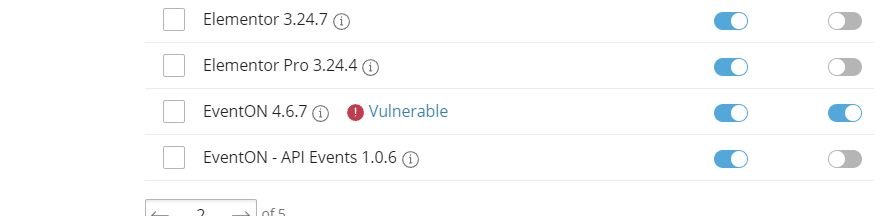
and plesk is saying the EVENTON plugin is vulnerable. So I have to update the plugin, right?
screenshot attached
This is how CodeCanyon names it’s archives.
Could you unzip it and check inside? Did you download the full archive or only installation files?