Hello,
Please update it manually to 4.7.1.
To update eventon to latest version: If you are unable to do autoupdate, you can go to codecanyon your account > download and get the latest eventon version as zip file. Then you can go to your website > make sure “Delete eventon settings & data when EventON is uninstalled” is Deslected from eventon settings, delete old eventon, install new one and activate. This link will further explain the process it. Also you can follow us on twitter to get real-time announcements on updates!
Hello,
Please update it manually to 4.7.1.
To update eventon to latest version: If you are unable to do autoupdate, you can go to codecanyon your account > download and get the latest eventon version as zip file. Then you can go to your website > make sure “Delete eventon settings & data when EventON is uninstalled” is Deslected from eventon settings, delete old eventon, install new one and activate. This link will further explain the process it. Also you can follow us on twitter to get real-time announcements on updates!
The newest update should fix the autoupdate issue.
Hello,
Are you trying to refund the plugin and also Tickets add-on because you cannot activate the add-on?
You can just start using it while we are working on the activation issue.
Ashan,
Could you check?
#197821 completed
Event Tickets – 2-5 Sites
EVOTX071b7aa3-e2bb-4c12-a412-1e92a6471e37
Hello,
You can start using the add-on without activating it while we are working on the issue.
I am going to assign this ticket to Ashan and he will be able to take it from here and find you a solution. Please allow some time for him to get back to you, we greatly appreciate your patience and thank you for being a eventon customer!
Hi,
Thanks for the reply. I’ve adapted this, but this doesn’t hide the month being mentioned in the event card?
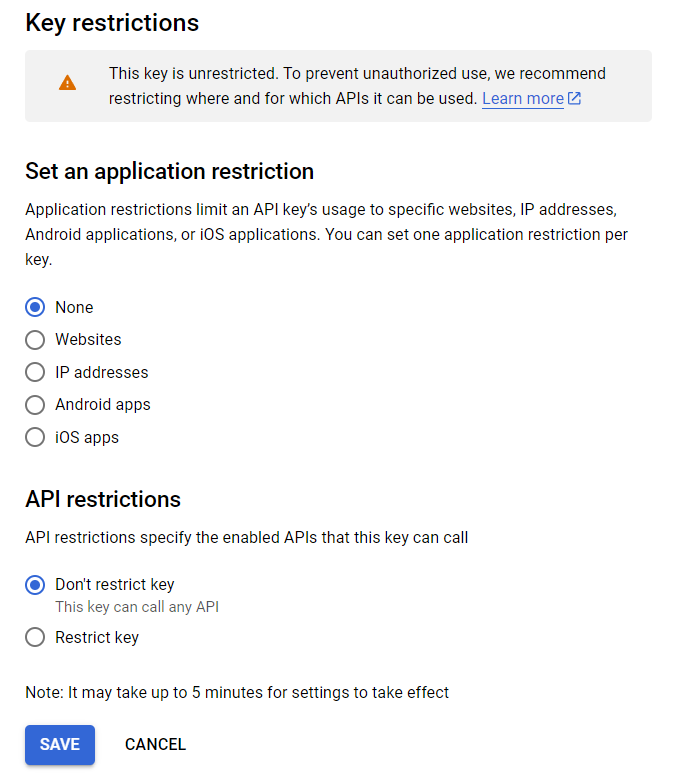
Yes, I have disabled its API restrictions to make things work. But I want to enable it again.
Found the issue!! the title and subtitle is using CSS text-transform: uppercase and that is what is causing this issue.
I think we will add an option in eventon settings to disable the auto all caps for title and subtitle.
For the moment,
please add this CSS into eventON settings > styles and clear cache and that should work.
.eventon_events_list .eventon_list_event .evoet_cx span.evcal_event_subtitle,
.evo_pop_body .evoet_cx span.evcal_event_subtitle,
.evo_pop_body .evoet_cx span.evcal_event_title
{text-transform:none!important;}
Hello there Horst, Sorry for not getting back to you. We are working on finding a solution for this. All our rework codes are not working. So please allow us some time.