Given that I am not technical, in the past an external consultant (who unfortunately is no longer available) had solved the loading time like this:
‘The line 673 of class-event.php in the EventON plugin has been commented out. Here’s what it means and why it might have been done: 1. What the Original Line Does php Copy code $repeats = unserialize($this->meta_data[‘repeat_intervals’][0]);
This line takes a value from the event’s meta-data (specifically the repeat interval) and deserializes it. The unserialize() function converts a serialized string (usually created with serialize()) into a PHP array or object. This is commonly used to restore complex data that was previously saved as strings.’
Hi, here an example page with only a calendar: https://staging22.giornatamondiale.it/agosto/ , loading times are still slow
Hey thanks so much for the update and checking it out. Sadly its still not 100%
Now at least the month are decending – however Dec is now missing? How can we can add most recent event on top? Also the archive at the bottom “this one is not showing the month” we dont need those.
Let me know if thats possible.
Many thanks in advance.
Tim
Hi – is there a timeline for when this can be looked at again?
During last days I have also checked interfering from other plugins or our theme, but found none.
Would really appreciate your help since the issue of cancelling not working is severerly impacting our organization.
Hello, yes no problem. I just updated the plugin following those steps and I was able to see that the event data is saved, but the events are still not populating on the page the eventon calendar is being displayed:
https://hpsj4stg2022.wpengine.com/calendar-of-events/
Also, when I open an event to edit it, I don’t see fields that used to be there such as event title, event start time, event location etc.
Thak you for letting me know, I shall look forward to getting the update feature back.
Hello,
1. Please go to EventON > Sorting and Filtering > enable Past & Future Event Filtering.
2. Please use this shortcode:
[add_eventon_list number_of_months=”12″ hide_empty_months=”yes”]
Change 12 to any number of months.
To show past events, please follow
https://docs.myeventon.com/documentations/how-to-show-past-events/
You can also show all events by following the previous guide if you change -3 and 2 to show all events available.
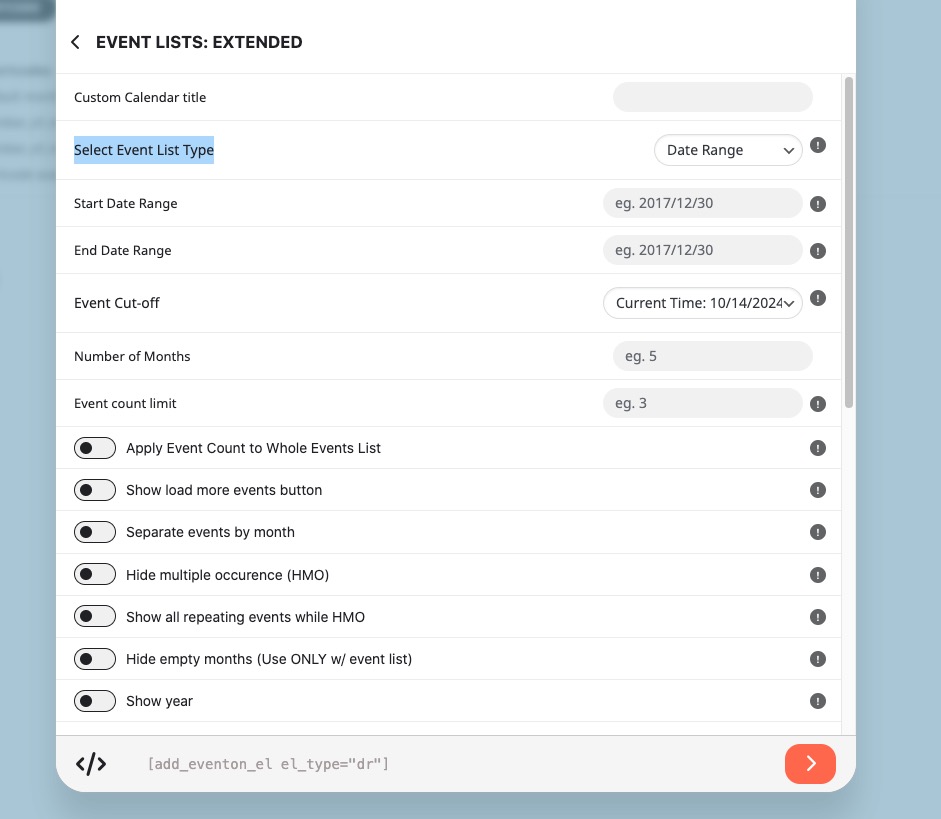
You can also use Event Lists: Ext add-on with Select Event List Type: Date Range:
https://www.myeventon.com/addons/event-lists-extended/
Try on
https://dev.myeventon.com/wp-admin/
Hello,
Please try going to EventON > Scripts > disable or enable Write dynamic styles to header, depending on what’s your current setting.