No, i am waiting for 4.6.9 version. I hope that new autoupdate will ok.
I have plugin on many sites, and i can not do it on all. It is too much time.
Lukas
Replies for tickets on suppota
No, i am waiting for 4.6.9 version. I hope that new autoupdate will ok.
I have plugin on many sites, and i can not do it on all. It is too much time.
Lukas
Could you please try the instructions mentioned in this documentation to make sure your issue is indeed coming from eventon.
Console errors throw up a JS minification its possible the cache is doing something but let us know the results
i really dont want delete settings of plugin on my sites.
If you update from 4.6.6 and “EventON > Delete eventon settings & data when EventON is uninstalled” is disabled, then you will not loose any of your events and settings.
Have you managed to update?
…upgrades are not supposed to crash…
Could you tell us more about this? Please follow the instructions in this documentation to activate debug in your site to see any PHP errors recorded that can provide insight on to whats going on. Please reply with a link to debug.log file. If you are not able to do this please send us FTP access to your site so we can do this for you.
…or even change my design work every time.
Each update changes the design. If there is nothing wrong with your current version then you need to make sure that new version changes doesn’t affect your current design and only the update.
Please also note that some of your current issues cannot come from EventON. For example,
I checked on two browsers: CURRENTLY font are not displayed anywhere as they should be
EventON doesn’t affect fonts at all. It only changes the styling.
https://helpdeskx.s3.amazonaws.com/wp-content/uploads/2024/09/20052326/Screenshot-2024-09-20-at-14.23.05.jpg
Could you tell us who added this code?
can you tell me, where it is determines which font is displayed in the event description?
Please go to EventON > Appearance > Secondary Calendar Font family. If you don’t see any change, EventON > Scripts & Styling > turn off Write dynamic styles to header > save settings > turn on Write dynamic styles to header.
ONLINE / VIRTUAL EVENT tab above the event name?
Please go to EventON > EventTop > make sure that Tags is added.
Unfortunately, we cannot grant refunds after the first 30 days of the original purchase.
We also cannot grant refunds on renewal payments. We may send you an email prior to your renewal date, and you may use this opportunity to cancel your subscription before the renewal payment is automatically processed.
Hello,
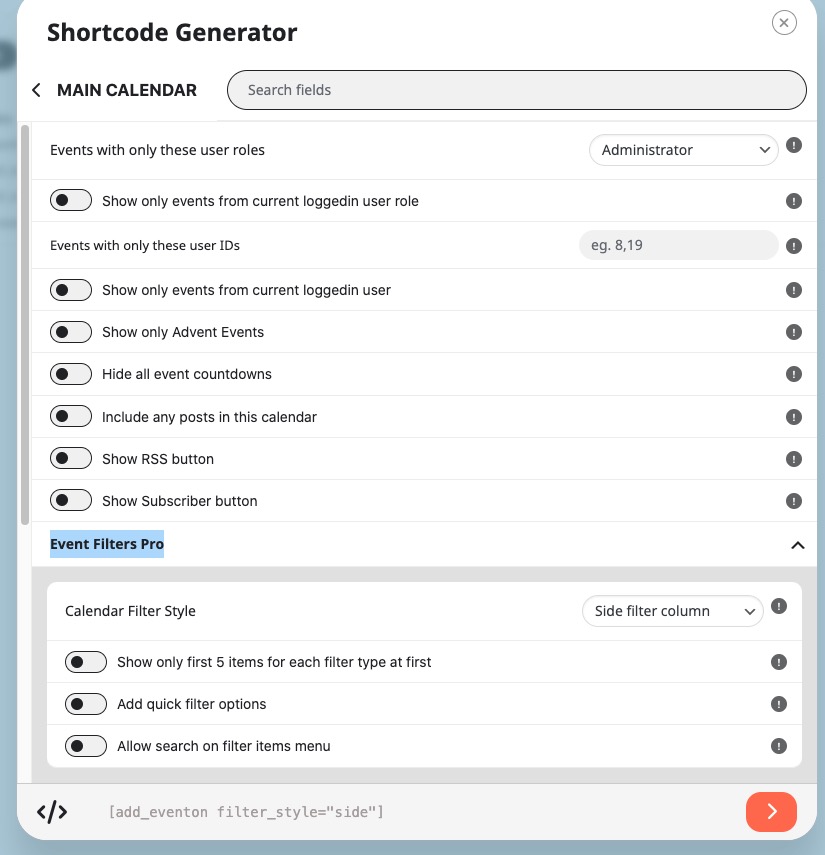
Does this work for you?
[add_eventon filter_style=”side”]
Please go to EventON > Shortcodes > change these settings and then add them to your shortcode:
Hello,
Event API has limited functionality. For example, it doesn’t allow filtering events in embedded calendars. Also designs are limited.
Try on https://dev.myeventon.com/wp-admin/ and let us know if it works for you.
Not possible, I am afraid. However please create a new ticket and select Feature Request as category so others can vote on your idea and get it moved into development faster.
We are glad your issue is resolved, if you have any further questions or concerns please create a new ticket.
Hello,
Initial repeat and repeat 1 are similar to each other:
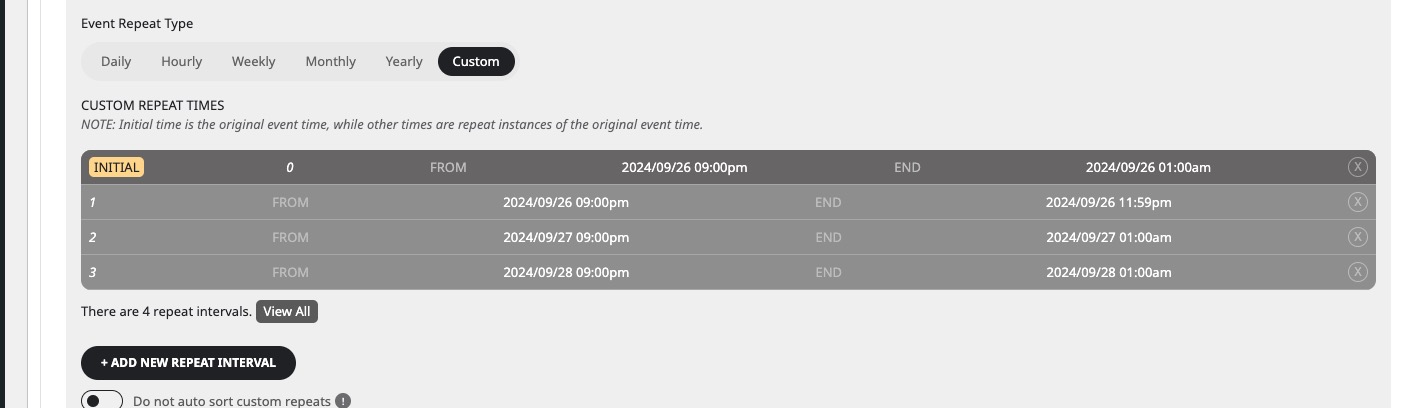
It seems that you need to remove repeat 1 and just leave Initial repeat.
Could you try and let me know?