Hello,
Add-ons aren’t compatible with each other, I am afraid.
Replies for tickets on suppota
Hello,
Add-ons aren’t compatible with each other, I am afraid.
Not sure what do you mean by “mask”. Do you want to hide the button?
Hello,
Event Subtitle is a simple text. If you want to use HTML tags, please use Custom Meta fields with Content Type Multiple lines of text (Trumbowig Editor):
https://docs.myeventon.com/documentations/setup-use-custom-meta-fields-events/
You can show then on EventTop from EventON Settings > EventTop > add the field.
Hi Ashan,
Still no update on this issue?
I saw there was an update för EventOn at our webpage, from 4.6.7 to 4.6.8. Tried do run it, but it failed.
Message was, the package did not contain any file. See below
Ett fel uppstod vid uppdatering av EventON: Paketet kunde inte installeras. Paketet innehåller inga filer.
Inaktiverar underhållsläge …
Please lower the number of repeats. It seems that your server can only handle a certain number of repeats.
You can find the archive with the latest version of EventON by going to
https://codecanyon.net/downloads
You don’t see it among your Purchases?
https://helpdeskx.s3.amazonaws.com/wp-content/uploads/2024/09/02060402/Schermafbeelding-2024-09-02-om-15.03.50.png
You need to install and enable the latest version of EventON.
WooCommerce allows free tickets if you put 0.00 as Ticket Price. But customers still need to go through the checkout process.
Hello,
1. Do you mean events? Are you trying to show all available events? Please take a look at Event Lists:
[add_eventon_list number_of_months=”12″ hide_empty_months=”yes”]
And this is how you can show past events:
https://docs.myeventon.com/documentations/how-to-show-past-events/
You can also try Event Lists: Ext shortcode:
[add_eventon_el el_type=”dr” start_range=”-12 months” end_range=”+24 months” hide_empty_months=”yes”]
2. You can change the text with this input text from Edit Event:
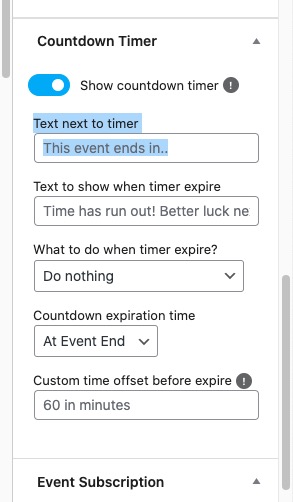
Hello,
Unfortunately, we unable to help with PHP customizations since it’s against CodeCanyon Support Policy. However, please take a look at this guide that has the info on locations:
https://docs.myeventon.com/documentations/taxonomies-eventon/
Can you also tell me in tickets and seats in variation types where write Who can purchase this variation how I can have option the event owner only so I will create variation Complimentary and it will be free? So the event owner only not the users to have option to choose seat and select Complimentary and book the ticket for free.