PERFECT! Your help and support is so appreciated.
I think/know this is the best event app on WP. For years I have converted stubborn developers who finally had to admit.
You are the best!
cr
Replies for tickets on suppota
PERFECT! Your help and support is so appreciated.
I think/know this is the best event app on WP. For years I have converted stubborn developers who finally had to admit.
You are the best!
cr
Sorry, it was not your team. It was YOURSELF referring to the article recommending URL and IP address separate restrictions.
See here:
https://helpdesk.ashanjay.com/ticket/google-maps-disappaers-after-a-few-moments-and-is-not-showing-the-location/
Even more nuts…

If that field is for an email address ONLY, why does it say:
From eg. My Name <myname@domain.com>
It makes it seem that I can include a from name as well as email, but if it’s an email field only, please let me know.
Thanks Ashan for finally answering what I was asking several times. Of course this is the answer why it works in your demo page and not in my installation.
Your own team has given the reference to an article clearly indicating to protect the google API against misuse by restrictions.
I cannot agree to your statement: “over 67k+ clients use this with no issues on EventON.” The described issue ONLY appllies to the EventsMap Addon. Without this there is no long/lat generation included in your tool and it is not necessary as the Map in a single event does not require this. Only for the overall map with all events your addon requires the coordinates. You have 67k+ clinets of the EventsMap Addon? Don’t think so!
I can only try to help to improve this Addon. Here is my suggestion: Give the possibility to post a second API key in the backend. Then users can restrict the API key as recommended. They can use the one restricted for URL to generate the maps (BTW, this is what works for 67k+ customers). Optionally they can use the other key restricted by IP address to generate the long/lat values. This is what is described in the article recommended by your team in another ticket. Just add the possibility to optionally use this second API key for the recommended restrictions and your tool is running smothly and safe.
Again what happens:
URL restriction allows to show the map.
IP restriction allows to generate the coordinates.
Vice versa is blocked.
Found that out for you. Just for free.
As said several times: You’d better read carefully your customer’s requests and descriptions. I don’t want to do you harm, just use this tool. I get recommendation to do these restrictions from your support and finally you tell me it is my deal to find out that this is not the right path. Hope you see yourself that this is nuts!
HI!
If you are not in the USA, it is probably blocked. We block all countries outside the USA and unfortunately there is nothing I can do about that 🙁
I will see if I can do it on your demo site and send the link.
Hi Leslie,
We are glad your issue is resolved, if you have any further questions or concerns please feel free to create a new ticket.
Thank you so much; this worked great! We have set them up this way for a while without issue, but glad to have this resolved!
Any update??
Hello,
Please take a look at this:
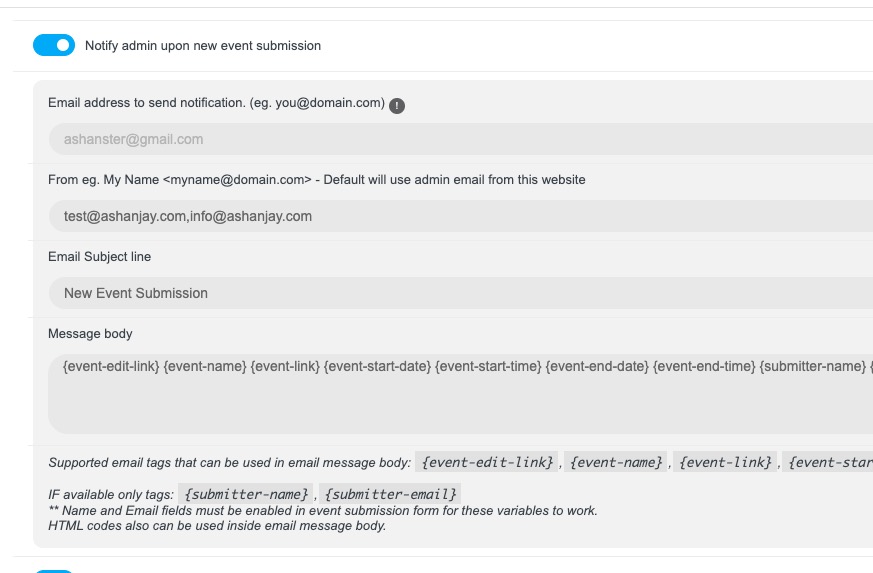
Could you send us a screenshot of the same part from your side?