Thank you very much for pointing this out. We are trying to slowly move all input elements to use the eventON elements class.
Here is the patch fix that will resolve this and will also allow you to use the open in new window yes/no button.
code: evcal_lmlink_target

Yes Adam I completely agree with you the block based design is so much cleaner and very smooth. Just the coding aspect is a mess right now. We really want to add compatibility but, we are not going to waste time if they haven’t even 100% consolidate their pluggable hooks.
However, with a little bit of coding magic you can make the shortcode based cart/checkout look siliar to the block design. We have done some custom codes on myeventon.com so utilize woocommerce into a smooth slide in cart 🙂
Here is the answer I got from AI on whats causing this and how to fix it.
If PHP’s DateTime is outputting a Unix timestamp that corresponds to GMT-5 while you expect GMT-6 for Mexico City, this discrepancy could be due to outdated or incorrect timezone information on the server. PHP relies on the system’s timezone database, which can become outdated if not regularly updated.
Update Timezone Database:
On Unix-like systems, the timezone database can be updated using the tzdata package. For example, on a Debian-based system, you can update it with:
bash
Copy code
sudo apt-get update
sudo apt-get install –reinstall tzdata
Ensure PHP Uses the Latest Timezone Database:
Restart your web server to ensure PHP picks up the latest timezone data:
bash
Copy code
sudo systemctl restart apache2 # For Apache
sudo systemctl restart php-fpm # For PHP-FPM
Thank you for debugging and the reassuring result. It is a bit as a I expected: as long as I keep LSCWP disabled (as it is now) I have no problem. When I enable LSCWP then 24 of 48 hours later the site crashes. But I cannot afford to let that happen to this live site. Therefore I leave LSCWP disabled for now. Maybe the problem will stay away. But It would be a pity not to be able to use the caching.
I am trying to make a copy to experiment and debug, but that is a bit above my league, I fear. Thanks for the troebel you took so far.
Phew I spent so much time trying to figure it out and I was going in loops not finding anything… and your server info helped make sense of whats going on. 🙂
This also explains why the all day events showing in different days.
I hope you can get the DST adjusted correctly on server.
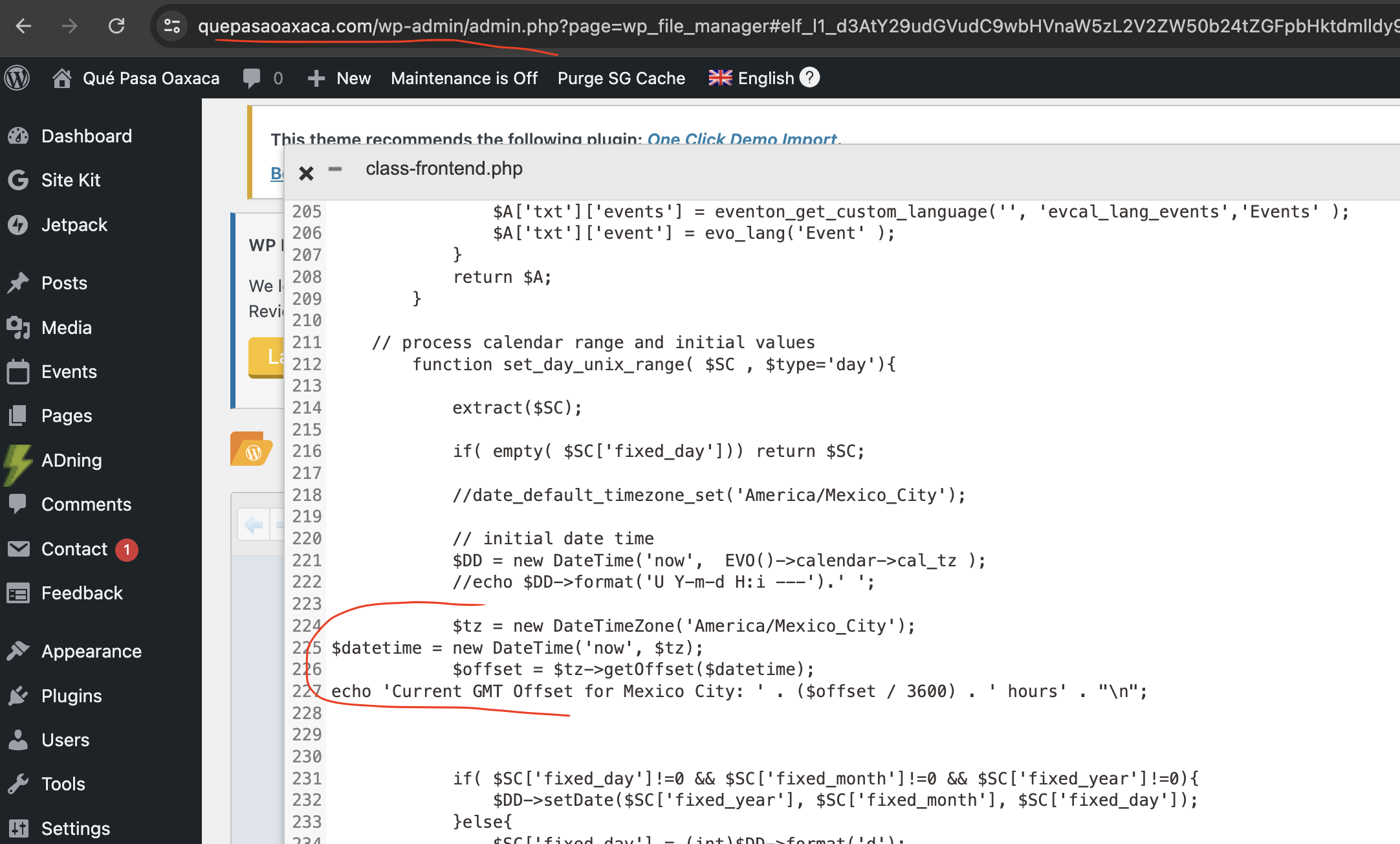
here is the code and I will comment this out for now, if you want to show this to your website host you can uncomment it,.
page link: https://www.quepasaoaxaca.com/wp-admin/admin.php?page=wp_file_manager#elf_l1_d3AtY29udGVudC9wbHVnaW5zL2V2ZW50b24tZGFpbHktdmlldy9pbmNsdWRlcw
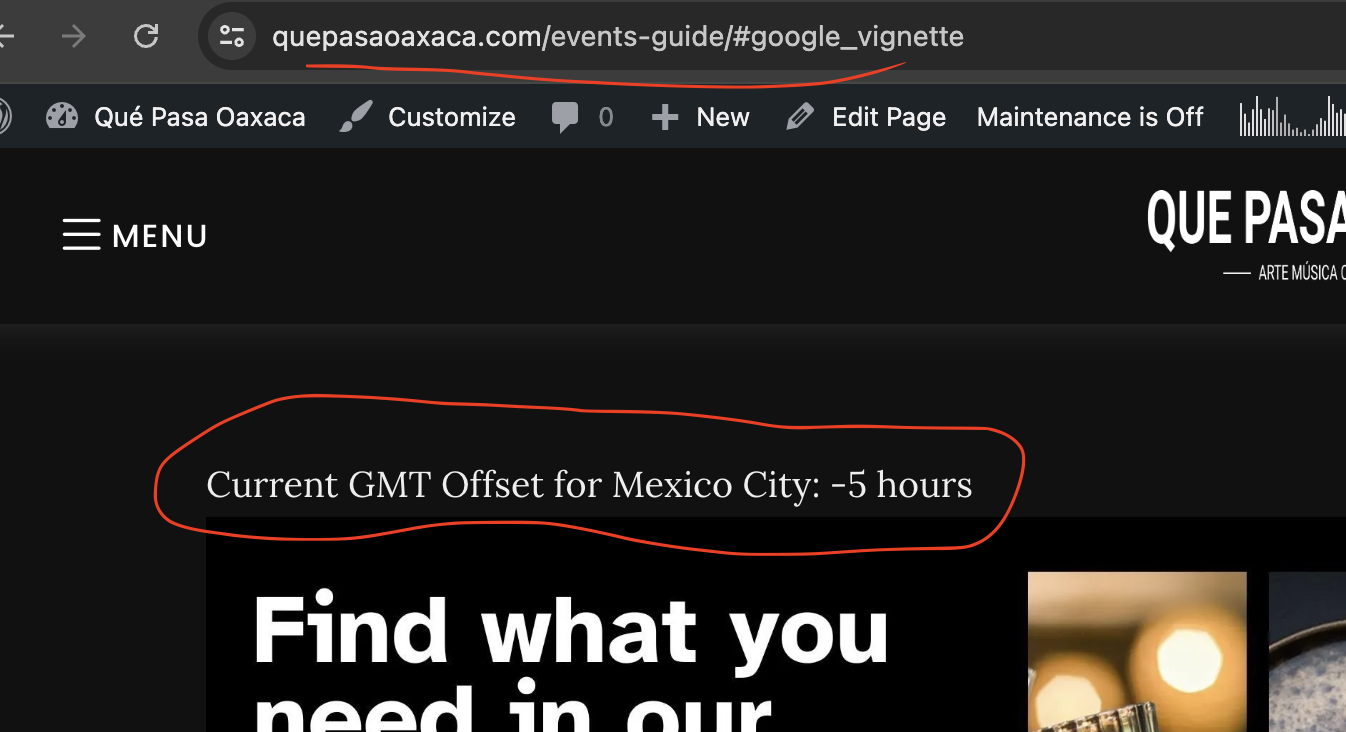
i just had few codes output from the server side and this further explains the errored time unix coming from the server.
I went through all the expert advice you gave me, point by point, and finally found that one plug-in had got in the way of Event On Event ticket working properly.
It was the Payment Plugins for Stripe WooCommerce plug-in, which I finally replaced with another one, and everything now works fine.
Thank you for your advice and responsiveness, and have a great weekend!
Rebecca, thank you for sharing me that information. That explains it a lot So Mexico city currently is in GMT -6 with no DST. The day strip times are created using initial unix time range generated on server side. While current day number (big number) is generated on client side.
Server side is still assuming the DST that is why you are seeing GMT-5 instead of -6. We are using PHP DateTime() function to calculate the start of the month and then adjust based on timezone set on eventON settings. So on server side it is calculating incorrectly. I think more than WordPress, it is coming from the server. Any way you can get the website hosting company to take a look at this? May be update to latest version of PHP ?
We need to solve this inmediatly. We are very disappointed with the customer service, and we are planning to start legal actions in case this is not solved.