Hi Artem –
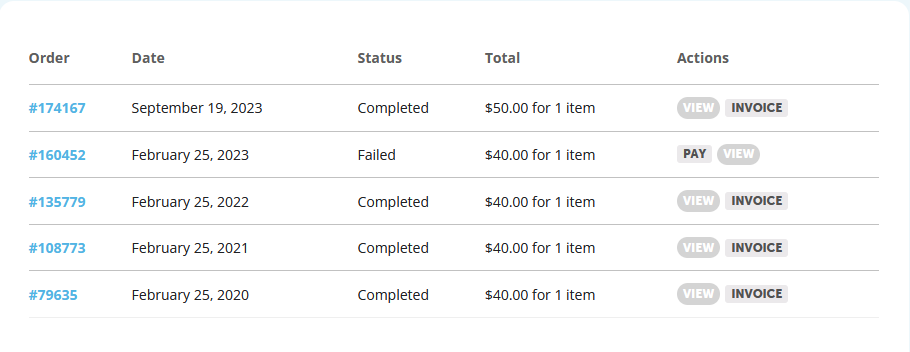
So the only orders we have are for Full Cal, not Event Slider. Does that mean I can’t update Event Slider, even though I have it added to my site? How do I order Event Slider?
Here are my order numbers. The email address currently on our account is charles.landy@worldly.io, but these orders may have been placed with amy@higg.com.
Thanks,
Charles
Hello,
Please try adding cal_init_nonajax=”yes” to add_eventon shortcode. This should load the calendar without Ajax.
Hello,
I am sorry, the access information you have provided did not work for us. Please check them and post the correct login information as a private message, thank you!
We are glad your issue is resolved, if you have any further questions or concerns please create a new ticket.
If you have a moment, we would greatly appreciate if you could kindly leave us a review at Codecanyon. By going to your account > Downloads. We are very grateful for your kind review!
Not possible to show all available events in different languages in one calendar when Language corresponding events is enabled, I am afraid.

Yes, it is on (see image)
Oh, and apologies – the HTML password details for the site as follows:
wmfsstaging
?Y>z^EiT2s.5WxKSowkF
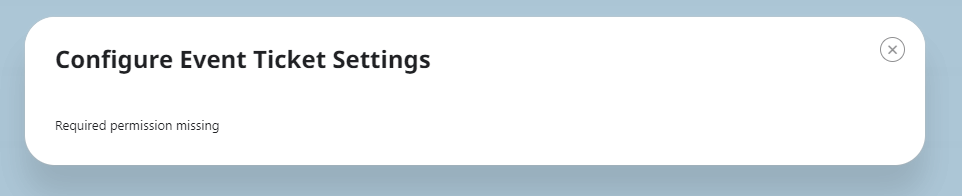
To replicate the issue (which we’ve confirmed on our live and staging site):
Visit https://staging.wmfs.net/wp-admin/
Login with credentials: online@wmfs.net
Password: !N9WvmNj6sfy0Sd6)KA3A4#0
Go to Events, and edit any event with tickets attached. Then try to click the ‘Configure Ticket Settings’ option. You’ll receive the same error (see attached).
Dear Artem,
thanks a lot. That was exactly what I was searching for.
best regards, Alisa