Ashan,
The same on dev2:
https://dev2.myeventon.com/test-576/
Open “Book 1” (Jun 28) > click on a booking block > now open “Book” (Jun 30) > the same date is shown.
Replies for tickets on suppota
Ashan,
The same on dev2:
https://dev2.myeventon.com/test-576/
Open “Book 1” (Jun 28) > click on a booking block > now open “Book” (Jun 30) > the same date is shown.
Hello,
Thank you for your messages, I am going to assign this ticket to Ashan and he will be able to take it from here and find you a solution. Please allow some time for him to get back to you, we greatly appreciate your patience and thank you for being a eventon customer! Also please disable any IP blocking on your site if there are any.
[03-Jun-2024 14:25:39 UTC] PHP Fatal error: Allowed memory size of 587202560 bytes exhausted (tried to allocate 20480 bytes) in /var/www/vhosts/fundacioncajasol.com/httpdocs/wp-includes/meta.php on line 1194
Please follow
https://docs.myeventon.com/documentations/increasing-wordpress-memory-limit/
The message says that it needs ~600MB of memory.
Hello,
Could you send us a link to the file, so we can try importing it?
I think that number_of_months=”72″ is causing the performance issue. Could you try lowering the number?
Please also try installing a caching plugin.
Please add this CSS code to EventON > Styles (If you don’t see any change, EventON > Scripts & Styling > turn off Write dynamic styles to header > save settings > turn on Write dynamic styles to header):
.eventon_events_list .eventon_list_event .evcal_list_a { border-color: #c3aa5b !important; }
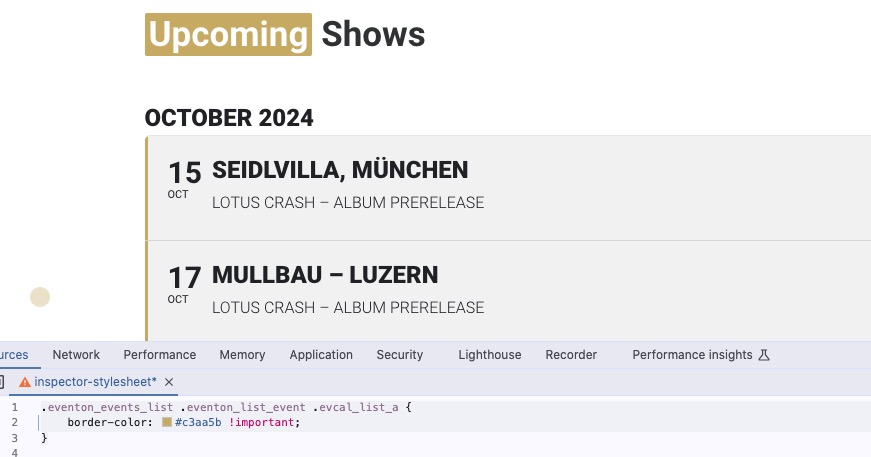
Quotes were wrong. Please check now.
I’ve deleted the /events page altogether, but it’s still showing up – https://hellbaystaging.littletorside.co.uk/events/
This suggests to me that this page has been auto-created by EventOn but then I can’t edit it (and the header menu is corrupted on this page)
Please update to latest version of tickets addon, the emailing information should appear under order details.
Hi Dave
Thank you so much for the really helpful video!
The main issue is the /events page. In short, I want my Events listing page to be at /events but the plugin seems to have created /event-directory The calendar displays correctly on that page, but at /events the header menu is corrupted and I can’t edit the page.
It seems there’s some kind of weird conflict with this plugin – and this is referenced at this previous Helpdesk post but the answer is not publicly shown: https://helpdesk.ashanjay.com/ticket/eventon-possible-conflict-with-elementor-plugin/
One of the answers says: “More info: If the /events page does not work due to theme/plugin conflicts, create a new page, call it “Events Directory” Insert eventon shortcode and use that as your main events page which will have a URL ending like /events-directory. This would be a perfect solution if you have conflicts with /events slug.”
However, this is not a satisfactory answer for me as I want the page to be at /events
Even if I accepted a different page (/event-directory) I can’t disable the /events page and the display is incorrect here, so people may still end up on this broken page.
Please help!