So the issue has been fixed?
Archives: Replies
Replies for tickets on suppota
Reply to: tickets(355464)
Hello,
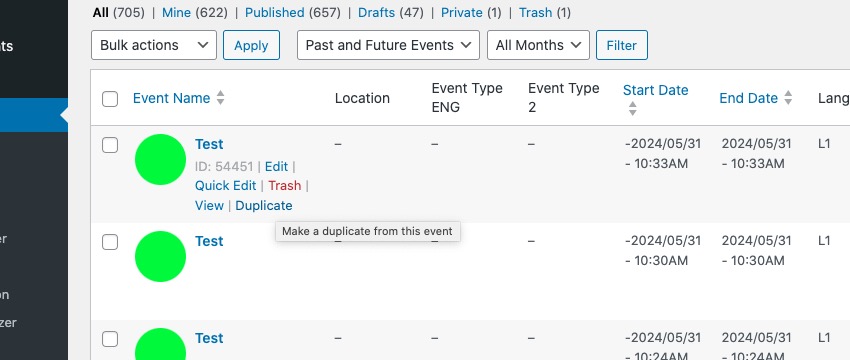
You can create one event and then duplicate it from wp-admin > Events:
Reply to: tickets(355465)
Closed as duplicate.
Reply to: tickets(355354)
I found the problem! It was with WP Rocket on some new CSS optimization that I updated. I rolled it back and it all came back.
Reply to: tickets(352131)
and we would like to start adding advertising banners in the events section, can you give us a method to accomplish this?
Reply to: tickets(352131)
Reply to: tickets(352131)
The times are still a little bit off, I’ll try to upload this screenshot. in the image the local time is 2:49pm, the “coming up next in” shows a timer set to expire in 10 minutes, 26 second, however it shows the time of that event at 7pm which should be 4 hours and ten minutes. Also, the “events happening now” section shows an event at 5pm and one at 6pm which should show in the “coming up next” section since they are before the one that is listed. Can you change the title of that section to “events happening today” rather than now?
Reply to: tickets(353630)
Hello Ashan, is the update ready?
Reply to: tickets(355354)
I fixed the permissions- sorry about that. Should be good to go.
The weird thing is that all I did was take the update and this broke. It is just frustrating because every time I update the full cal doesn’t work.
I don’t think it is the memory, on my clementonpark.com site I have the same error. Memory is 512 and that is the same memory limit on my BIGGEST website indianabeach.com but that one never broke and is working fine which is weird!
Here is FTP access for you, I hope this works! Thank you!
Niagara
Login: EventOn@niagaraamusementpark.com
Password: eventon89123!
Clementon
Login: eventon@clementonpark.com
Password: eventon89123!
Reply to: tickets(354740)
Hi, ok so I understand with the second link you sent that the issue is how my new colleague has been adding the photos. She isn’t doing that anymore so I assume that we won’t see this issue with any new events.
The first link you sent, the issue isn’t that the images aren’t appearing, the issue is that none of the calendar is appearing when I use that device. There seem to be a number of issues with how the calendar is displaying for people.
I have two phones and on one it seems ok, but on the other it appears like that screenshot that I sent you (that you linked back to in your previous reply). My website loads fine in general, but the calendar doesn’t show up at all.
I’ve been contacted by several users of our site who have reported problems. Last night someone told me that they were able to see the current day’s events but nothing loaded at all for future days. Previously I was contacted by someone who said that they were only able to see the same events every day, that they never changed.
What would cause this? I usually have the calendar pages excluded from caching so that they are always updated, but I turned this off while following your instructions to clear the cache when checking things. I have just excluded the pages again but I don’t know if that will make any difference.
There is also the issue I mentioned in a previous message related to automatically deleting old events and how that is working in English but not in Spanish. Could all these things be connected? I really need the calendar to be working well, as it was before the updates.
Thank you