By the way. I´m using the ICS importer……
Archives: Replies
Replies for tickets on suppota
Reply to: tickets(394070)
Hello and Thanks! Have a tried to use the link, but got the same message:
Time: 2025-05-23 18:51:01 Details: Can not access the ICS file remotely. Make sure ICS file URL is correct.
Time: 2025-05-23 18:22:03 Details: Can not access the ICS file remotely. Make sure ICS file URL is correct.
Time: 2025-05-23 18:28:05 Details: Can not access the ICS file remotely. Make sure ICS file URL is correct.
Time: 2025-05-23 18:45:05 Details: Can not access the ICS file remotely. Make sure ICS file URL is correct.
Time: 2025-05-23 18:41:08 Details: Can not access the ICS file remotely. Make sure ICS file URL is correct.
Time: 2025-05-23 18:51:08 Details: Can not access the ICS file remotely. Make sure ICS file URL is correct.
Time: 2025-05-23 18:17:18 Details: Can not access the ICS file remotely. Make sure ICS file URL is correct.
Time: 2025-05-23 18:35:18 Details: Can not access the ICS file remotely. Make sure ICS file URL is correct.
Time: 2025-05-23 18:03:23 Details: Can not access the ICS file remotely. Make sure ICS file URL is correct.
Time: 2025-05-23 18:14:24 Details: Imported: 13 Failed: 0
Time: 2025-05-23 18:10:26 Details: Imported: 0 Failed: 13
Time: 2025-05-23 18:47:27 Details: Imported: 0 Failed: 13
Time: 2025-05-23 18:36:30 Details: Can not access the ICS file remotely. Make sure ICS file URL is correct.
Time: 2025-05-23 18:47:31 Details: Imported: 3 Failed: 0
Time: 2025-05-23 18:23:32 Details: Imported: 3 Failed: 0
Time: 2025-05-23 18:35:32 Details: Can not access the ICS file remotely. Make sure ICS file URL is correct.
Time: 2025-05-24 18:35:05 Details: Can not access the ICS file remotely. Make sure ICS file URL is correct.
Time: 2025-05-25 18:45:05 Details: Can not access the ICS file remotely. Make sure ICS file URL is correct.
Time: 2025-05-26 18:33:05 Details: Can not access the ICS file remotely. Make sure ICS file URL is correct.
Time: 2025-05-27 18:33:05 Details: Can not access the ICS file remotely. Make sure ICS file URL is correct.
Time: 2025-05-28 18:30:05 Details: Can not access the ICS file remotely. Make sure ICS file URL is correct.
Time: 2025-05-29 18:29:05 Details: Can not access the ICS file remotely. Make sure ICS file URL is correct.
Time: 2025-05-30 18:28:05 Details: Can not access the ICS file remotely. Make sure ICS file URL is correct.
Time: 2025-05-31 18:36:05 Details: Can not access the ICS file remotely. Make sure ICS file URL is correct.
Time: 2025-06-01 18:31:05 Details: Can not access the ICS file remotely. Make sure ICS file URL is correct.
Time: 2025-06-02 18:29:05 Details: Can not access the ICS file remotely. Make sure ICS file URL is correct.
Time: 2025-06-03 18:19:06 Details: Can not access the ICS file remotely. Make sure ICS file URL is correct.
Time: 2025-06-04 18:29:05 Details: Can not access the ICS file remotely. Make sure ICS file URL is correct.
Time: 2025-06-05 18:31:05 Details: Can not access the ICS file remotely. Make sure ICS file URL is correct.
Time: 2025-06-06 18:33:05 Details: Can not access the ICS file remotely. Make sure ICS file URL is correct.
Time: 2025-06-07 18:32:05 Details: Can not access the ICS file remotely. Make sure ICS file URL is correct.
Time: 2025-06-08 18:31:05 Details: Can not access the ICS file remotely. Make sure ICS file URL is correct.
Time: 2025-06-09 18:35:05 Details: Can not access the ICS file remotely. Make sure ICS file URL is correct.
Time: 2025-06-10 18:28:05 Details: Can not access the ICS file remotely. Make sure ICS file URL is correct.
Time: 2025-06-11 18:32:05 Details: Can not access the ICS file remotely. Make sure ICS file URL is correct.
Time: 2025-06-12 18:15:06 Details: Can not access the ICS file remotely. Make sure ICS file URL is correct.
Time: 2025-06-13 18:28:05 Details: Can not access the ICS file remotely. Make sure ICS file URL is correct.
Time: 2025-06-14 18:11:06 Details: Can not access the ICS file remotely. Make sure ICS file URL is correct.
Time: 2025-06-15 18:31:05 Details: Can not access the ICS file remotely. Make sure ICS file URL is correct.
Time: 2025-06-16 18:39:05 Details: Can not access the ICS file remotely. Make sure ICS file URL is correct.
Time: 2025-06-17 18:15:06 Details: Can not access the ICS file remotely. Make sure ICS file URL is correct.
Time: 2025-06-18 18:37:05 Details: Can not access the ICS file remotely. Make sure ICS file URL is correct.
Time: 2025-06-19 18:15:06 Details: Can not access the ICS file remotely. Make sure ICS file URL is correct.
Time: 2025-06-20 18:54:05 Details: Can not access the ICS file remotely. Make sure ICS file URL is correct.
Time: 2025-06-21 18:28:05 Details: Can not access the ICS file remotely. Make sure ICS file URL is correct.
Time: 2025-06-22 18:06:06 Details: Can not access the ICS file remotely. Make sure ICS file URL is correct.
Time: 2025-06-23 18:37:07 Details: Can not access the ICS file remotely. Make sure ICS file URL is correct.
Time: 2025-06-24 18:31:05 Details: Can not access the ICS file remotely. Make sure ICS file URL is correct.
Time: 2025-06-25 18:31:05 Details: Can not access the ICS file remotely. Make sure ICS file URL is correct.
Time: 2025-06-26 18:09:06 Details: Can not access the ICS file remotely. Make sure ICS file URL is correct.
Time: 2025-06-27 18:26:05 Details: Can not access the ICS file remotely. Make sure ICS file URL is correct.
Time: 2025-06-28 18:00:06 Details: Can not access the ICS file remotely. Make sure ICS file URL is correct.
Time: 2025-06-29 18:28:05 Details: Can not access the ICS file remotely. Make sure ICS file URL is correct.
Time: 2025-06-30 18:04:06 Details: Can not access the ICS file remotely. Make sure ICS file URL is correct.
Time: 2025-07-01 18:05:06 Details: Can not access the ICS file remotely. Make sure ICS file URL is correct.
Time: 2025-07-02 18:08:06 Details: Can not access the ICS file remotely. Make sure ICS file URL is correct.
Time: 2025-07-03 18:35:05 Details: Can not access the ICS file remotely. Make sure ICS file URL is correct.
Time: 2025-07-04 18:57:07 Details: Can not access the ICS file remotely. Make sure ICS file URL is correct.
Time: 2025-07-05 18:44:06 Details: Can not access the ICS file remotely. Make sure ICS file URL is correct.
Time: 2025-07-06 18:43:05 Details: Can not access the ICS file remotely. Make sure ICS file URL is correct.
Time: 2025-07-07 18:03:06 Details: Can not access the ICS file remotely. Make sure ICS file URL is correct.
Time: 2025-07-08 18:53:05 Details: Can not access the ICS file remotely. Make sure ICS file URL is correct.
Time: 2025-07-09 18:08:06 Details: Can not access the ICS file remotely. Make sure ICS file URL is correct.
Time: 2025-07-10 18:34:06 Details: Can not access the ICS file remotely. Make sure ICS file URL is correct.
Time: 2025-07-11 18:27:05 Details: Can not access the ICS file remotely. Make sure ICS file URL is correct.
Time: 2025-07-12 18:33:05 Details: Can not access the ICS file remotely. Make sure ICS file URL is correct.
Time: 2025-07-13 18:38:05 Details: Can not access the ICS file remotely. Make sure ICS file URL is correct.
Time: 2025-07-14 18:46:05 Details: Can not access the ICS file remotely. Make sure ICS file URL is correct.
Time: 2025-07-15 18:43:05 Details: Can not access the ICS file remotely. Make sure ICS file URL is correct.
Time: 2025-07-16 18:56:05 Details: Can not access the ICS file remotely. Make sure ICS file URL is correct.
Time: 2025-07-17 18:31:05 Details: Can not access the ICS file remotely. Make sure ICS file URL is correct.
Time: 2025-07-18 18:33:05 Details: Can not access the ICS file remotely. Make sure ICS file URL is correct.
Time: 2025-07-19 18:54:05 Details: Can not access the ICS file remotely. Make sure ICS file URL is correct.
Time: 2025-07-20 18:50:05 Details: Can not access the ICS file remotely. Make sure ICS file URL is correct.
Time: 2025-07-21 18:29:05 Details: Can not access the ICS file remotely. Make sure ICS file URL is correct.
Time: 2025-07-22 18:31:05 Details: Can not access the ICS file remotely. Make sure ICS file URL is correct.
Time: 2025-07-23 18:42:05 Details: Can not access the ICS file remotely. Make sure ICS file URL is correct.
Time: 2025-07-24 18:28:05 Details: Can not access the ICS file remotely. Make sure ICS file URL is correct.
Time: 2025-07-25 18:30:05 Details: Can not access the ICS file remotely. Make sure ICS file URL is correct.
Time: 2025-07-26 18:09:06 Details: Can not access the ICS file remotely. Make sure ICS file URL is correct.
Time: 2025-07-27 18:36:05 Details: Can not access the ICS file remotely. Make sure ICS file URL is correct.
Time: 2025-07-28 18:38:08 Details: Can not access the ICS file remotely. Make sure ICS file URL is correct.
Time: 2025-07-29 18:38:05 Details: Can not access the ICS file remotely. Make sure ICS file URL is correct.
Time: 2025-07-30 18:31:05 Details: Can not access the ICS file remotely. Make sure ICS file URL is correct.
Time: 2025-07-31 18:41:05 Details: Can not access the ICS file remotely. Make sure ICS file URL is correct.
Time: 2025-08-01 18:26:06 Details: Can not access the ICS file remotely. Make sure ICS file URL is correct.
Time: 2025-08-02 18:27:07 Details: Can not access the ICS file remotely. Make sure ICS file URL is correct.
Time: 2025-08-03 18:36:07 Details: Can not access the ICS file remotely. Make sure ICS file URL is correct.
Time: 2025-08-04 18:08:06 Details: Can not access the ICS file remotely. Make sure ICS file URL is correct.
Time: 2025-08-05 18:39:05 Details: Can not access the ICS file remotely. Make sure ICS file URL is correct.
Time: 2025-08-06 18:31:05 Details: Can not access the ICS file remotely. Make sure ICS file URL is correct.
Time: 2025-08-07 18:35:05 Details: Can not access the ICS file remotely. Make sure ICS file URL is correct.
Time: 2025-08-08 18:46:05 Details: Can not access the ICS file remotely. Make sure ICS file URL is correct.
Time: 2025-08-09 08:32:02 Details: Can not access the ICS file remotely. Make sure ICS file URL is correct.
Time: 2025-08-09 08:41:03 Details: Can not access the ICS file remotely. Make sure ICS file URL is correct.
Time: 2025-08-09 08:08:04 Details: Can not access the ICS file remotely. Make sure ICS file URL is correct.
Time: 2025-08-09 08:05:11 Details: Can not access the ICS file remotely. Make sure ICS file URL is correct.
Time: 2025-08-09 08:39:23 Details: Can not access the ICS file remotely. Make sure ICS file URL is correct.
Time: 2025-08-09 18:53:05 Details: Can not access the ICS file remotely. Make sure ICS file URL is correct.
Time: 2025-08-10 18:38:05 Details: Can not access the ICS file remotely. Make sure ICS file URL is correct.
Time: 2025-08-11 18:15:06 Details: Can not access the ICS file remotely. Make sure ICS file URL is correct.
Time: 2025-08-12 18:36:05 Details: Can not access the ICS file remotely. Make sure ICS file URL is correct.
Time: 2025-08-13 18:06:07 Details: Can not access the ICS file remotely. Make sure ICS file URL is correct.
Time: 2025-08-13 19:08:00 Details: Can not access the ICS file remotely. Make sure ICS file URL is correct.
Time: 2025-08-13 19:16:01 Details: Can not access the ICS file remotely. Make sure ICS file URL is correct.
Time: 2025-08-13 19:49:05 Details: Imported: 10 Failed: 0
Time: 2025-08-13 22:32:17 Details: Imported: 10 Failed: 0
Time: 2025-08-14 13:21:48 Details: Imported: 10 Failed: 0
Time: 2025-08-14 13:32:49 Details: Imported: 10 Failed: 0
Time: 2025-08-14 14:56:47 Details: Imported: 10 Failed: 0
Time: 2025-08-14 14:14:51 Details: Imported: 0 Failed: 10
Time: 2025-08-14 14:49:51 Details: Imported: 0 Failed: 10
Time: 2025-08-14 14:15:52 Details: Imported: 6 Failed: 0
Time: 2026-03-13 18:29:26 Details: No events found in ICS file
Time: 2026-03-13 18:26:27 Details: Can not access the ICS file remotely. Make sure ICS file URL is correct.
Time: 2026-03-13 18:57:27 Details: Can not access the ICS file remotely. Make sure ICS file URL is correct.
Time: 2026-03-14 18:56:27 Details: Can not access the ICS file remotely. Make sure ICS file URL is correct.
Time: 2026-03-15 18:39:23 Details: Imported: 24 Failed: 0
Time: 2026-03-15 19:43:26 Details: Imported: 24 Failed: 0
Br. Roger
Reply to: tickets(405165)
Could you try switching the theme and disabling plugins one by one to see if any of them cause the modal window to appear?
Reply to: tickets(394070)
Hello,
Instead of
webcal://www.fotball.no/footballapi/Calendar/GetCalendarForArena?arenaId=10131
It should be
https://www.fotball.no/footballapi/Calendar/GetCalendarForArena?arenaId=10131
I changed it, so please check and let me know.
Reply to: tickets(405284)
Could you also send us the full error message? It should contain the line number.
I am going to escalate this ticket to development to help in here. Please allow us some time to address this, and we truly appreciate your patience. Thank you for being a valued EventON customer!
Reply to: tickets(405298)
Ashan,
The customer is trying to change this text:
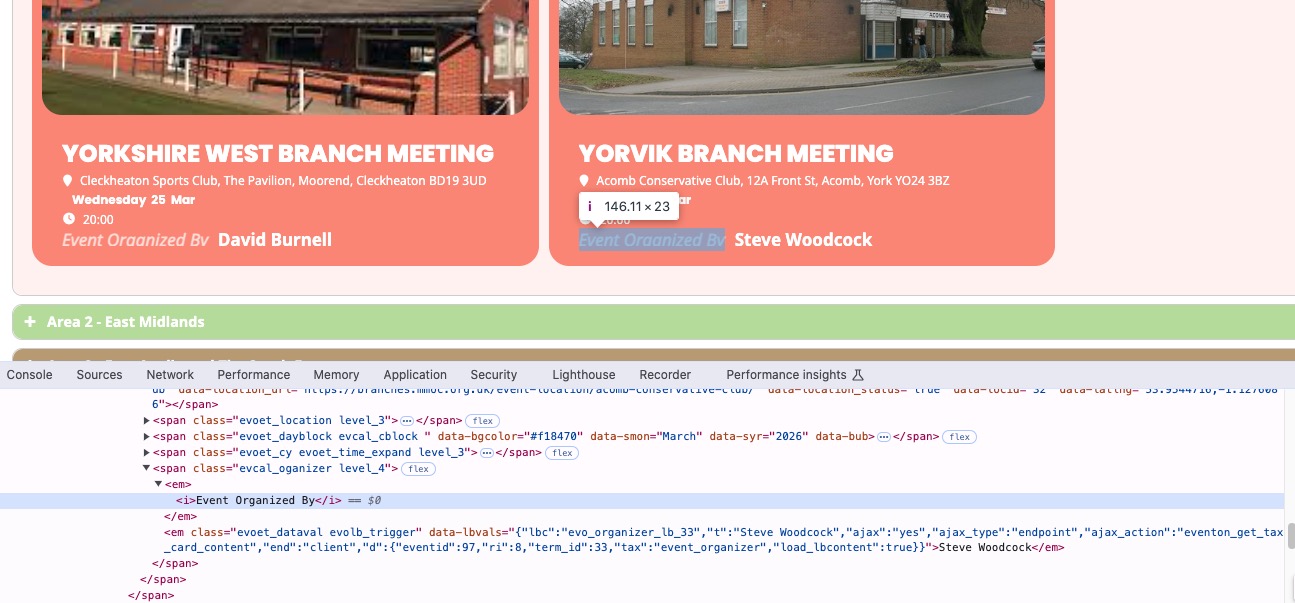
I cannot find it as well:
https://dev2.myeventon.com/wp-admin/admin.php?page=eventon&tab=evcal_2
Reply to: tickets(405298)
Hello,
Thank you for your messages!
I am going to escalate this ticket to development to help in here. Please allow us some time to address this, and we truly appreciate your patience. Thank you for being a valued EventON customer!
Additionally, if your site has any IP blocking or security restrictions in place, kindly disable them temporarily to facilitate our support process.
…and I want to increase the font size and weight for that element
Please add this CSS code to EventON > Styles (If you don’t see any change, EventON > Scripts & Styling > turn off Write dynamic styles to header > save settings > turn on Write dynamic styles to header).
You can also add this code to wp-admin > Appearance > Customize > Additional CSS.
.eventon_events_list .eventon_list_event .evoet_cx .level_4 em, .evo_pop_body .evoet_cx .level_4 em { font-size: 17px; font-weight: bold; }
Reply to: tickets(405299)
Hello,
This is not related to only EventON, but overall to WordPress itself, I believe.
So please try checking this or similar questions:
https://stackoverflow.com/questions/31745482/change-default-order-of-pages-in-wordpress-admin-backend
Reply to: tickets(405285)
I created this event without saving it and added a new custom repeat:
https://defiancelibrary.org/wp-admin/post.php?post=16357&action=edit
No issues after saving it.
Two repeats: initial date and also my custom repeat.
However, if saving it first works for you, then please save events before adding custom repeats.
Reply to: tickets(405285)
Okay I checked and what I think I determined is, it works if you save/publish the event first with just one date/time.
If you go into an already saved/published event and add custom repeats, it seems to work, but if you create an all-new event and attempt to add custom repeats *before* saving, it does not work. If that’s the case it’s a simple workaround to just save the initial event time then add the custom repeats, but there does still seem to be an issue on my end. Thank you for looking into this.