We are glad your issue is resolved, if you have any further questions or concerns please create a new ticket. If you have a moment, we would greatly appreciate if you could kindly leave us a review at Codecanyon. By going to your account > Downloads. We are very grateful for your kind review!
Archives: Replies
Replies for tickets on suppota
Reply to: tickets(352922)
We just need to find out what’s causing this? Can we go and disable plugins and switch the theme on your server?
Reply to: tickets(353885)
Ashan,
In Troubleshooting Mode the same as on customer’s screenshot:
https://omd.visitmaramures.ro/wp-content/uploads/2024/05/Ticket_order_558-2.pdf
Reply to: tickets(353885)
Thank you for your messages, I am going to assign this ticket to Ashan and he will be able to take it from here and find you a solution. Please allow some time for him to get back to you, we greatly appreciate your patience and thank you for being a eventon customer! Also please disable any IP blocking on your site if there are any.
Reply to: tickets(351647)
My ip if different now: 95.16.48.4
Could you add it as well?
As for the issue with the “Loading…” text, could you go to EventON > EventCard > try Feature image display style: Fit entire image resized to min height or Fit entire image, resized box height?
Reply to: tickets(353838)
Hello,
Please check your other ticket. I replied there.
Reply to: tickets(350419)
The debug file doesn’t have anything related to the issue, I am afraid.
I added load_fullmonth=”yes” to the shortcode, so it should show all available events when advanced to the next month:
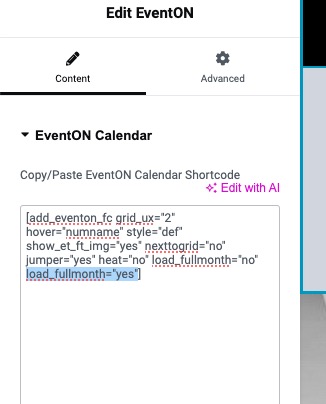
Could you check?
About the cache. Could you try this plugin:
https://wordpress.org/plugins/wp-fastest-cache/
Reply to: tickets(353714)
I have rectified the issue, thanks for identifying the issue.
I’ll close the ticket.
Helen
Reply to: tickets(353630)
We are sorry for the delay.
Please take a look at these tickets:
https://tickets.arsmagna.live/wp-admin/edit.php?post_type=evo-tix
They should be correct.
I created this page with default WooCommerce shortcode:
https://tickets.arsmagna.live/wp-admin/post.php?post=353&action=edit
Please go to and select it as “Página de pago”:
https://tickets.arsmagna.live/wp-admin/admin.php?page=wc-settings&tab=advanced
Then try making a purchase with and without Autocomplete plugin.
You should receive the correct ticket after you complete your order.
Reply to: tickets(353830)
see video