i found it thanks a lot !
Archives: Replies
Replies for tickets on suppota
Reply to: tickets(353293)
It works 🙂 Thanks
Could you have a look please about the share icons ? i can’t see them even activated
Reply to: tickets(353306)
Reply to: tickets(353290)
Below is what im trying to add to one date for an event — Its one artist that wants to track the event page for his concert… Im just doing my due diligence to see if that is possible, since im probably not the first one to wonder this …
Basicly it is adding code that doesnt display on the event card… but is read by the browser
If its not possible, then I can atleast say I tried… LOL
Find the <head></head> tags in your webpage code or locate the header template in your CMS or web platform. Paste the code at the bottom of the header section, just above the closing head tag.
FULL CODE IS BELOW FOR ALL OTHER SITES(copy/paste highlighted):
<!– Facebook Pixel Code –>
<script>
!function(f,b,e,v,n,t,s)
{if(f.fbq)return;n=f.fbq=function(){n.callMethod?
n.callMethod.apply(n,arguments):n.queue.push(arguments)};
if(!f._fbq)f._fbq=n;n.push=n;n.loaded=!0;n.version=’2.0′;
n.queue=[];t=b.createElement(e);t.async=!0;
t.src=v;s=b.getElementsByTagName(e)[0];
s.parentNode.insertBefore(t,s)}(window, document,’script’,
‘https://connect.facebook.net/en_US/fbevents.js’);
fbq(‘init’, ‘174**********1311’);
fbq(‘track’, ‘PageView’);
</script>
<noscript><img height=”1″ width=”1″ style=”display:none”
src=”https://www.facebook.com/tr?id=1*************11&ev=PageView&noscript=1″
/></noscript>
<!– End Facebook Pixel Code –>
Reply to: tickets(352437)
thank you for your interest dear Ashan…. No problem right now…
There are two problems we expect to solve one day, my friend. We hope :)))
1) The QR code image (visible or invisible) is completely outside the media folder.
2) To be able to adjust by selecting multiple seats at the same time when reservation is made.
Reply to: tickets(352653)
Also for future, I would highly recommend your create a clone version of your website, so these new updates you can run on there first to make sure everything is working properly before pushing into live site…
Reply to: tickets(353246)
I did not manage to solve the problem, I created for you an account, if you can take a look.
The ticket was added for the last event added.
URL: https://visitmaramures.ro/dashboard
username: eventon
password: )kk%Jn62nWcBv0v
Thank you!
Reply to: tickets(352653)
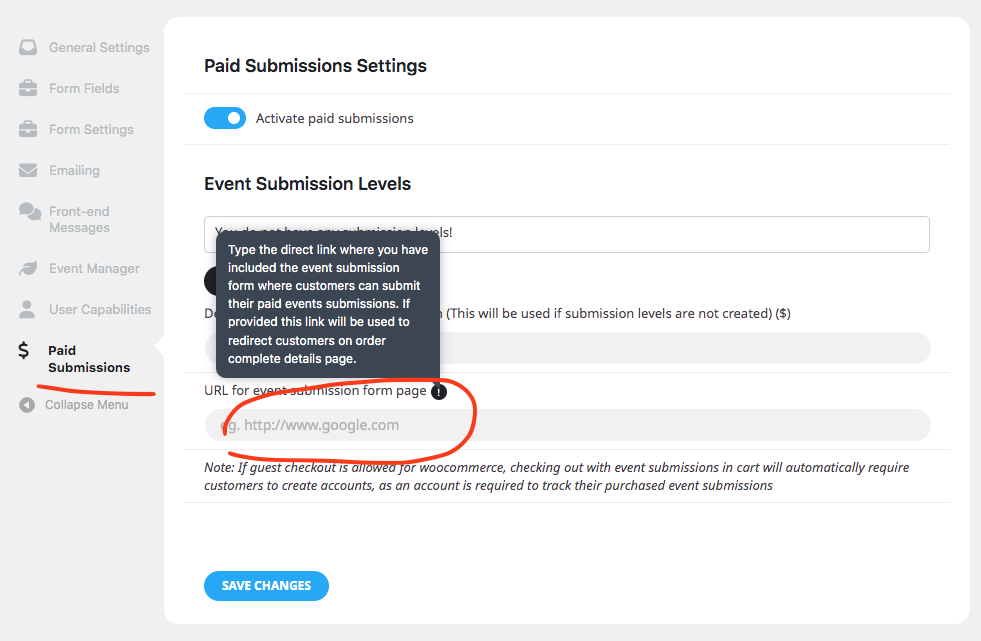
As for redirecting customer back to event submission form, should work once you added the proper event submission page link into settings.
However, as with your other tickets the issue is tickets purchased via eventON are not recording the necessary custom data into the order to identify those orders are ticket orders. Which will need some serious investigations. Which will need some time from our end.
Reply to: tickets(353008)
ops, it works.
i’ve removed EventON customizated files
Reply to: tickets(353008)
i have duplicated the website into
https://www.civilweek-vivere.it/CW/
theme: twenty-two
plugins: only EventOn and EventOn Map
map not loaded
https://www.civilweek-vivere.it/CW/mappa-eventi-civil-week-2024/
https://civilweek-vivere.it/CW/wp-login.php
admin
&u2OvTNIQSaOXRpS