Are you having the same issue with this event (it’s hidden from the calendar):
https://wearewomenconnect.com/wp-admin/post.php?post=88414&action=edit
Seems to be working:
Replies for tickets on suppota
Are you having the same issue with this event (it’s hidden from the calendar):
https://wearewomenconnect.com/wp-admin/post.php?post=88414&action=edit
Seems to be working:
Ashan,
On dev2:
https://dev2.myeventon.com/test-526/
Hello,
Thank you for your messages, I am going to assign this ticket to Ashan and he will be able to take it from here and find you a solution. Please allow some time for him to get back to you, we greatly appreciate your patience and thank you for being a eventon customer! Also please disable any IP blocking on your site if there are any.
Basic Event Lists only has “Event Order”, while Event Lists: Ext has “Month Order for List” that orders events for the whole list: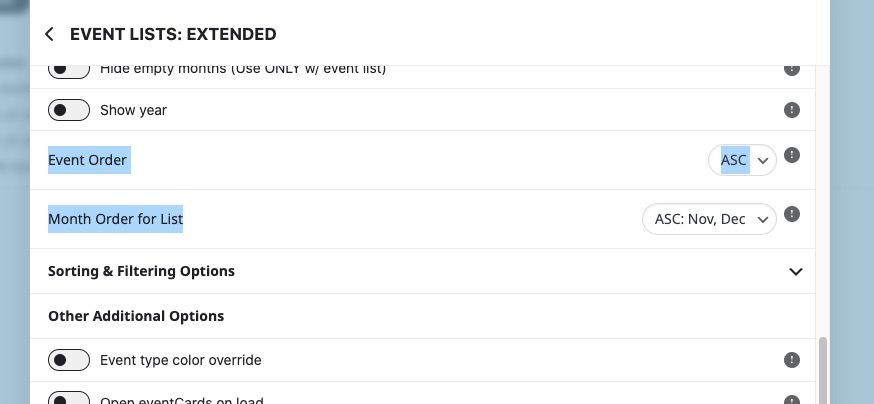
Please try on https://dev.myeventon.com/wp-admin/
In addition, the dates don’t appear for any past events.
Could you elaborate? Are you referring to Month Headers?
Also, not all of our previous events are showing up on that page.
Try changing month_incre and number_of_months.
Also, there is coding when I click on an event
Please go to EventON > Advanced > try a different Select calendar event content filter type.
Yes, this is one of the plugins I attempted to use but had no such luck as stated above.
Hello,
Unfortunately, since this is related to your third-party plugin, so we cannot do much from our side. Please go to EventON > Advanced > try switching Select calendar event content filter type.
Thank you for your messages, I am going to assign this ticket to Ashan and he will be able to take it from here and find you a solution. Please allow some time for him to get back to you, we greatly appreciate your patience and thank you for being a eventon customer! Also please disable any IP blocking on your site if there are any.
If you go to the theme folder and rename this file wpcontent/themes/zeit/eventon/templates/email/tickets/ticket_confirmation_email.php, does it work. Could you try?
Hello,
Instead of Main Calendar (add_eventon), please use Event Lists shortcode (add_eventon_list).