HELLO?
i’m working my way through the previous errors. they are fixed now. BUT… Event on is NOT sending ticket information to the client after purchase. The order is stuck in “processing” mode and must “manually” be marked as “complete”. to send the client their ticket information.
I really need help fixing this.
EventOn Tickets is the only issue right now.
Thank you for your assistance.
becky
Yes thank you very much. What did you do? Because I have another website with this problem. So i can do this myself.
Is this okay for you? or Ashan wants to write to me what he decided in case in the future I use the annual calendar.
Thank you
Guido
OK perfect it worked!
Thanks for the fast support
Ticket Closed
Guido
I have granted access to booking addon. Our system log says customer has removed booking addon on Nov 18, 2023. — you should have access to it now.
We have gone ahead and refuned you for the addon and cancelled your subscription.
here is the link to download the corrected invoice.
https://helpdeskx.s3.amazonaws.com/wp-content/uploads/2024/03/19102900/invoice-39706.pdf
Hi
Did it and its not working, Please advice
here is the code:
<h5>לוח ההופעות שלי עומד לרשותכם להזמנת כרטיסים ומקומות און ליין.</h5>
<script src=”https://ajax.googleapis.com/ajax/libs/jquery/3.2.1/jquery.min.js”></script>
<script type=’text/javascript’ src=’https://standupist.co.il/wp-content/plugins/eventon-api/eventon.js?ver=1.0.6′></script>
<script type=”text/css”>.ajde_evcal_calendar.evoapi #evcal_list .eventon_list_event .hasFtIMG .evcal_desc { padding-left: 0 !important; padding-right: 170px; } .ajde_evcal_calendar.evoapi .eventon_events_list .eventon_list_event .hasFtIMG .evcal_cblock { left: 0; right: 0; } .ajde_evcal_calendar.evoapi .eventon_events_list .eventon_list_event span.evoet_time_expand.level_3 { } .ajde_evcal_calendar.evoapi .eventon_events_list .eventon_list_event .ev_ftImg { margin-right: 10px; } .ajde_evcal_calendar.evoapi .eventon_events_list .eventon_list_event .hasFtIMG .evcal_cblock { left: 0; right: 90px; } .ajde_evcal_calendar.evoapi .eventon_events_list .evcal_time.evo_tz_time { padding-right: 165px; } .ajde_evcal_calendar.evoapi .eventon_events_list .eventon_list_event .evcal_cblock span { float: right; }</script>
<script type=’text/javascript’>
jQuery(document).ready(function($){
$(‘#eventoncontent’).evoCalendar({
api: ‘https://standupist.co.il/wp-json/eventon/calendar?event_type_5=1241&show_et_ft_img=yes’,
calendar_url: ‘https://standupist.co.il’,
new_window: true,
loading_text: ‘טוען הופעות…’,
});
});
</script>
<div id=”eventoncontent” style=”height: 100%; width: 100%;”></div>
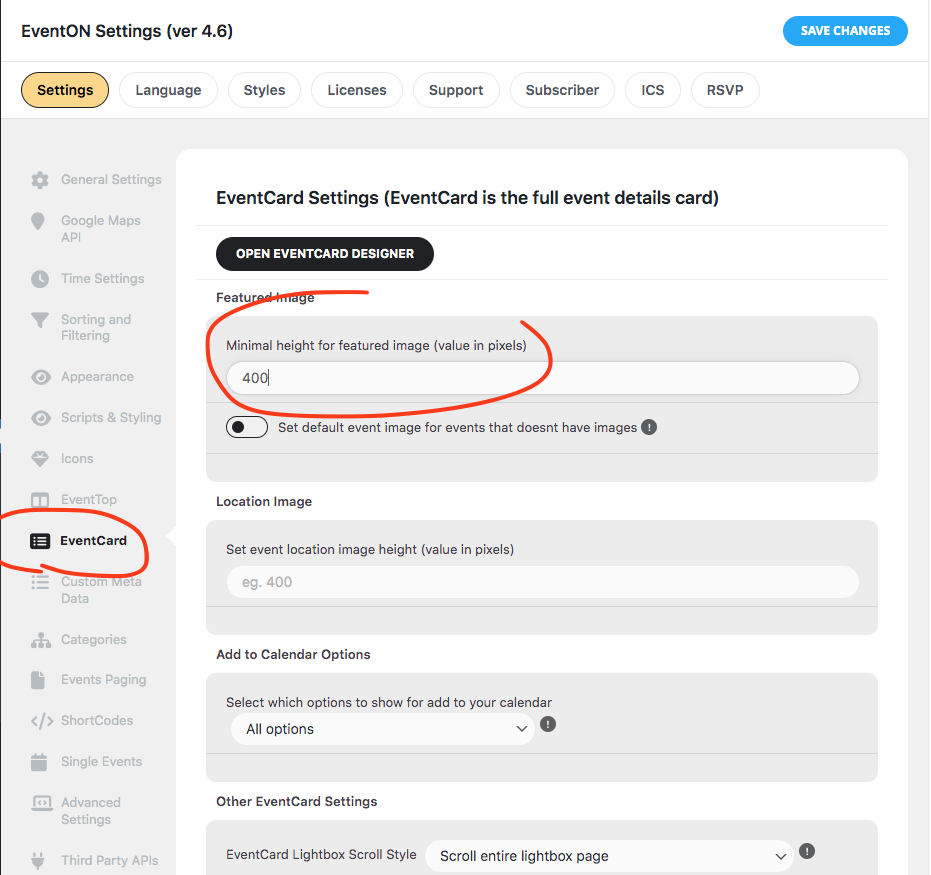
With 4.6 you can set the featured image height for eventcard. And featured image is clickable now, which will open featured image as a fullsize image in lightbox.
https://eventos.flad.pt/wp-admin/
user: eventon
pass: eventon_support24