We are going to include the code in the next version, so all files will be rewritten.
Please add this CSS code to EventON > Styles (If you don’t see any change, EventON > Scripts & Styling > turn off Write dynamic styles to header > save settings > turn on Write dynamic styles to header):
span.evo_btn_arr.evolb_trigger { display: none !important; }
Hello,
I cannot recreate this issue on our test server. Can we take a look at wp-admin?
Please send us wp-admin access to your site as a private message for us to further assist your situation.
This ticket is private.
Your Checkout page is manually created. It Troubleshooting Mode:
While it should have [woocommerce_checkout] shortcode, so EventON can work correctly. Could you tell us did you create the page?
So I believe that the checkout page is what’s causing the issue.
Hello,
Here’s the issue:
Access to XMLHttpRequest at ‘https://aloha-more.com/guripic/eventon/calendar’ from origin ‘https://live.aloha-more.com’ has been blocked by CORS policy: No ‘Access-Control-Allow-Origin’ header is present on the requested resource.
Can we access wp-admin of https://aloha-more.com/ as well?
Hello,
Are you having the same issue with 4.6 version? Could you check?
Hello,
Please add hide_cancels=”yes” to your shortcodes to hide canceled events.
Hello,
Please add this CSS code to EventON > Styles (If you don’t see any change, EventON > Scripts & Styling > turn off Write dynamic styles to header > save settings > turn on Write dynamic styles to header):
span.evo_btn_arr.evolb_trigger { display: none !important; }
We are glad your issue is resolved, if you have any further questions or concerns please create a new ticket.
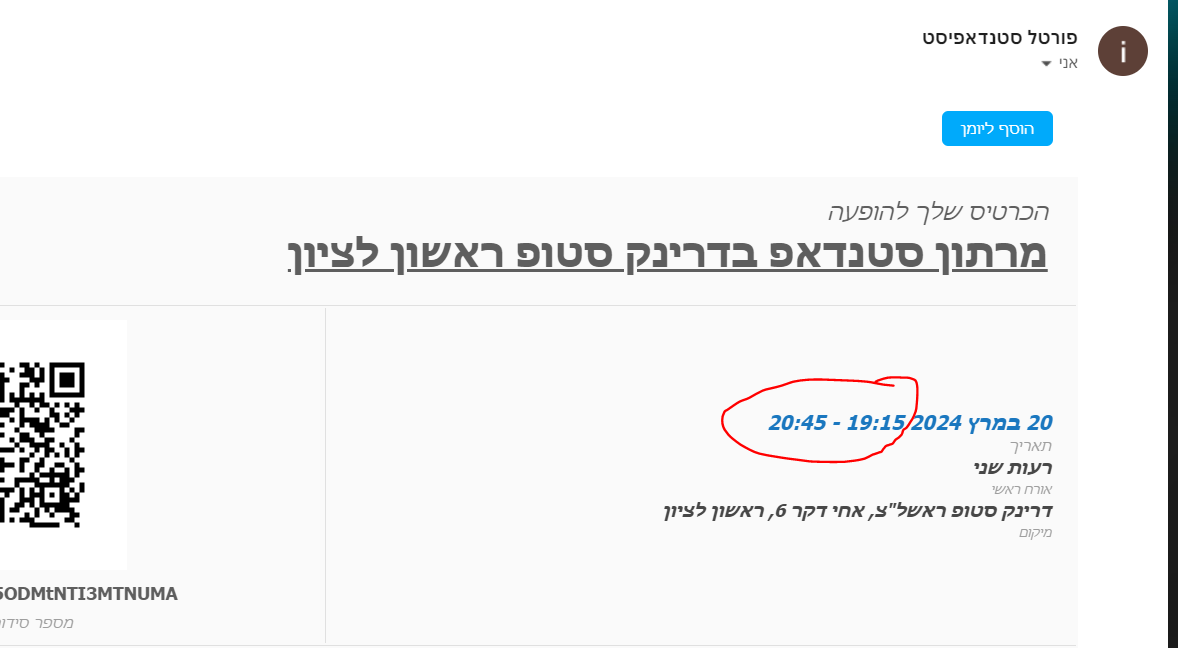
Hello
Attached the issue with the time on the ticket
the correct time should be “21:15-22:45”
From the wocommerce the time looks OK in the order, The problam is on the ticket as sent through EVENTON
Please advice ?
Thank you
Nitzan
Hi
Yes, removing cal_init_nonajax=”yes” has fixed the problem