Hello,
This ticket is private.
I can see variations, but not options, because the order doesn’t contain any options:
https://rmt2024.sandboxpro.de/wp-admin/post.php?post=206153&action=edit
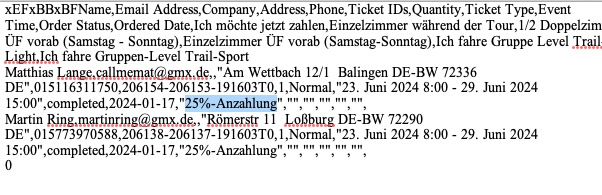
Are you referring to variations or options?
Replies for tickets on suppota
Hello,
This ticket is private.
I can see variations, but not options, because the order doesn’t contain any options:
https://rmt2024.sandboxpro.de/wp-admin/post.php?post=206153&action=edit
Are you referring to variations or options?
I think because of cache.
Are you having any issues with this calendar:
https://dev2.myeventon.com/test-400/
Here’s the error:
[07-Mar-2024 21:29:01 UTC] PHP Fatal error: Allowed memory size of 134217728 bytes exhausted (tried to allocate 32768 bytes) in /home/clients/9612f57e92ad64af20cb93eb16aa60dd/web/wp-content/plugins/wpforms/vendor/woocommerce/action-scheduler/classes/abstracts/ActionScheduler_Lock.php on line 1
Please follow this guide:
https://docs.myeventon.com/documentations/increasing-wordpress-memory-limit/
Could you upgrade your version of PHP to 8+?
Hello,
Please update Tickets add-on to 2.2.7.
To update eventon addons: You can download latest eventon addons from myeventon > my account. Then you can go to your website, deactivate old addon and install new one and activate then delete the old addon. This link will further explain the process. Also you can follow us on twitter to get real-time announcements on updates!
Hello,
Could you go to EventON > EventTop > make sure that Tags field is added?
Please send us wp-admin access to your site as a private message for us to further assist your situation.
Thank you – this seemed to help. I appreciate it.
One more thing please – can you help me to know how to change the text to white from black in the date blocks? Thank you
Hello,
Please update Ticket add-on to 2.2.7.
To update eventon addons: You can download latest eventon addons from myeventon > my account. Then you can go to your website, deactivate old addon and install new one and activate then delete the old addon. This link will further explain the process. Also you can follow us on twitter to get real-time announcements on updates!
Hello,
Please follow this guide:
https://docs.myeventon.com/patch-fixes/organizer-and-social-icons-not-showing-on-eventcar/
Hi Melissa,
Please apply the patch fix in the link below to try and display social media icons on the event card.
https://docs.myeventon.com/patch-fixes/organizer-and-social-icons-not-showing-on-eventcar/
Let us know if this works for you.