Reply to: tickets(342806)

I spoke with GoDaddy. They believe it is because it is a “managed” WordPress account and that cache cannot be turned off. To resolve, the tech said it would be best for me to move to a linux c-panel account, but he could not guarantee that GoDaddy would allow me to swap to another account. Here is a brief rundown of the conversations:


You: 1. plugin works and is up-to-date when signed into the WordPress account. 

2. when the “event” changes, it stalls (unless signed into the WordPress account). 3. If plugin is deactivated and reactivated, it works for all viewers, until the event changes, then it stalls again. 

4. flushing cache has no change on it being stalled. 

5. CDN has already been turned off having no impact.
6. plugin is correct when signed into the WordPress account. What are the differences in being logged into the account and not to show two different perspectives?

Danilo Ž: Thank you for information. Allow me a few more minutes to consult with tech leads.

Danilo Ž: Managed WordPress plans can’t have cache disabled. Here’s what I can suggest: considering your situation, you might want to think about switching to a cPanel (Linux hosting) plan. While I can’t offer a refund for your Managed WordPress plan due to our refund policy, our company sometimes makes exceptions, especially if you explain that you intend to use the refunded money to switch to cPanel. They might be flexible in working with you on this. Just keep in mind that migrating your site to the new plan will be needed to be done from your side.

You: okay. let me think on this. we launched the site right before our big event coming up in the first week of April. I’m not sure I have the bandwidth (time) to migrate right now.

You: so you believe it is the caching of the managed WordPress account?

Danilo Ž: I am almost certain that is a cache issue. Managed WordPress plans are for more static websites, regular presentation sites.

You: understood. let me sleep on this to see if. can get this done next week.

Danilo Ž: Here is our complete article on how to submit a refund request for a product that is out of the refund policy: https://uk.godaddy.com/help/request-a-refund-exception-42203

Danilo Ž: Please make sure that in comment of request, you write why you want the change and that you plan to remain GoDaddy customer, just need cPanel plan for your site to work properly. Like I said I can not promise you anything from my side. This was all friendly advice.
Reply to: tickets(343427)

It could produce some other compatibility issues, which can’t be confirmed until tested. The EventOn app was working fine until about two weeks ago, when the app was auto-updated via ManageWP. Can you please provide an earlier version of the plugin that I can upload, which you know will work on the current site, as it was a couple weeks ago?

This current site in question will not be receiving any updates until it is replaced with a new site within a couple months. So, please note that we only need the EventOn solution to work properly on the current site instance for a couple months. After that all plugins will be switched over to a new site on PHP 8.2.  Thank you!

Reply to: tickets(342093)

Hi Artem. In the meantime, I have had to restore the 4.5.4 version of EventOn because that is the last version that displayed our events correctly. So now my EventOn and 3 EventOn addons are out-of=date. We are entering our busy meeting and event season and I can’t have my calendar confusing people with incorrect starting times and information. If I do try to update EventOn and the add=ons again, how long will it take your team to look at my site and fix the errors? Does the EventON > Time Settings > Timezone get reset when i update the plugin.

Please advise.

Reply to: tickets(342910)

Here’s the issue:

[07-Mar-2024 22:03:49 UTC] PHP Fatal error:  Uncaught TypeError: count(): Argument #1 ($value) must be of type Countable|array, bool given in /home2/chefjul3/public_html/wp-content/themes/foodhub-child/functions.php:30

Stack trace:

#0 /home2/chefjul3/public_html/wp-includes/class-wp-hook.php(324): auto_complete_virtual_orders(‘processing’, 332687, Object(AutomatticWooCommerceAdminOverridesOrder))

#1 /home2/chefjul3/public_html/wp-includes/plugin.php(205): WP_Hook->apply_filters(‘processing’, Array)

#2 /home2/chefjul3/public_html/wp-content/plugins/woocommerce/includes/class-wc-order.php(150): apply_filters(‘woocommerce_pay…’, ‘processing’, 332687, Object(AutomatticWooCommerceAdminOverridesOrder))

#3 /home2/chefjul3/public_html/wp-content/plugins/woocommerce/includes/class-wc-checkout.php(1084): WC_Order->payment_complete()

#4 /home2/chefjul3/public_html/wp-content/plugins/woocommerce/includes/class-wc-checkout.php(1289): WC_Checkout->process_order_without_payment(332687)

#5 /home2/chefjul3/public_html/wp-content/plugins/woocommerce/includes/class-wc-ajax.php(508): WC_Checkout->process_checkout()

#6 /home2/chefjul3/public_html/wp-includes/class-wp-hook.php(324): WC_AJAX::checkout(”)

#7 /home2/chefjul3/public_html/wp-includes/class-wp-hook.php(348): WP_Hook->apply_filters(”, Array)

#8 /home2/chefjul3/public_html/wp-includes/plugin.php(517): WP_Hook->do_action(Array)

#9 /home2/chefjul3/public_html/wp-content/plugins/woocommerce/includes/class-wc-ajax.php(96): do_action(‘wc_ajax_checkou…’)

#10 /home2/chefjul3/public_html/wp-includes/class-wp-hook.php(324): WC_AJAX::do_wc_ajax(”)

#11 /home2/chefjul3/public_html/wp-includes/class-wp-hook.php(348): WP_Hook->apply_filters(NULL, Array)

#12 /home2/chefjul3/public_html/wp-includes/plugin.php(517): WP_Hook->do_action(Array)

#13 /home2/chefjul3/public_html/wp-includes/template-loader.php(13): do_action(‘template_redire…’)

#14 /home2/chefjul3/public_html/wp-blog-header.php(19): require_once(‘/home2/chefjul3…’)

#15 /home2/chefjul3/public_html/index.php(17): require(‘/home2/chefjul3…’)

#16 {main}

  thrown in /home2/chefjul3/public_html/wp-content/themes/foodhub-child/functions.php on line 30

It seems that this function contains an error:

function auto_complete_virtual_orders( $payment_complete_status, $order_id, $order ) {

Could you try checking the line 30 of functions.php?

Reply to: tickets(343344)

Hello,

This ticket is private.

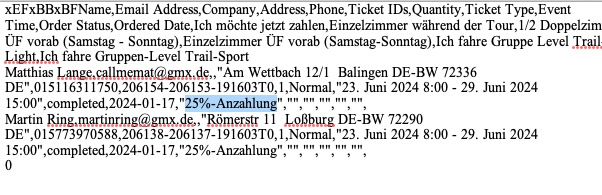
I can see variations, but not options, because the order doesn’t contain any options:

https://rmt2024.sandboxpro.de/wp-admin/post.php?post=206153&action=edit

Are you referring to variations or options?

Reply to: tickets(341433)

I think because of cache.

Are you having any issues with this calendar:

https://dev2.myeventon.com/test-400/

Reply to: tickets(343301)

Here’s the error:

[07-Mar-2024 21:29:01 UTC] PHP Fatal error:  Allowed memory size of 134217728 bytes exhausted (tried to allocate 32768 bytes) in /home/clients/9612f57e92ad64af20cb93eb16aa60dd/web/wp-content/plugins/wpforms/vendor/woocommerce/action-scheduler/classes/abstracts/ActionScheduler_Lock.php on line 1

Please follow this guide:

https://docs.myeventon.com/documentations/increasing-wordpress-memory-limit/