Dear Dave,
Thank you so much!!! Now it‘s clear for me.
Best regards
Dennis
Replies for tickets on suppota
Dear Dave,
Thank you so much!!! Now it‘s clear for me.
Best regards
Dennis
possibly although it shares some css with the main eventon
and it depends on your theme/pagebuilder- if you can add css to an element of a page then you might be able to do it- and have the normal calendar somewhere else on the page.
I did a quick little test on the dev site
https://vimeo.com/918632825
so perhaps dupliate the magic you want to try this on
then send us the page in a reply and possibly wp-admin access and I can go in and “have a play” with the css to get it the way you want to
just be specific on exactly what kind of look you want- from font size, to color to background color- if theres an element you don’t want in there like the view my time etc
just reply by also using my name so the other team members can assign this ticket to me to tweak the css
I don’t want to guarantee it- but I will have a serious go at altering it
what is the order ID for the purchase
so lisbon daylight saving ends on the 31st march its possible thats the reason – eventons not taking that into account-I’ll alert Ashan to this possibility
from what I Understand- the /events/ page- elementor considers that an archive page and when editing the page I get this error
https://vimeo.com/918626361
I don’t want to say upgrade elementor and then boom have it not work- but I would ask elementor first if you upgrade can you control the events slug page to apear as you want it before spending any money and see if thats what they mean by the edit archive theme template
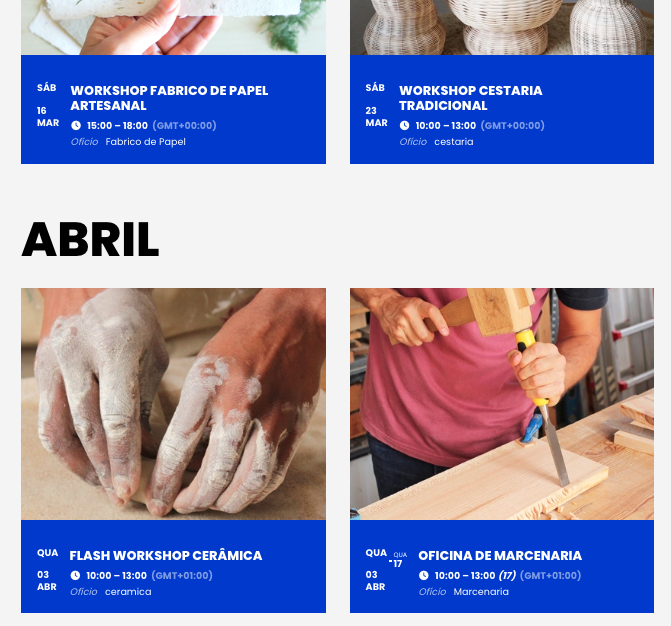
Hello Artem,
The update fixed the wrong hour sent by e-mail. But on the calendar, its still possible to see different GMT, before and after March/April:
March +00:00 and April +01:00
I’ve sent an image. And can confirm that the correct GMT (+00) is selected on every event.
How can i fix it?
Thank you,
Hello Jeff,
We are glad your issue is resolved, if you have any further questions or concerns please feel free to create a new ticket.
Hello,
thank you for your response.
I added your CSS code to EventON > Styles.
It works, but only when I switch the configuration: EventON > Advanced > Select calendar event content filter type > “EventON Content Filter” (instead of “Default WordPress Filter”).
In this case (“EventON Content Filter”) the text is black, but the list elements got to much spacing -> see my old ticket: https://helpdesk.ashanjay.com/ticket/reducing-space-between-list-elements-in-event-details/
I’m looking forward to a further or alternative solution, code, etc.
Thank you!
Eddy
T
But, in the list, they still display as “all day”…
I found it!