Hi Amy,
Please add the following custom CSS code to your site to fix the issue.
.evo_lightboxes .color.eventon_list_event .evcal_cblock, .evo_lightboxes .color.eventon_list_event .evoet_cx span {
color: black;
}
To add the CSS code go to Appearance > Customize > Additional CSS.
Hi Naoko,
Please apply the patch fix in the link below to try and display organizer information on the event card.
https://docs.myeventon.com/patch-fixes/organizer-and-social-icons-not-showing-on-eventcar/
Let us know if this works for you.
The issue only occurs after you purchased a ticket which I did under your account, thus you’ll now see the error message.
Hi
Thanks for the reply and the video. I did have a play around with CSS but its quite tricky to get it looking how I want. I did hope you would have some sort of clean style that was applied automatically.
I will see what I can do with some more fiddling.
Thanks
Andy
Hi.
I’m waiting for your answer.
Could you please tell me something?
Thanks
Hi Sarah,
Thank you for your message, I am going to assign this ticket to Ashan and he will be able to take it from here. Please allow some time for him to get back to you, we greatly appreciate your patience and thank you for being an Eventon customer!
Hello,
please ignore my previous comment.
I changed the settings: EventON > Advanced > Select calendar event content filter type > “no filter”.
This solves all problems:
- no spacing
- no content while using filter
- no green text
Thank you!
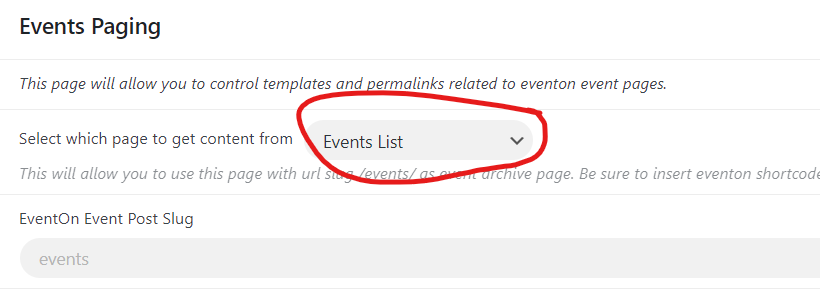
This is very frustrating how EventON highjacks the /events slug. You’re forced into this, you have no choice. When you install EventON, it creates the Events page, which Elementor then apparently interpretes as an archive. At one point in time the Events page had some kind of attribute just like our pages have the attribute Elemetor (I don’t remember but something like maybe events-page?) but disappeared at some point, maybe when I upgraded from the EventON free version to the paid version?
I’m not sure exactly what your back end does, but the way I understand it, if you fill in the section under Events Paging, the /events slug should show the content of the page it’s directed too. Or am I missing something? We shouldn’t have to upgrade Elementor to the paid version to solve this.
In the screenshot below, the “Select which page to get content from” is Events List, which is the events-list page.
So you can never use /events again unless you do a manual redirect to another page? We might have to do something in the .htaccess file, but EventON should really offer an option to turn off this behaviour. I’m not the first one to struggle with this.
I tried to change with the test page you created, and while it does display the page, it doesn’t show it with the right elementor formatting. So the behaviour is not just with events-page, it’s with every page that is used in this setting. Maybe I just don’t understand what’s supposed to happen?
Thanks for the help so far.
Dear Dave,
Thank you so much!!! Now it‘s clear for me.
Best regards
Dennis
possibly although it shares some css with the main eventon
and it depends on your theme/pagebuilder- if you can add css to an element of a page then you might be able to do it- and have the normal calendar somewhere else on the page.
I did a quick little test on the dev site
https://vimeo.com/918632825
so perhaps dupliate the magic you want to try this on
then send us the page in a reply and possibly wp-admin access and I can go in and “have a play” with the css to get it the way you want to
just be specific on exactly what kind of look you want- from font size, to color to background color- if theres an element you don’t want in there like the view my time etc
just reply by also using my name so the other team members can assign this ticket to me to tweak the css
I don’t want to guarantee it- but I will have a serious go at altering it