Could you update FullCal add-on to the latest version?
To update eventon addons: You can download latest eventon addons from myeventon > my account. Then you can go to your website, deactivate old addon and install new one and activate then delete the old addon. This link will further explain the process. Also you can follow us on twitter to get real-time announcements on updates!
Hello,
Could you go to EventON > try enabling Remove schema data from calendar and Remove JSON-LD data for events > Everywhere except single event pages?
Could you unzip the archive and send us a screenshot of it’s contents?
I think you downloaded the full archive with the documentation included.
Yes, the latest version fixes the issue. But I am not sure why on your website it still has it.
Please try this code:
.evocard_box { background-color: rgba(0, 0, 0, .5); }
Is it at least possible to chose the transparency of the card or background. So do something?
I’m sorry to bother again with this. I’ve seen it might be some problem with CSS (that translatepress doesn’t translate), but don’t know if you can see anything else so I can make it work.
I believe the issue has fixed itself with the most recent update of the plugin. Please confirm.
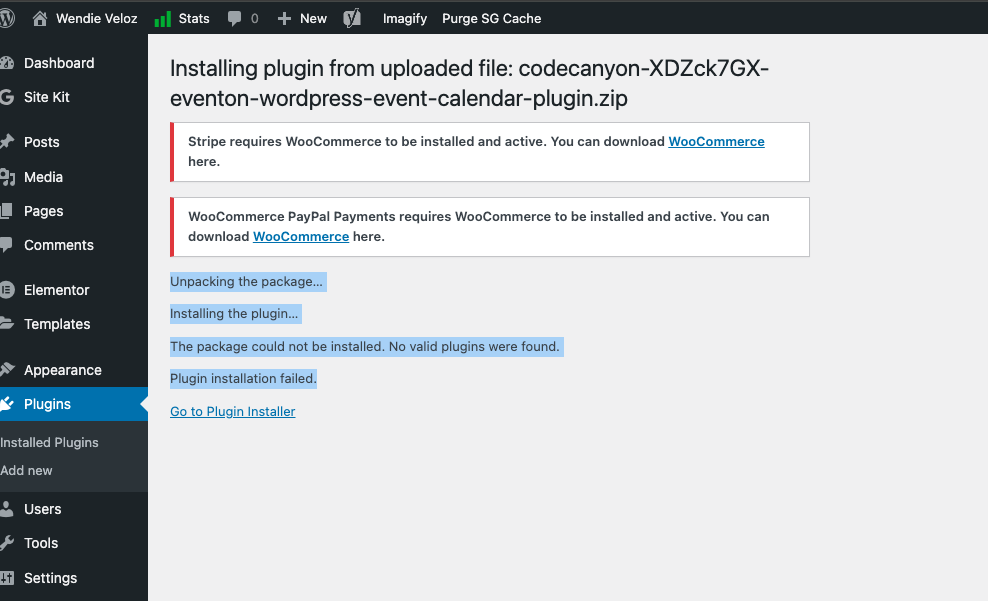
Even when I trun off the plugins that are conflicting this is the error I’m getting from the file that I downloaded:
Unpacking the package…
Installing the plugin…
The package could not be installed. No valid plugins were found.
Plugin installation failed.
The plugin isn’t letting me install it, even when the Kadence plugins are not installed.
I’m on 6.4.3
| PHP version |
7.4.33 (Supports 64bit values) |
This seems like it should be compatible with your plugin but the file that that I downloaded is not letting me install it.