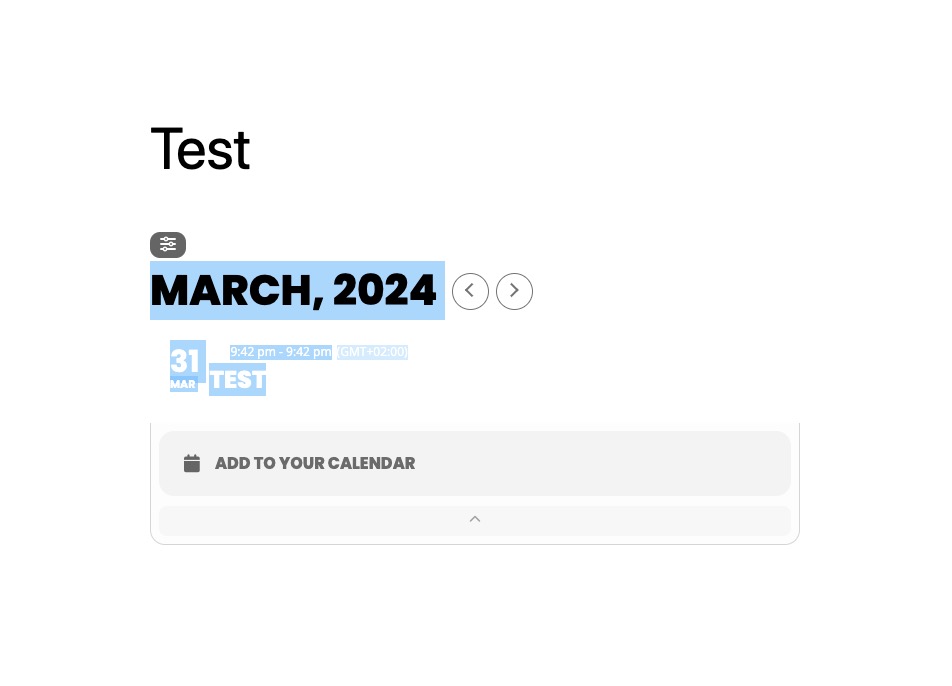
It seems that Polylang doesn’t seem to serve events to EventON, I think.
Because EventON works correctly in Troubleshooting Mode:
https://tehnopolis.me/wp-admin/site-health.php?tab=troubleshoot
The page
https://tehnopolis.me/en/test-3/

Thank you for your messages, I am going to assign this ticket to Ashan and he will be able to take it from here and find you a solution. Please allow some time for him to get back to you, we greatly appreciate your patience and thank you for being a eventon customer! Also please disable any IP blocking on your site if there are any.
Ah sorry. Unfortunately, there is no way of hiding Sold Out events if they are still not past.
Hello,
Could you send us a screenshot of what it looks like on whatsapp on your side?
You need to replace the file with the one you can download from the link from the guide.
Thank you for your great suggestion, at the moment it is not supported. However please create a new ticket and select Feature Request as category so others can vote on your idea and get it moved into development faster.
We are glad your issue is resolved, if you have any further questions or concerns please create a new ticket. If you have a moment, we would greatly appreciate if you could kindly leave us a review at myeventon/my-account!. Cheers!
Hello,
When I go to https://inishowen.ie/wp-admin/admin.php?page=wc-orders&paged=1 and check your orders none of them are Ticket Order.
Orders from our test server:
Could you please try the instructions mentioned in this documentation to make sure your issue is indeed coming from eventon.
I am sorry, the access information you have provided did not work for us:
ERROR: Your username or password was incorrect
Please check them and post the correct login information as a private message, thank you!
Please check now. It should be in 24H.
I added the code because all your events are All Day, so the change only affects what you need. And since it was made through the settings, it can be easily enabled/disabled.
As for RSVP email, unfortunately, there is no way of changing the time there. But since all your events are All Day and you need to show Time, isn’t it easier to simply set all events to “Event Time Extended Type: None”. Please let me know.
I think that the original issue is because of PHP version on the server. Could you upgrade to 8+ and then update the plugin?