Perfect, thank you.
Archives: Replies
Replies for tickets on suppota
Reply to: tickets(342227)
Ashan,
Please check:
https://kornerstg.wpengine.com/wp-admin/post.php?post=7424&action=edit
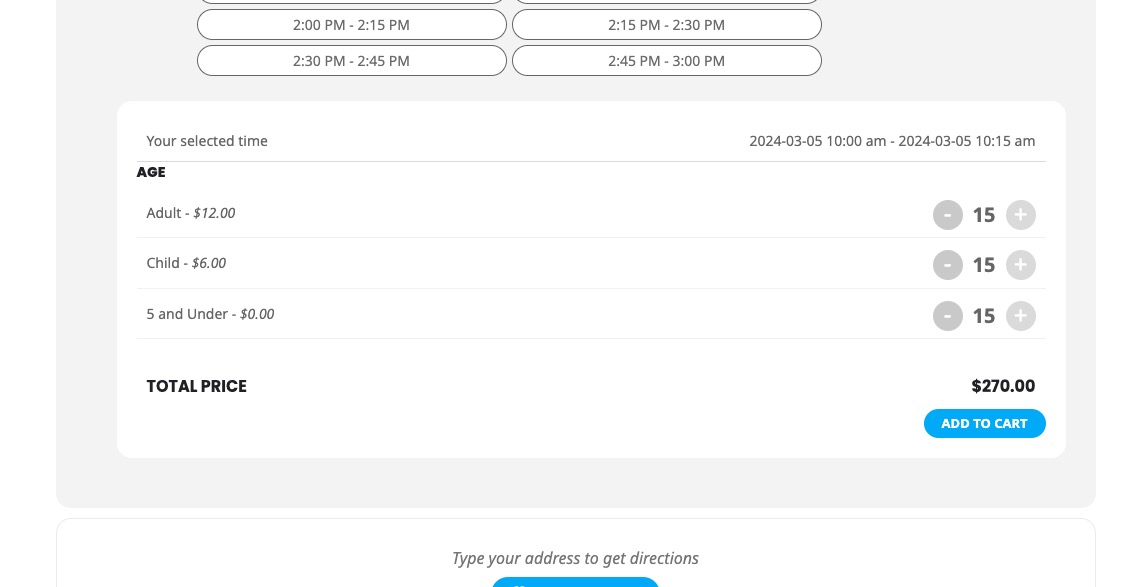
Block capacity is set to 15 but you can select 15 for each variation:
Reply to: tickets(342227)
Thank you for your messages, I am going to assign this ticket to Ashan and he will be able to take it from here and find you a solution. Please allow some time for him to get back to you, we greatly appreciate your patience and thank you for being a eventon customer! Also please disable any IP blocking on your site if there are any.
Reply to: tickets(342451)
Hello,
This is correct, EventON doesn’t show the list of available tags. Please go to Events > Tags > get ID and copy it to the shortcode.
Reply to: tickets(342454)
Hello,
Could you elaborate more? When I check the main page, the calendar is translated to me. Are there some texts that aren’t translated?
Please also note that we cannot access wp-admin:
WordPress管理画面へのアクセスが拒否されました
Reply to: tickets(342456)
Hello,
Please follow
https://docs.myeventon.com/patch-fixes/organizer-and-social-icons-not-showing-on-eventcar/
Reply to: tickets(342180)
None of those lines exist in the confirmation_email.php. I suppose it’s because you’re looking at the generated HTML code. I need to know how to edit the PHP template.
You can find the template here:
https://www.dropbox.com/scl/fi/d3ngr88gd2irq6vbqpgfj/confirmation_email.zip?rlkey=ielxcuo5ctgyx5mxjheu6kcq2&dl=1
Reply to: tickets(342419)
We are glad your issue is resolved, if you have any further questions or concerns please create a new ticket.
If you have a moment, we would greatly appreciate if you could kindly leave us a review at myeventon/my-account!. Cheers!
Reply to: tickets(342332)
Hello,
Please go to EventON > EventCard > enable Show full event description.
Reply to: tickets(342333)
Please update EventON to 4.5.9 and Tickets add-on to 2.2.7, so we can continue fixing this.
To update eventon to latest version: If you are unable to do autoupdate, you can go to codecanyon your account > download and get the latest eventon version as zip file. Then you can go to your website > make sure “Delete eventon settings & data when EventON is uninstalled” is Deslected from eventon settings, delete old eventon, install new one and activate. This link will further explain the process it. Also you can follow us on twitter to get real-time announcements on updates!
To update eventon addons: You can download latest eventon addons from myeventon > my account. Then you can go to your website, deactivate old addon and install new one and activate then delete the old addon. This link will further explain the process. Also you can follow us on twitter to get real-time announcements on updates!