Hello,
Please use this code:
.evors_incard_form.error { background-color: red !important; }
Replies for tickets on suppota
Hello,
Please use this code:
.evors_incard_form.error { background-color: red !important; }
No I want to refund the product. I do not need this extension as the RSVP is more suited for my application. Please cancel and refund my subscription. The addon has already been deactivated from my site.
That changes my whole style of calendar and makes it different from one on first language home page.
We are glad your issue is resolved, if you have any further questions or concerns please create a new ticket. If you have a moment, we would greatly appreciate if you could kindly leave us a review at myeventon/my-account!. Cheers!
Hi,
Thanks for these updates, I have followed both links and still no luck. The page takes a very long time to save in the admin (if at all) and then takes approx 4/5 mins to load the frontend page, in the mean time it has jammed up the entire site from any other users.
I have updated the password for the user account eventon on wp-admin to qYpRXEvagTaWWnAONpES^I1v this should allow you to log in as expected to see the issues.
For now, I have only used the CSV import for this particular event type. All the others have manually been entered.
https://www.itdojo.com/courses-cyber-security-info-assurance/certified-ethical-hacker-training-virginia/
ah sorry. forgot to clean the cache 🙂
thank you!
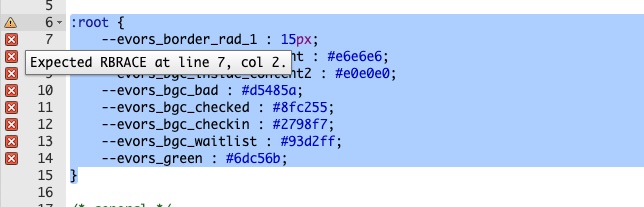
here is the error
Hello,
You need to use Event Lists: Ext add-on:
https://www.myeventon.com/addons/event-lists-extended/
The shortcode you can try on https://dev.myeventon.com/wp-admin/:
[add_eventon_el number_of_months=”12″ event_count=”3″ event_count_list=”yes” hide_empty_months=”yes”]
Hello,
Please update Tickets to 2.2.7 to fix this.
To update eventon addons: You can download latest eventon addons from myeventon > my account. Then you can go to your website, deactivate old addon and install new one and activate then delete the old addon. This link will further explain the process. Also you can follow us on twitter to get real-time announcements on updates!