Hello,
I cannot access wp-admin because of WordFence.
Could you go to wp-admin > Events > Event Location > Edit > make sure that Lat/Long values exist.
The error I found:
InvalidValueError: setCenter: not a LatLng or LatLngLiteral with finite coordinates: in property lat: NaN is not an accepted value
Ashan,
Login info:
Reply to: 342213
The event that shows on March 2 and 3 at the same time even so it should only be on the 2nd:
https://www.menudoesleon.com/wp-admin/post.php?post=35704&action=edit
But when I create a new event, it only shows once.
Thank you for your messages, I am going to assign this ticket to Ashan and he will be able to take it from here and find you a solution. Please allow some time for him to get back to you, we greatly appreciate your patience and thank you for being a eventon customer! Also please disable any IP blocking on your site if there are any.
Unfortunately, since Location is a taxonomy, it isn’t available for Quick Edit. However please create a new ticket and select Feature Request as category so others can vote on your idea and get it moved into development faster.
Unfortunately, there is no way of changing the order of names. However please create a new ticket and select Feature Request as category so others can vote on your idea and get it moved into development faster.
Hello,
Please go to EventON > RSVP > enable Allow only logged-in users to submit RSVP and Pre-fill fields if user is already logged-in (eg. first name, last name, email).
Hello,
Does it work when you completely remove the custom version of the template? Could you rename it and check if it works?
Seems to be working on our test server.
The second URL is wrong, sorry.
Please check: https://tehnopolis.me/en/dogadjaj/eng-test/var/ri-0.l-L2/
As for the calendar, could you check this shortcode:
https://tehnopolis.me/en/test-2/
Instead of Main Calendar I used Event Lists. Is it working for you?
Please use these styles:
1.
.evcal_cblock .evo_start .date { font-size: 30px !important; }
2.
.evcal_cblock .evo_start em.month, .evcal_cblock .evo_end em.month, .evcal_cblock .evo_start em.day { font-size: 14px !important; }
3.
.evoet_cx .evoet_time_expand .evcal_time i.fa, .evoet_cx .evoet_location .evcal_location i.fa, .eventon_events_list .eventon_list_event .evcal_desc .evcal_desc_info, .eventon_events_list .eventon_list_event .evoet_cx .level_3, .evo_pop_body .evcal_desc .evcal_desc_info, .evo_pop_body .evoet_cx .level_3 { font-size: 15px !important; }
4.
.eventon_list_event .evo_metarow_details .eventon_full_description p, .eventon_list_event .evo_metarow_details .eventon_full_description li {font-size: 15px !important}
Also, is there a way to add text to the add to calendar box?
Not possible without customizing the code. But you can add a new fields alongside with the section:
https://docs.myeventon.com/documentations/setup-use-custom-meta-fields-events/
I see what you mean, if you look at the live demo.
https://demo.myeventon.com/happening-now-calendar-view/
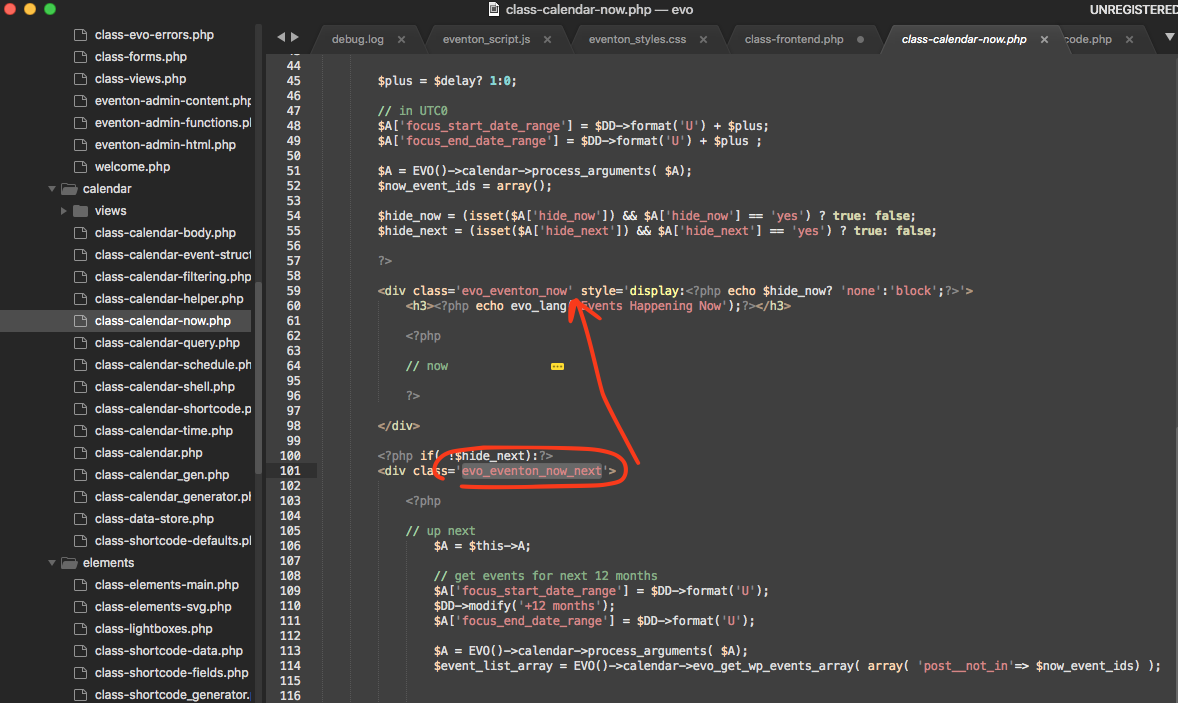
You can see the live now events do have a different look as oppose to coming up events. Live now events section is without any nesting.
Here is a simple fix you can do in the code. Just copy the class name from coming next section and ADD to live now.
Just FYI it will be override in the next update.