Hi Roger,
We are glad your issue is resolved, if you have any further questions or concerns please feel free to create a new ticket.
Replies for tickets on suppota
Hi Roger,
We are glad your issue is resolved, if you have any further questions or concerns please feel free to create a new ticket.
Yes, that worked fine.
Thanks very much..!
All caches have been deactivated. Still not working consistently.
I’m trying to find a pattern. I’m testing in Edge and Chrome. Sometimes a refresh works. Sometimes I need to clear the cache before the calendar works. But in most cases, I have discovered that I need to resave or update the wordpress page that the calendar is on. Once I do, the page works again.
I test every morning when I sit down to work. Most times the page isn’t working. So I then update the wordpress page to get it working for the day. The next morning, I have to do it over again.
Why is this happening? As I mentioned earlier, we used this calendar all of last year with very few issues. I haven’t added any new plugins to the site. Nothing significant…as far as I can see has changed on our end. Any yet we’re getting emails and calls that our users cannot advance the month on the site. This isn’t happening all the time. I just got a message from one of my students that was asking about class dates. So she was able to see other months at some time. But I did just get a note from one of our instructors telling me he couldn’t see beyond April.
Hi Roger,
Please apply this patch fix to resolve the social media icons issue.
https://docs.myeventon.com/patch-fixes/organizer-and-social-icons-not-showing-on-eventcar/
Let us know if this works for you.
Duplicate ticket #341306
Ok, i disabled, But I cannot have a cache plugin activated?
In another one page with the calendar, after march, i only see one event. And when I click in more events it dont show more.
Can you see?
Pesquisa no Calendário o teu próximo Trail! (portugalrunning.com)
thanks
np
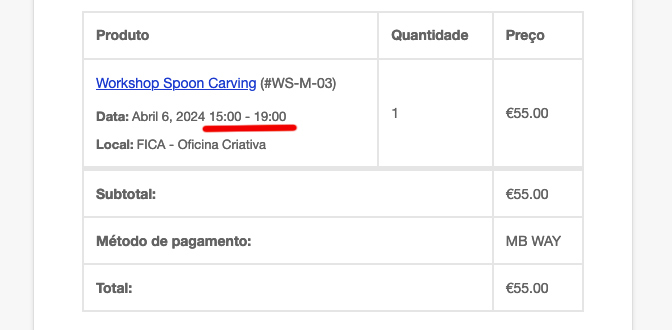
Hello Artem,
Its a wordpress website with woocommerce (image attached). So it sends automatically after an order.
I have the right time zone on wordpress. And correct on the events. For example, in the image, its 15-19h. But everywhere else its 14-18h (my time zone). And this happened after an update of the plugin. Events that i have created before the update, are sending the correct hour. I cant figure out whats happen.
Thank you
Hi,
Thanks for the reply, I got a response from the others about CSS. I don’t know how to manually code, but its sorted now. Didn’t have to turn off the link, however, good to know for future reference.
Another question about paid submissions… I would like to have some users using the calendar submitting events for free or discounted prices. How do I go about setting that up? Would it be a user capability thing, or would I have to create coupons or can I change this in the admin user settings?
Thanks 🙂
Kindly use this patch fix — https://docs.myeventon.com/patch-fixes/organizer-and-social-icons-not-showing-on-eventcar/
Kindly apply this patch fix.
https://docs.myeventon.com/patch-fixes/organizer-and-social-icons-not-showing-on-eventcar/