Sorry for the delay again. I sent Ashan an email regarding your issue, he’ll reply you very soon.
Archives: Replies
Replies for tickets on suppota
Reply to: tickets(339759)
I cannot find the attached screenshot. Could you upload it somewhere and send us a link?
Reply to: tickets(339273)
We are glad your issue is resolved, if you have any further questions or concerns please create a new ticket.
If you have a moment, we would greatly appreciate if you could kindly leave us a review at myeventon/my-account!. Cheers!
Reply to: tickets(339757)
wp-admin > Appearance > Customize applies the code in a faster more dynamic way (EventON has an internal cache).
You can use hex values as well. Just replace with:
color: #000000;
Reply to: tickets(339568)
All done! Please check now and let me know.
Reply to: tickets(339820)
I went to EventON > EventTop > arranged fields differently. Seems to be working now. Please check and let me know.
Reply to: tickets(339972)
Hi,
Here you go, https://summit.itf-oecd.org/2024/wp-admin/
eventon
R&$M9hKTvnQkAoTW&#L0JGN%
Thank you
Reply to: tickets(340047)
Hello,
This event is more than several months old (I changed the date to make it purchasable again)
https://dev2.myeventon.com/events/seats-8/
But as you can see the seats are still blocked.
Could you tell which seats that have already been purchased are still available for sale?
Reply to: tickets(339940)
…different calendar style…
Are you referring to different designed like on this page
https://demo.myeventon.com/
Simply copy the code and add it to your shortcode:
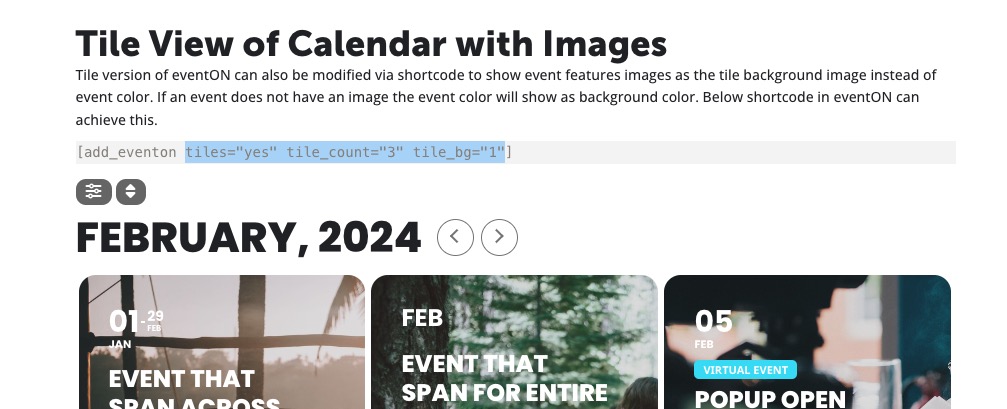
If you want to change the colors please go to EventON Settings > Appearance.
Reply to: tickets(340049)
Hello,
Are you referring to this functionality:
https://blog.hubspot.com/website/wordpress-password-protect-page
Could you send us a screenshot of the protection form?