Hi updates done and no change.
Payment is going through but website says its failed and try again. Confirmation email sent but follow up email with ticket barcode not being sent.
Replies for tickets on suppota
Hi updates done and no change.
Payment is going through but website says its failed and try again. Confirmation email sent but follow up email with ticket barcode not being sent.
It seems to be working correctly on our test site:
https://dev2.myeventon.com/test-347/
https://search.google.com/test/rich-results/result/r%2Fevents?id=l-YfYdoR5pr1pZOPaPW5Fw
The event:
https://dev2.myeventon.com/events/tischtennisturnier/
Don’t look at the Location issues, it’s just almost none of events have locations assigned.
Could you please try the instructions mentioned in this documentation?
The difference is that the page passes through the Ezoic proxy and their page optimization. This is why I asked which scripts shall be excluded in Ezoic from optimization and load delay.
Now only this is unsolved:
5/ I changed icon for “add calendar and GoogleCal” in event card but it doesn’t change in frontend.
(EventOn > settings > icons)
Perfect, thanks a lot!!!!!!!!!!!!!!!!!
We are going to include this patch in the next version anyway, so you can just apply it to the code.
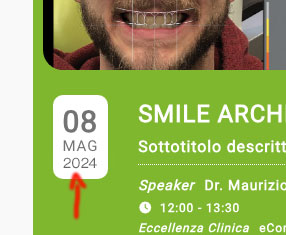
I went to https://align360.it/wp-admin/admin.php?page=eventon#evcal_004aa and selected “EventTop Main Day block fields” for the year to be visible. Please check and let me know.
Hello,
Could you update EventON and Tickets add-on as well?
To update eventon to latest version: If you are unable to do autoupdate, you can go to codecanyon your account > download and get the latest eventon version as zip file. Then you can go to your website > make sure “Delete eventon settings & data when EventON is uninstalled” is Deslected from eventon settings, delete old eventon, install new one and activate. This link will further explain the process it. Also you can follow us on twitter to get real-time announcements on updates!
To update eventon addons: You can download latest eventon addons from myeventon > my account. Then you can go to your website, deactivate old addon and install new one and activate then delete the old addon. This link will further explain the process. Also you can follow us on twitter to get real-time announcements on updates!
Also could you send us a link to an event with the issue?
Do you change the capacity for each individual repeat and then update and it shows the random values:
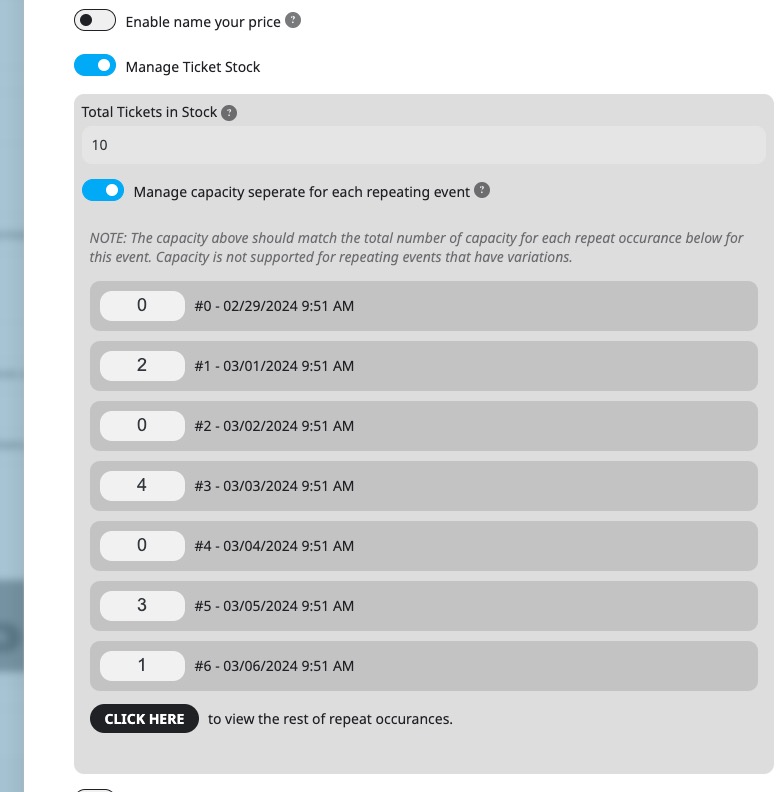
Hello im sorry im not sure where to find this preferences option?
do i click on an event page? is this option available when im creating a new event? sorry if you can send me screenshot
Thanks for the code. I replaced it in social share u4.5.7, not in event organizer, and it works.
I edited the original file in plugin, so I will loose this at next update. How can I manage this in order to have it always working? Should I put that code in functions.php in child theme??
I usually replace CSS code but I’m not familiar with php changes…
Regarding the year (point #1) I attach a screen shot of what I would like to have. Is it possible?
Many thanks for your support,
Francesco
https://tv-irsee.de/wp-login.php
eventon
ighiCNbyAH9CjU!CHrsh0r3d