Hi Vicki,
We are happy to provide any assistance you might need in setting the plugin up. Also, you can access our documentation below
https://docs.myeventon.com/
Please let us know if you still need the refund and I will forward your request to the developer
I also just went to Codecanyon and it refers back to you as the only way to contact support…
I think when I tried it I went to the Events page. Is it what you did? Or did you go to the Upcoming Events (/events-directory)? I’m wondering because the owner of the site removed one of the URLs and I can no longer make the edits… Thanks
Hey, do I even need to do anything aside from updating it from the WP site to properly ensure the plugin will remain up to date or does it just happen by having the plugin installed on the website? thx
Thank you for this – the upgrade 4.5.6 has corrected the issue.
Hi Artem,
sorry – no need to answer anymore:
Use custom time zone works fine for me!
Br JEns
Could you update EventON to 4.5.6? After the update, go to EventON Settings and save them, then check colors.
the second question i have was not for the user to jump to the months…
You need to use CSV Importer for this:
https://www.myeventon.com/addons/csv-event-importer/
Try on https://dev.myeventon.com/wp-admin/
i have played around also with the filter and jumper on the front end.
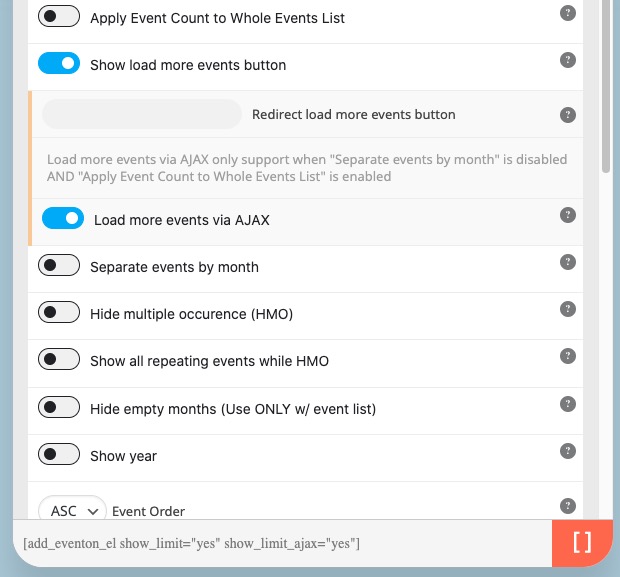
Jumper is for Main Calendar only. Since you are using Event Lists: Ext, only Load More functionality is available.
Ah sorry, it seems that you’ve already resolved the issue with 4.5.5 version.
Please update to 4.5.6 version that we’ve just released. To update eventon to latest version: If you are unable to do autoupdate, you can go to codecanyon your account > download and get the latest eventon version as zip file. Then you can go to your website > make sure “Delete eventon settings & data when EventON is uninstalled” is Deslected from eventon settings, delete old eventon, install new one and activate. This link will further explain the process it. Also you can follow us on twitter to get real-time announcements on updates!