I send you authentication codes
- 72597818
- 27360283
- 93090434
- 08636497
- 50157956
- 76370005
- 85179098
- 08034036
- 43223082
- 07763496
Replies for tickets on suppota
I send you authentication codes
Hello,
Please send us wp-admin access to your site as a private message for us to further assist your situation.
Yes, its happen with more events.
We need to recreate such events. Can we take a look at wp-admin?
Please send us wp-admin access to your site as a private message for us to further assist your situation.
Or send us links to events since this one doesn’t any of them:
https://gik.pt/events/teste/
We are glad your issue is resolved, if you have any further questions or concerns please create a new ticket.
If you have a moment, we would greatly appreciate if you could kindly leave us a review at myeventon/my-account!. Cheers!
Hello,
You can use “Feature event priority” from Shortcode Generator:
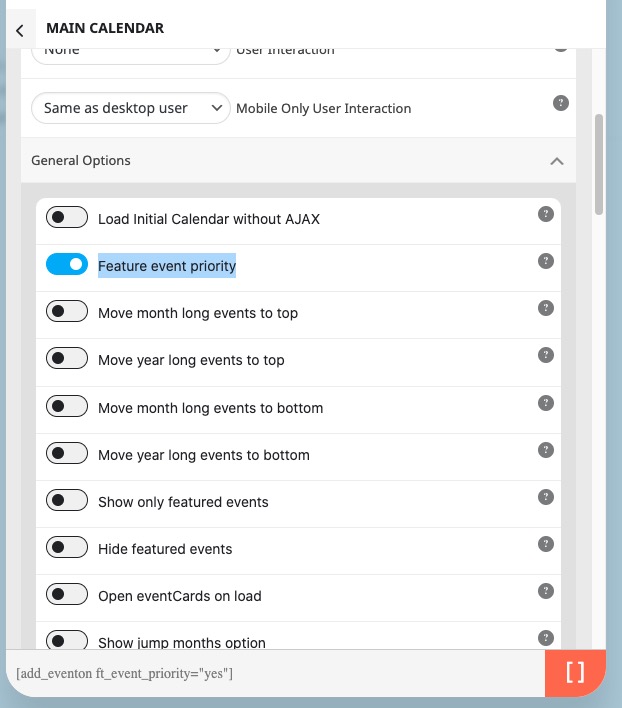
Please take a look and let us know.
Hello,
I cannot login because of
An Authentication Code has been sent to the email address associated with your account. Look for an email with “Login Authentication Code” in the subject line.
Since you use both event_organizer and event_type, please make sure that your events are assigned to both organizer with id 39 and event type with 37.
Also try adding filter_relationship=”OR” to the shortcode. Also try the number in increasing number_of_months=”12″.
Hello,
You can make it “All Day Event” by enabling it from Edit Event:
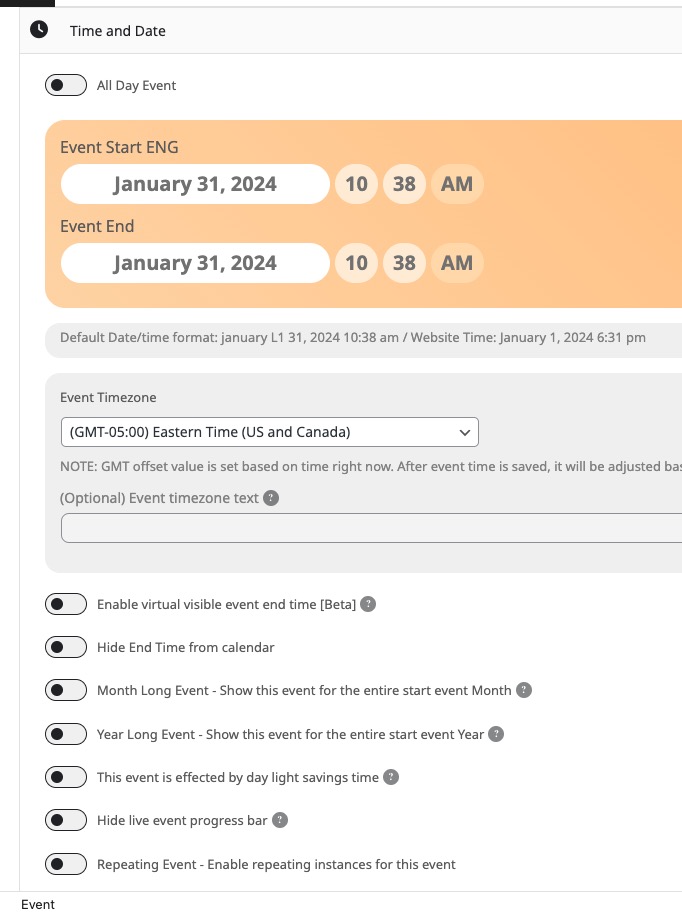
Or hide “Start Time” with CSS:
https://docs.myeventon.com/documentations/change-css-calendar/
Hello,
You need to deactivate your licenses on your old website and then activate on the new one.
More info:
https://docs.myeventon.com/documentations/how-to-deactivate-eventon-addon-licenses/
You can also deactivate add-ons’ licenses from your account.
I believe it is working as expected, in regards to the ticketing now, as I have complete several test orders.
However, there are a couple things NOT working as I would expect, and I am wondering if you could clarify for me?
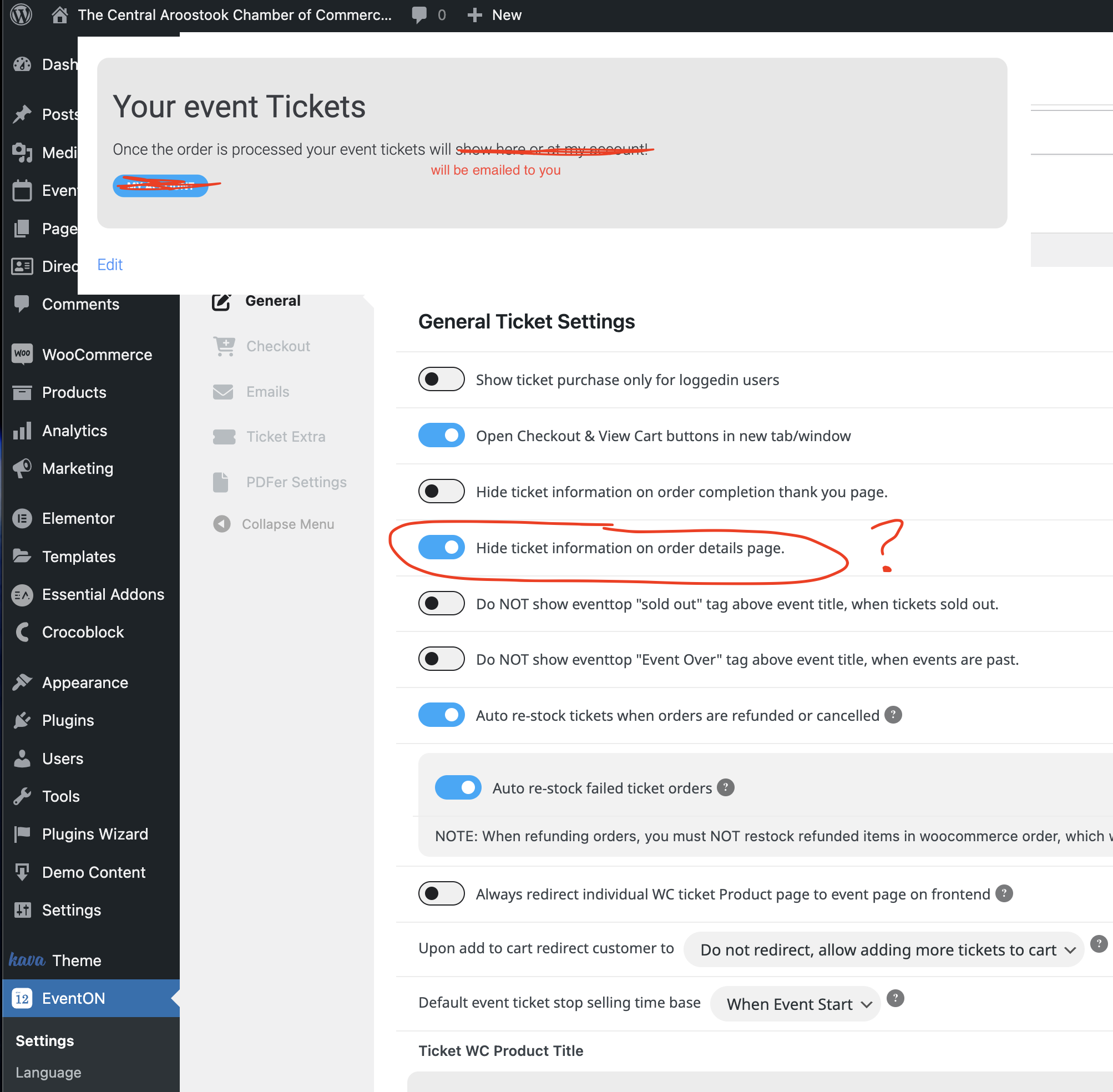
First, on the Order Conformation Page, there is a ‘Thank You’ message at the bottom, with a ‘My Account” Button. I want this message to be disappear, OR, indicate they will get their tickets by email, and the Account button hidden.
This setting pictured in the attachment is the one I thought I needed to disable, to make this Thank You section/message disappear from the confirmation page, but it still persists. How do I remove this button… there are no accounts enabled for this site, and I don’t want the user to navigate to a login page.
Second, the ‘Auto Complete’ code you pointed to in the documentation (https://docs.myeventon.com/documentations/auto-complete-ticket-order/), doesn’t seem to work. I added it to my themes function.php file, but it breaks the cart. It declines the order on the Front End, but accepts it on the backend as ‘Pending Payment’, yet indicates the payment was successful in the order notes.
So, are you able to provide me with code that will take a ‘Processing’ status, and set it to ‘Completed’ automatically, so the tickets and confirmation emails send on successful orders?
Lastly, the only other minor issue I’d love to correct, and I am not sure if you can help, is with the PDFer add-on. If I have more than one attendee, it puts more than one ticket on a page. Would it be possible to modify some code somewhere, that adds only one ticket PER page? If I have 5 attendees, I have would have 5 pages in the PDF?
If you could clarify these items for me, I think I’d have everything ready to create all my clients events, and launch their site… pending some final testing.
Your info would be appreciated.
Thanks,
Brock
This code does not work
.evosv_grid .row .evosv_items .evosv_event { color: red !important; }
because it recolor all events not only featured.
And it does not recolor date, month, week