Please make sure to cancel the subscription:
https://docs.myeventon.com/documentations/how-to-cancel-addon-subscription-before-auto-renew/
Replies for tickets on suppota
Please make sure to cancel the subscription:
https://docs.myeventon.com/documentations/how-to-cancel-addon-subscription-before-auto-renew/
Ashan,
They want to refund:
Events Map add-on #178804
Thank you for your messages, I am going to assign this ticket to Ashan and he will be able to take it from here and find you a solution. Please allow some time for him to get back to you, we greatly appreciate your patience and thank you for being a eventon customer!
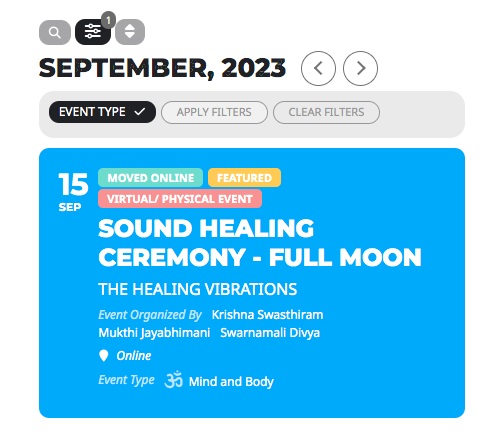
I want this result, as in your site.
We are glad your issue is resolved, if you have any further questions or concerns please create a new ticket.
If you have a moment, we would greatly appreciate if you could kindly leave us a review at myeventon/my-account!. Cheers!
Hello,
Please update EventON to 4.5.4.
To update eventon to latest version: If you are unable to do autoupdate, you can go to codecanyon your account > download and get the latest eventon version as zip file. Then you can go to your website > make sure “Delete eventon settings & data when EventON is uninstalled” is Deslected from eventon settings, delete old eventon, install new one and activate. This link will further explain the process it. Also you can follow us on twitter to get real-time announcements on updates!
There are changes in the new version related to time.
When you go to https://www.hopeandhelp.uk/events/, do you see any difference with events’ backgrounds colors? Some of them should change their color basing it on the assigned Event Type.
I moved the code to wp-admin > Appearance > Customize > Additional CSS. Seems to be working now.
Please check and let me know.
Hi Artem Yes its showing when you looked…. because I had to turn on …
Enable Search on all calendars by default….. it wasn’t showing by default… good now.
***– Is it possible to show all the locations at the top… its in the Filter…. without clicking on the Filter icon?
People could just see the locations and choose one
https://www.thefraservalley.ca/event-directory/
Thanks
Hello,
Please go to EventON > Time Settings > enable Allow universal event time format on eventCard.
You can use {} to add constants to the date/time format eg. F j(l) g{hr} i{min}. NOTE: Setting a custom time format will stop hide end time and all day event times from working as default.