Hello,
There are multiple options available:
1. Try going to EventON > Advanced > try a different Select calendar event content filter type.
2. Try adding the form through the code by following
https://docs.myeventon.com/documentations/show-additional-custom-data-eventcard/
I want a refund on the other plugins.
I already explained the errors, lack of support, which you already said you were busy.
I have lost trust in the technology and level of support.
Please cancel and refund the plug-ins
Thank you
Mark Colley
We are glad your issue is resolved, if you have any further questions or concerns please create a new ticket.
If you have a moment, we would greatly appreciate if you could kindly leave us a review at myeventon/my-account!. Cheers!
Thank you, your suggestion worked.
This a great!
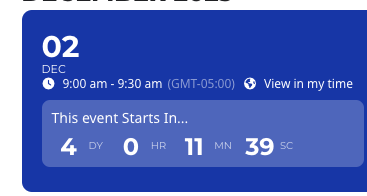
I did what you said up above but it still just displays GMT-5:00
I would like it to say 9:00-9:30 am EST
I put the EST in that box that says display after the time.
Here’s the new log in info:
URL: https://www.southtechschools.org/wp-admin/
Username: EventON-support
Password: qF47P7b&^0%eO6uUjAejqFJF
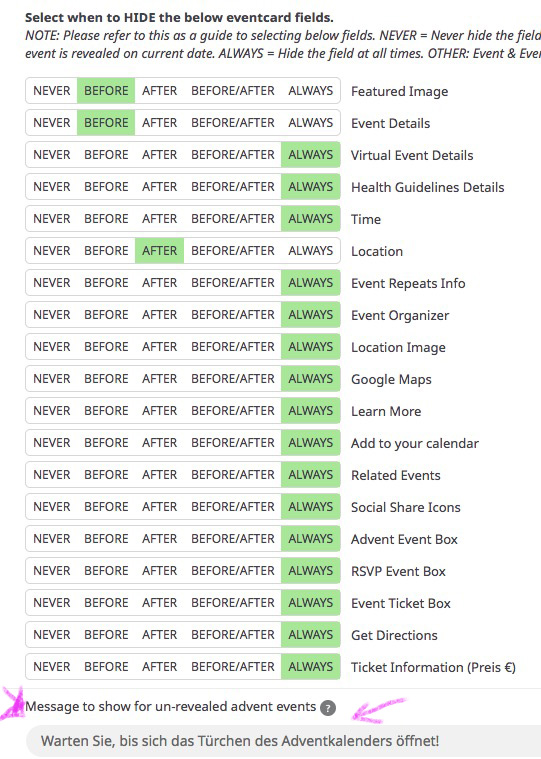
Hello,
thank you for your help. The text -please see image- is still missing.
Hi,
Thanx for your fast response. I’ll try what you have told me and let you know.
Hi, Thx. If you look at page: Winter Program | The Clearing
Look at class #7 Memorable Movies. It goes from Jan 5-Feb 9. I shows in both the Jan & Feb calendars. (There are other classes that do the same thing.)
We don’t want it to show up in the Feb calendar. The shortcode includes:
[add_eventon
show_et_ft_img=’yes’
jumper=”yes”
exp_jumper=”yes”
jumper_offset=”2″
jumper_count=”1″
accord=’yes’
fixed_month=”1″
fixed_year=”2024″
show_year=”no”
event_type=”223″
hide_so=”yes”
hide_mult_occur=”yes” ]
If it includes the ‘hide mult occur’ code, why do the classes show in both months? Thx!
Erik