WOW! Great – thank you so much, you really helped me out!!!!
You mention server performance, what should I ask my host?
Thanks again! Heimo
Replies for tickets on suppota
WOW! Great – thank you so much, you really helped me out!!!!
You mention server performance, what should I ask my host?
Thanks again! Heimo
This has been going on for over a week so this was referring to the first events that disappeared before they were happening. Whoever I originally started this thread with specifically asked for a listing that dropped off so that is why I shared that.
Ah, it’s just when I asked you in the message 331932 about this, I was referring to new events after Nov 15.
It was already set to do that — why is it reverting to a setting I have never used? Regardless I am glad to see it is set back to its original setting. Am I supposed to be constantly going back and checking settings to see if they have changed on their own? Trying to follow what you are saying here? Can you explain to me why it suddenly changed even tho I did not touch any of the settings?
In 332295 message I told you that I went and changed this setting.
As for the performance. I contacted Ashan about this. We are going to investigate this issue.
Would it be possible for me to have an older version to load back up? Specifically
We unable to provide previous versions of EventON, I am afraid.
Margarita thank you very much for bringing this up!
So your live site is running version 2.7.3 https://bbg-eg.de/aktuelles/bbg-veranstaltungen/ and works super fast.
Staging site is running 4.5.4 latest version. thank you for trying this on staging before going live with it.
So since that version we have done so many things into eventON so hard to pinpoint what could have caused the slowness. Recently we saw someone say similar thing, but in a different server the same site was running super fast. So I wonder if your staging site can be run on a better server with more memory and see if things would speed there more?
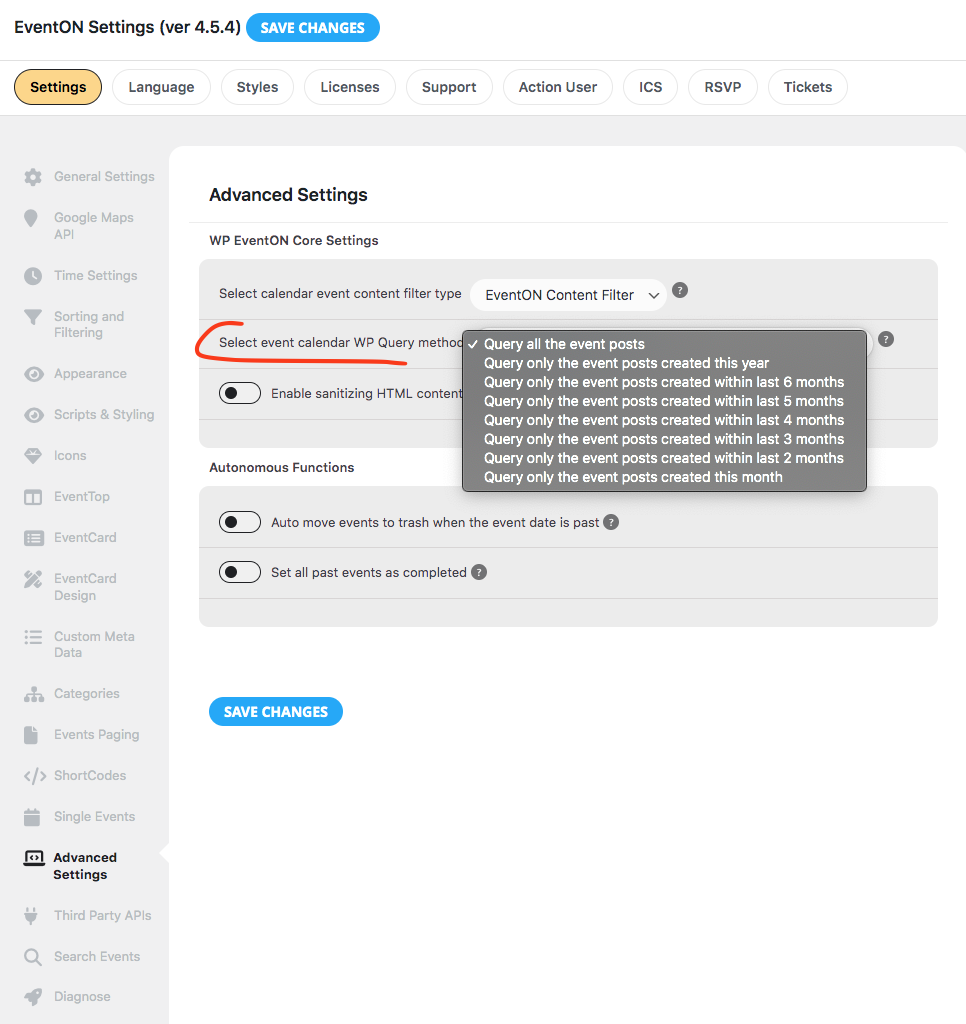
Another thing you can try out is the wp_query method in settings.
Hello,
This code changes the colors of the + button:
.evoTX_wc_section .evotx_quantity .qty b.plu, .evotx_qty_adjuster b.plu { background: red; color: green; }
This one changes “Warenkorbbutton“:
#evcal_list .eventon_list_event .event_description .evcal_btn, #evcal_list .eventon_list_event .event_description .evcal_btn p, body .evo_lightboxes .evo_lightbox_body.evo_pop_body .evcal_btn, .ajde_evcal_calendar .eventon_list_event .event_description .evcal_btn, .evo_lightbox .evcal_btn, body .evcal_btn, .evo_lightbox.eventon_events_list .eventon_list_event a.evcal_btn, .evcal_btn, .evoTX_wc .variations_button .evcal_btn, .evo_lightbox.eventon_events_list .eventon_list_event .evoTX_wc a.evcal_btn { background: red; color: green; }
This hides EventTop on https://festival.crealto.ch/tickets/:
.eventon_single_event p.desc_trig_outter {display: none !important}
https://festival.crealto.ch/events/staecketoeri-2024/
The page is empty. Could you check?
Great! evo_tax_meta stores all the taxonomy meta data that is addition to what is available with wordpress. But yea I am glad we can set up a cron based flush system to clear those out and speed things out 🙂
Please look for this in the next update 4.5.5 I think we wil probably release this next week.
Hello,
Are you logged-in when checking the website from your mobile device?
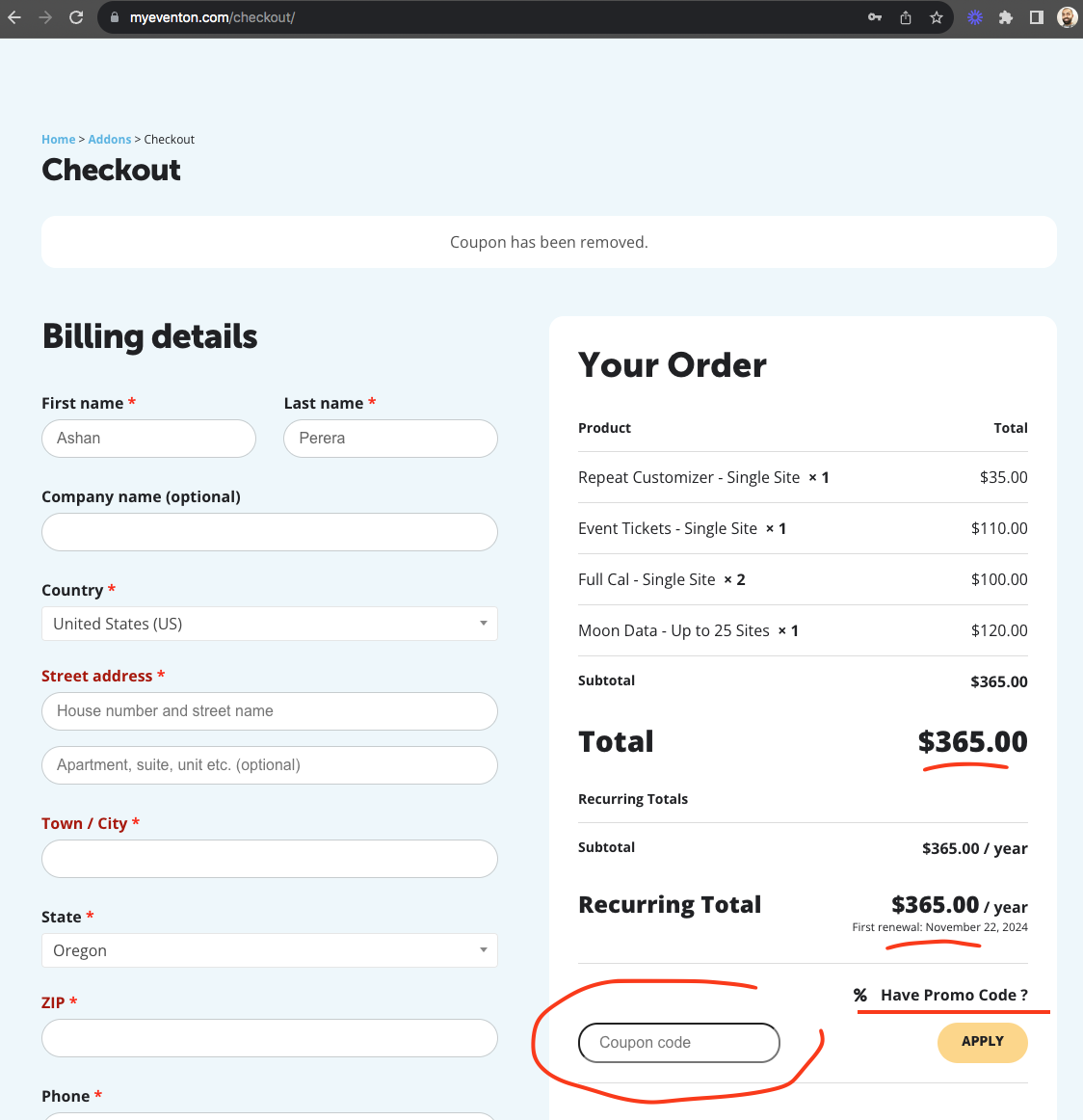
This is very strange. FIRST time we hearing this in 12 years. At the checkout page https://www.myeventon.com/checkout/ there is a text called “% Have promo code?” if you click that it will open box for you to put the discount code. when you apply you should see updated discounted price.
From the order details in the back it seems you have never applied the discount code. If you would like I can refund you this whole order and you can place it again ?
I have also been trying to increase the text size for everything
Please follow
https://docs.myeventon.com/documentations/change-css-calendar/
Just make sure to add !important to make sure that your code is in use.
Hello,
Could you try EventON > Scripts & Styling > turn off Write dynamic styles to header > save settings > turn on Write dynamic styles to header?
Hello,
Please add this CSS code to EventON > Styles (If you don’t see any change, EventON > Scripts & Styling > turn off Write dynamic styles to header > save settings > turn on Write dynamic styles to header):
@media (max-width:800px) {.single-ajde_events .eventon_main_section, .single-ajde_events #eventon_comments {padding: 10px 10px;}}