Thank you for your messages, I am going to assign this ticket to Ashan and he will be able to take it from here and find you a solution. Please allow some time for him to get back to you, we greatly appreciate your patience and thank you for being a eventon customer! Also please disable any IP blocking on your site if there are any.
Archives: Replies
Replies for tickets on suppota
Reply to: tickets(329899)
Ashan,
The same on dev2:
https://dev2.myeventon.com/test-204/
Schedule View doesn’t support event_past_future=”future” as well as EventON > “Hide past events for default calendar(s)”.
Reply to: tickets(329899)
Thank you for your messages, I am going to assign this ticket to Ashan and he will be able to take it from here and find you a solution. Please allow some time for him to get back to you, we greatly appreciate your patience and thank you for being a eventon customer! Also please disable any IP blocking on your site if there are any.
Reply to: tickets(330840)
Hello,
Please use Event Lists: Ext > Select Event List Type: Date Range:
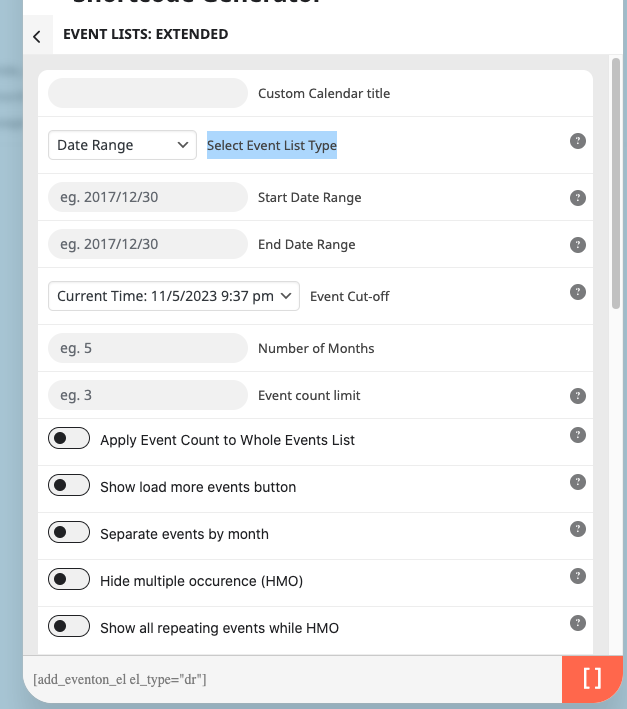
Unfortunately, Jumper isn’t supported by Ext, only Main Calnedar.
Reply to: tickets(330622)
Hello,
1. Please add this CSS code to EventON > Styles (If you don’t see any change, EventON > Scripts & Styling > turn off Write dynamic styles to header > save settings > turn on Write dynamic styles to header):
.ajde_evcal_calendar.eventon_single_event .desc_trig_outter {display:none !important}
2. Please use this code:
.evosch_oneday_schedule span b, #evcal_list .eventon_list_event .event_description .evosch_oneday_schedule li.date, .evo_lightbox .evosch_oneday_schedule li.date, #evcal_list .eventon_list_event .event_description .evosch_blocks_list .evosch_nav li, .evo_lightbox .evosch_blocks_list .evosch_nav li, .evcal_evdata_row .evcal_evdata_cell h2, .evcal_evdata_row .evcal_evdata_cell h3, h3.evo_h3 { text-transform: none; }
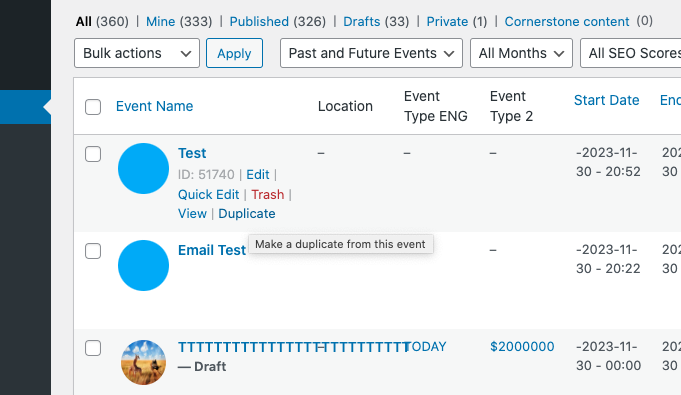
3. The only option is to duplicate your event:
Reply to: tickets(330738)
Unfortunately, wishlist shortcode has limited available option. However, please try adding to the shortcode:
event_order=”DESC”
Reply to: tickets(330822)
Unfortunately, this is the first time this happened. Could you try adding it again and let us know if the same will happen after some time.
Reply to: tickets(330822)
I would like to know in you opinion why does the plugin “forget” about an API key?
Reply to: tickets(330822)
I already did that and the map was working fine before. Does your plugin loose API keys?
Reply to: tickets(330845)
Hello,
Please take a look at this guide:
https://docs.myeventon.com/documentations/how-to-use-the-ics-import-tool/
Make sure that the .ics link your calendar creates is public and can be accessed and downloaded by a third-party app (in this case – EventON).