This ticket is private now.
The link redirects me to
https://login.microsoftonline.com/30a47d74-7f4a-43fb-bf02-425bcec0e4ca/oauth2/v2.0/authorize?client_id=ce2afd35-4a3d-4ad2-ad8e-739b20e5c776&redirect_uri=https%3A%2F%2Fstaging.impactems.com%2F&response_mode=form_post&scope=openid+email+profile&state=https%253A%252F%252Fstaging.impactems.com%252Fwp-admin%252F&nonce=652914446ad22&response_type=code
How can I login?
Do you have similar issue with creating a new event with enabled Tickets on our test site:
https://dev.myeventon.com/wp-admin/
Could you try and let me know?
We are glad your issue is resolved, if you have any further questions or concerns please create a new ticket.
If you have a moment, we would greatly appreciate if you could kindly leave us a review at myeventon/my-account!. Cheers!
Go to wp-admin > Events > Edit Event > change Event Color to white.
Now go to EventON > Appearance > EventTop > change Category title color (eg. Event Type) to black and Text under event title (on EventTop. Eg. Time, location etc.) to black as well.
Now go to EventON > Scripts & Styling > turn off Write dynamic styles to header > save settings > turn on Write dynamic styles to header.
Hello,
Are you referring to FullCal?
Please follow the instructions in this documentation to activate debug in your site to see any PHP errors recorded that can provide insight on to whats going on. Please reply with a link to debug.log file. If you are not able to do this please send us FTP access to your site so we can do this for you.
EventON Core. We are fixing some bugs and will be releasing a new version soon.
You right. Please send us wp-admin access to your site as a private message for us to further assist your situation.
1. Please add this CSS code to EventON > Styles (If you don’t see any change, EventON > Scripts & Styling > turn off Write dynamic styles to header > save settings > turn on Write dynamic styles to header):
.evopop_top { display: none !important; }
2. Add this to the shortcode:
exp_so=”yes”
Hello,
To help you to solve the issue, you can find the issue on my staging website.
Event link : https://canardsbastogne.be/stg_a7a5f/?ajde_events=vodelee&var=ri-4.l-L1
Login page : https://canardsbastogne.be/stg_a7a5f/?page_id=9656
ID and password still the same as provided.
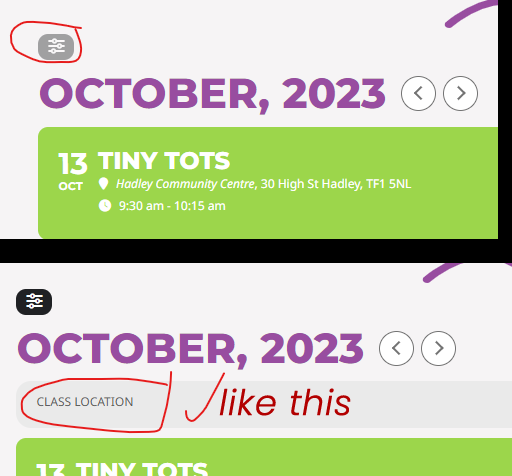
auto-expand without clicking? See attached
Hello Artem
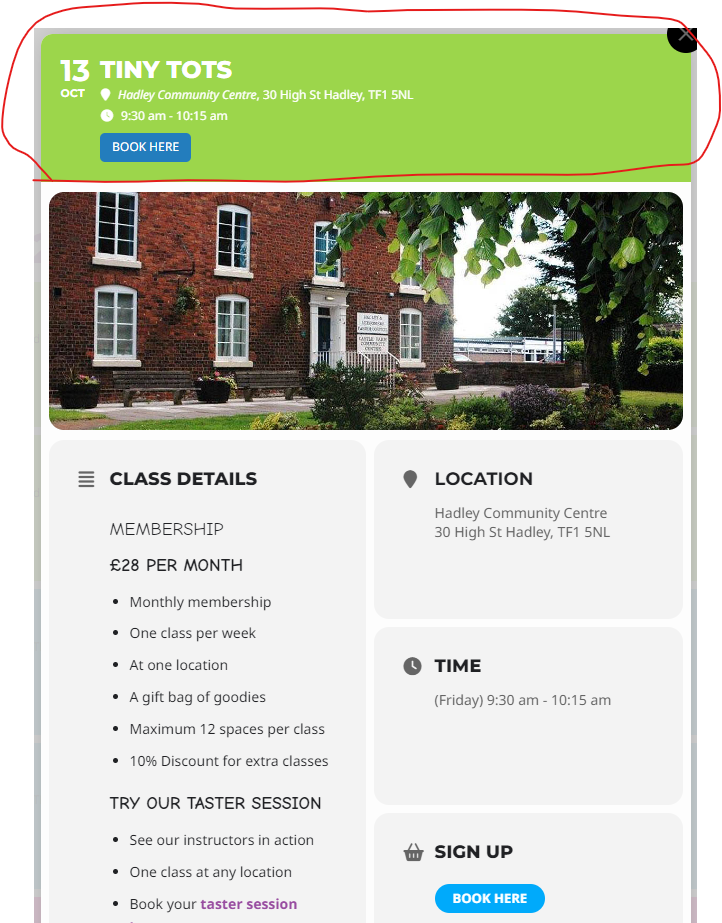
Thank you. How do we hide this data from the Event Card Layout pop-out at the top? See the attached “Event Card Layout” image example.
Also, when adding a filter, how to we enable the filter to auto-expand without clicking? See attached
THANK YOU